
August 23, 2023
Question

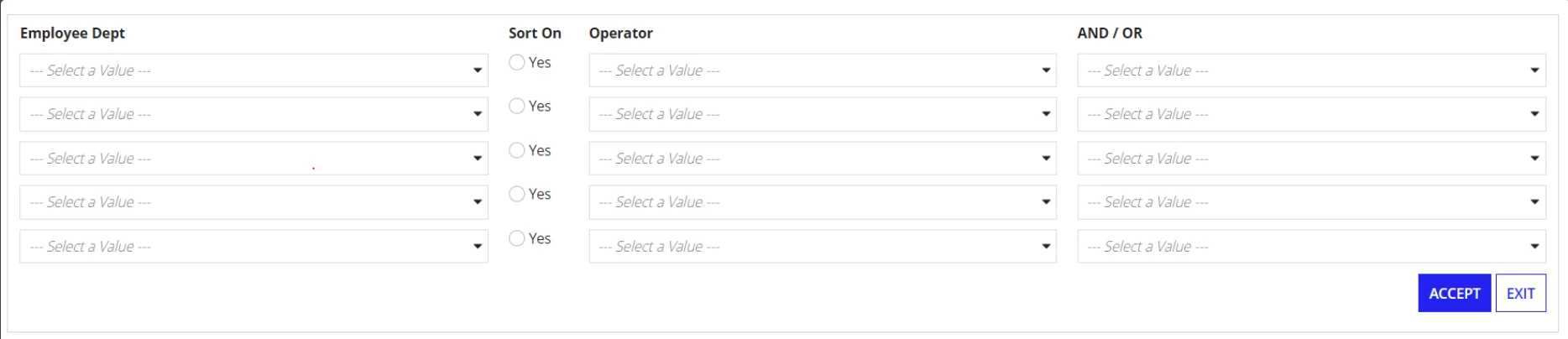
Should able to select only one radio button from the grid

  • August 23, 2023
  • 6 replies
  • 0 views

Should able to Select only one radio button from the grid as shown in the below attachment.
a!radioButtonField(
label: "Sort On",
labelPosition: "COLLAPSED",
choiceLabels: { "Yes" },
choiceValues: {true()},
value: fv!item.sortOn,
saveInto: {local!sort,
a!save(local!sortIndex,fv!index),
a!save(index(ri!input,"sortOn",local!sortIndex,{}),true())},
choiceLayout: "STACKED",
validations: {}
)

How to achieve this please suggest.

    6 replies

    ignacio.moran
    August 23, 2023

    Please, could you give a better context of what you need to do? Could you attach the complete code of the grid?

    hemap0003Author
    August 23, 2023

    a!forEach(
    items: local!empCriteria,
    expression: a!columnsLayout(
    columns: {
    a!columnLayout(
    contents: {
    a!dropdownField(
    label: "Employee Dept",
    labelPosition: "COLLAPSED",
    placeholder: "--- Select a Value ---",
    choiceLabels: CONS!EMPDEPTLABELS,
    choiceValues: cons!EMPDEPTVALUES,
    value: fv!item.employeeDept,
    saveInto: fv!item.employeeDept,
    searchDisplay: "AUTO",
    required: true(),

    )
    }
    ),
    a!columnLayout(
    contents: {
    a!radioButtonField(
    label: "Sort On",
    labelPosition: "COLLAPSED",
    choiceLabels: { "Yes" },
    choiceValues: {true()},
    value: fv!item.sortOn,
    saveInto: fv!item.sortOn,
    choiceLayout: "STACKED",
    validations: {}
    )
    },
    width: "EXTRA_NARROW"
    ),
    a!columnLayout(
    contents: {
    a!dropdownField(
    label: "Operator",
    labelPosition: "COLLAPSED",
    placeholder: "--- Select a Value ---",
    choiceLabels: cons!OPERATORS,
    choiceValues: cons!OPERATORS,
    value: fv!item.operator,
    saveInto: fv!item.operator,
    searchDisplay: "AUTO",
    validations: {},
    required: true(),

    )
    }
    ),
    a!columnLayout(
    contents: {
    a!dropdownField(
    label: "AND / OR",
    labelPosition: "COLLAPSED",
    placeholder: "--- Select a Value ---",
    choiceLabels: { "AND", "OR" },
    choiceValues: { "AND", "OR" },
    value: fv!item.gate,
    saveInto: fv!item.gate,
    searchDisplay: "AUTO",
    validations: {},
    required: true(),

    )
    }
    )
    }
    )
    ),
    a!buttonArrayLayout(
    align: "END",
    buttons: {
    a!buttonWidget(
    label: "Search",
    submit: true,
    saveInto: {
    a!save(
    ri!empCriteria,
    local!empCriteria
    ),
    a!save(ri!button, "Search"),

    },
    style: "PRIMARY",
    loadingIndicator: true,

    ),
    a!buttonWidget(
    label: "Exit",
    value: "Exit",
    saveInto: ri!button,
    submit: true,
    style: "NORMAL",
    validate: false
    )
    }
    )

    I should able to select only on radio button out of five rows on the grid.For example if I select sortOn radio button on 3rd row and switch to 1st row then 3rd row radiobutton should be unselected and only 1st row radiobutton should act selected.

    ignacio.moran
    August 23, 2023

    Let me know if this could help you

    a!localVariables(
      local!value,
      local!empcriteria: { 0, 0, 0, 0 },
      local!index,
      {
        a!forEach(
          items: local!empCriteria,
          expression: {
            a!boxLayout(
              contents: {
                a!radioButtonField(
                  label: "Sort On",
                  labelPosition: "COLLAPSED",
                  choiceLabels: { 1, 2, 3, 4 },
                  choiceValues: { 1, 2, 3, 4 },
                  value: local!value,
                  saveInto: { fv!item, local!index },
                  choiceLayout: "STACKED",
                  validations: {}
                )
              },
              
            ),
            
          }
        )
      }
    )