
January 26, 2023
Question

shows validation message in texbox

  • January 26, 2023
  • 10 replies
  • 0 views

Hi,

Is there a way to show validation textbox message even if the attribute type required: false -> set to false?

The process should be when button is clicked and textbox has an empty value, will show a message. See sample codes below.
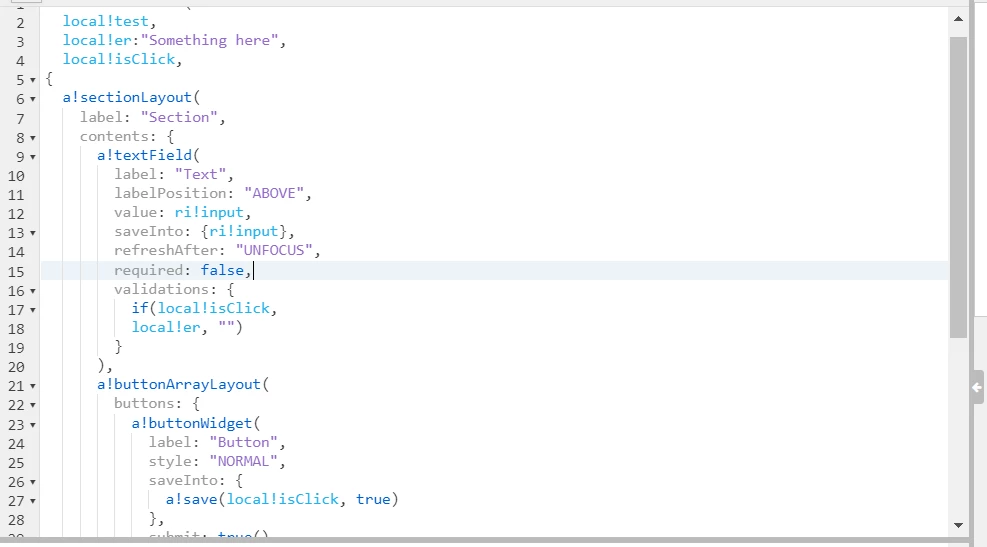
Seems that I could not show the message in local!er in textbox validation.

Thanks ahead guys!

10 replies

stefanhelzle0001
Brainy
January 26, 2023

What is the reason to not use the built-in "required" functionality?

January 27, 2023

I have this requirement that even if the value is empty it will still proceed the process of searching and if the result in the intergation is onError the error message will be printed. So if incase the textbox is not required it will still proceed the process in button and dispay necessary error message in intergation. However, currently it seems that i cant display the error message if the required attribute in textbox is set to false. Pls there any possible way to make this process? Thank you

January 27, 2023

Use the Validations parameter under the section layout to display your error message on the section level

mikes0011
Brainy
January 26, 2023

What's your use case exactly?

The Expression Guru
January 27, 2023

I have this requirement that even if the value is empty it will still proceed the process of searching and if the result in the intergation is onError the error message will be printed. So if incase the textbox is not required it will still proceed the process in button and dispay necessary error message in intergation. However, currently it seems that i cant display the error message if the required attribute in textbox is set to false. Pls there any possible way to make this process? Thank you

amans0009
January 27, 2023

Here is what you can do to solve this problem ->
-> you can put take the localisClick as rule input (ri) and initially value of ri will be null in process model 
-> then design your process in such a manner that it checks if your local!Click which will be our ri , is true then it return you to the same interface with validation
    
->enable activity chaining between the nodes
-> in xor we will check if local!isClick is true then direct it to the interface or else to the end node

this may solve your problem