
October 30, 2022
Question

Stored Procedure Configuration in SqlDeveloper Database

  • October 30, 2022
  • 5 replies
  • 0 views

Hi All,

For my requirement , I have to create a stored procedure in database which executes a sql query.

And I have to execute that store procedure in appian process model and have to save that output in  process variable to proceed further.

While creating the stored procedure in Database ,I am facing some difficulties.

If I just run the sql query in DB by passing value for input(task_id = 261),then it gives me output of 16 rows with 22 columns , I want that to be saved as output in my process variable as a result.
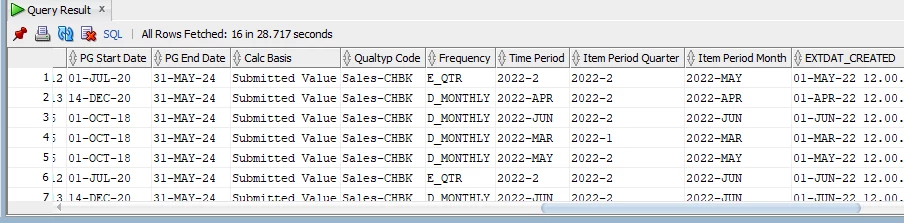
For this query I written below code to create store proc,

create or replace procedure test
(
i_task_id in NUMBER
)
AS
BEGIN
select column1,column2,column3,.... from xyz where task_id = i_task_id;
END;

But this shows me the error like PLS-00428: an INTO clause is expected in this SELECT statement.

Can anyone kindly help me to solve this.Thanks in Advance.

    5 replies

    stefanhelzle0001
    Brainy
    October 30, 2022

    Is there a specific reason to create a stored procedure here a simple queryEntity would do it?

    A stored procedure requires defined inputs and outputs. You need to fetch your data into a output variable. For more support, I visit to check a more database focused forum than this here.

    October 31, 2022

    Thanks for your response Stefan.Query entity will work for a table or view right,but I have sql query which takes more time to give output for 1 input alone,that is the reason I not created a view.

    stefanhelzle0001
    Brainy
    October 31, 2022

    OK

    The error message says "an INTO clause is expected in this SELECT statement" and I wrote "You need to fetch your data into a output variable".

    Did you try that?

    October 31, 2022

    There are examples for various databases given on the old plug-in page

    see attachmenthttps://community.appian.com/cfs-filesystemfile/__key/appian-appmarket-files/a0649666_2D00_ad0f_2D00_4708_2D00_a853_2D00_4c79426b97db/Execute-Stored-Procedure-Documentation.pdf?_=637832048180844349

    The Oracle example is:

    CREATE OR REPLACE PROCEDURE sp_ListBooks ( 
     title_search IN varchar2, 
     books_cursor OUT SYS_REFCURSOR 
    ) 
    AS 
    BEGIN 
     OPEN books_cursor FOR SELECT "title", "author", "quantity", "price" FROM 
    "book" WHERE "title" LIKE title_search; 
    END; 

    Sadly not replicated on the built-in page

    https://docs.appian.com/suite/help/22.3/Execute_Stored_Procedure_Smart_Service.html#example

    csteward
    October 31, 2022

    I wouldn't expect the Appian documentation to explain Oracle stored procedure creation, that is a different technology and in my experience should be reserved for complex scenarios only.

    Are you saying that your SQL query takes too long to complete, to use within a view / a!queryEntity()?  Are you familiar with Oracle database indexing?

    Otherwise as Stephan notes, have to created an OUT parameter in your procedure?