mollyn6512
March 9, 2023
Question

Sub-process input variable: Cannot index from an array using tp[instanceIndex]

  • March 9, 2023
  • 14 replies
  • 2 views

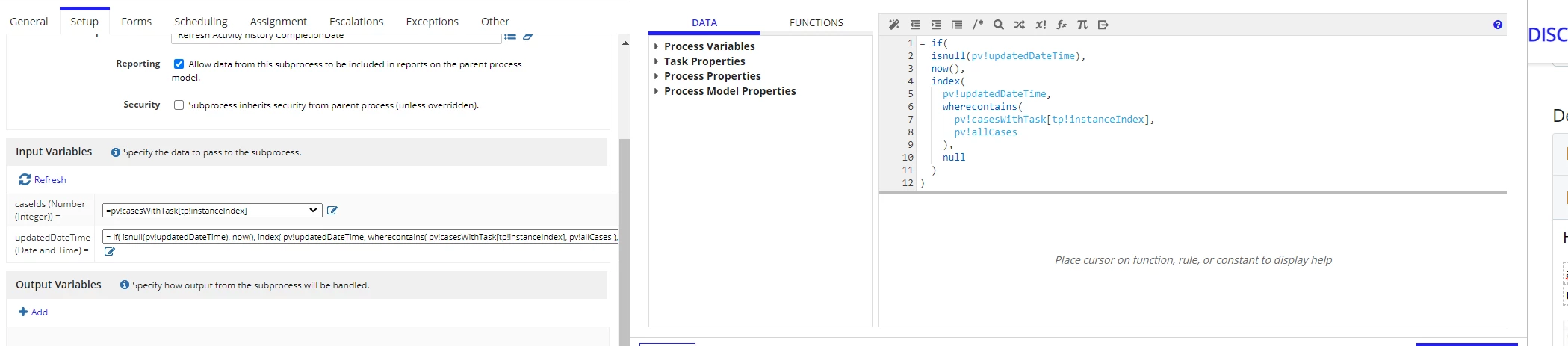
Hi everyone, I'm having this issue where I'm trying to index a date and time array using the index of caseID from another array with same order. Below are the process variables and the code that I wrote:

allCases Number (Integer) 3,061,158; 3,061,157; 3,061,156; 3,061,155; 30,611,111; 306,115,555

updatedDateTime Date and Time 20 May 2023 12:00; 21 May 2023 12:00; 20 Jun 2023 12:00; 6 Dec 2023 12:00; 20 May 2023 12:00; 20 May 2023 12:00

However there was no updatedDateTime value passed into my sub-process, so I'm wondering what did I do wrong with the indexing.

Any idea? Thanks a lot in advance :)

    14 replies

    stefanhelzle0001
    Brainy
    March 9, 2023

    With seeing the data its impossible to say anything. I recommend to not "hide" such logic inside the value assignment, but use a separate script task and store the result in a PV. That make debugging also a lot easier.

    mollyn6512
    March 9, 2023

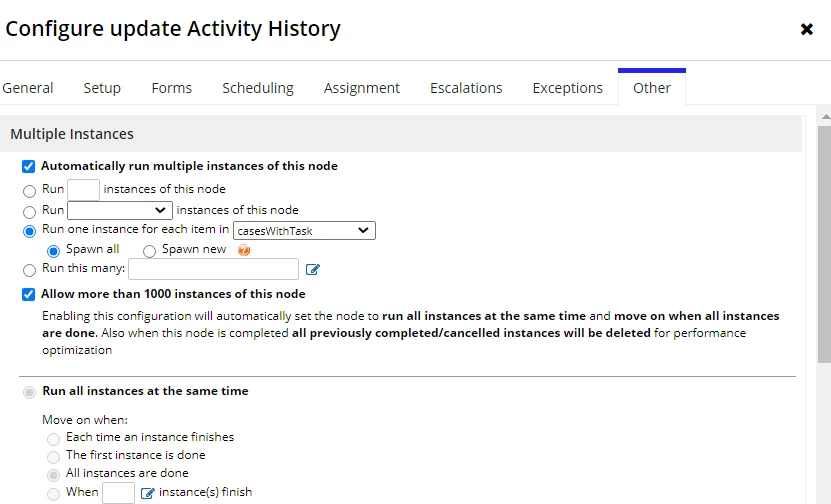
    I want to find datetime for each casesWithTask then pass that value into my sub-process. Not sure if tp!instanceIndex can be used in scriptask?

    mollyn6512
    March 9, 2023

    I created a scriptask and tried index(pv!updatedDateTime,wherecontains(pv![a case ID instead of pv!casesWithTask[tp!instanceindex],pv!allCases),null), this will return me the exact date time at that index. But it does not work with tp!instanceIndex not sure why... 

    jakubf0002
    March 9, 2023

    Are casesWithTasks and allCases same type? Is pv!updatedDateTime an array/dictionary? First i will take your where contains and check it manually if it ever return any true for any tpinstanceinex. Then check if index of pv!updatedDatetime return anything if you provide 1 or 2 as second argument.

    mollyn6512
    March 9, 2023

    Yes. casesWithTasks and allCases are both integer. updatedDateTime is now Date and Time (multiple values) type. 

    I created a scriptask and tried index(pv!updatedDateTime,wherecontains(pv![a case ID instead of pv!casesWithTask[tp!instanceindex],pv!allCases),null), this will return me the exact date time at that index. But it does not work with tp!instanceIndex not sure why... 

    jakubf0002
    March 9, 2023

    how many sub processes are triggered? is number correct? Is casesId passed right to sub process? If yes then there is nothing wrong with tpinstanceInded - there is something wrong with if.

    mikes0011
    Brainy
    March 9, 2023

    I second Stefan's suggested approach.  Add a single script task node right before your subprocess call, and have it output to a new PV of type Array of Map.

    The script task would have a single output entry wherein you reassemble essentially the same code you were trying to pass directly into your subprocess inputs:

    a!forEach(
      pv!casesWithTask,
      
      a!map(
        caseId: fv!item,
        updatedTime: index(
          pv!updatedDateTime,
          whereContains(
            fv!item,
            pv!allCases
          ),
          now()
        )
      )
    )

    You would then hopefully have a PV set to the proper value(s) for your input array, which you can verify the correct values of.  And then for your subprocess inputs, you'd simply set the MNI to reference your new Map PV, and the inputs would be pv!myNewMap[tp!instanceIndex].caseId, and pv!myNewMap[tp!instanceIndex].updatedTime.

    Also (and somewhat confusingly), you might not even need the tp!instanceIndex reference when referring to the specific PV set as the MNI identifier - Appian seems to use some sort of fuzzy logic to automatically pull the "current index" at least when not otherwise overridden.  I haven't tested this extensively recently but it seems to somehow work both ways in some instances.  If anyone knows in any more detail how this works exactly, I wouldn't mind a better description myself, hah.

    The Expression Guru
    komalj3844
    March 9, 2023

    Hi 

    Please try this to solve your MNI

    I am setting some value in caseid, casewithtask and date in first script task

    In Second script task i mapped the case id and date into a CDT

    In Sub Process I am using the mapped CDT for MNI

    Here is the data from sub process instance

    mikes0011
    Brainy
    March 9, 2023

    FYI, this is the sort of solution I proposed above, except now with the ability to add PVs of the type "Map", there's no need to create a custom CDT just to hold the values in question as you seem to have done here with pv!allData and the "KJA_caseswithtask" data type.  We can just create a Map (multiple) PV and assemble an array of Map objects within the a!forEach loop, and the process handles it.

    Edit: but i'm giving you a well-earned upvote anyway due to your apparently extensive work setting up a live example, and gathering of screenshots - well done [emoticon:c4563cd7d5574777a71c318021cbbcc8]

    The Expression Guru
    komalj3844
    March 9, 2023

    Thank You Mike. I create the CDT so that we are inline with proper data structure , if further needed it can be extend and easily maintained through CDT . Thank for you suggestion on using Map

    Inspiring
    March 9, 2023

    If subprocess is not necessary in your use case you can use start process which allow you to use tp!instanceindex