
July 21, 2024
Question

Trouble with updating a specific row in my recordtype using a!update

  • July 21, 2024
  • 4 replies
  • 0 views

I want to update a specific row in my recordtype with data in one of the columns as follows: 
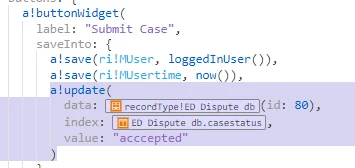
Here I am using my id (the primary key of the table) to specify which row I wish to update, in this case i want to update case number 80 and update the casestatus column with "accepted", however upon doing so I get the following error: 
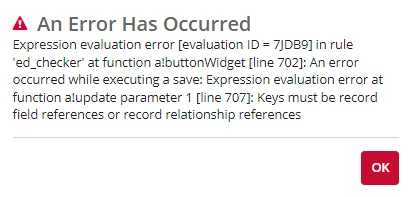
I am guessing that my syntax is incorrect, but I can't seem to figure out what I am doing wrong exactly.

4 replies

stefanhelzle0001
Brainy
July 21, 2024

Use the correct record type field reference syntax for the id field. Just like you do for the index parameter of a!update.

konduruc733182
July 21, 2024

In the update() the data parameter is configured incorrectly. You need to specify the variable in which your data is present. 

a!update(
  data: index(myVariable[fieldName],80,null),
  index: recordType.fieldName which you want to update,
  value: "accepted"
)

varuntejg243705
July 22, 2024

Hi [mention:5ca3724eac324319b36377f6e4fb404d:e9ed411860ed4f2ba0265705b8793d05] ,

you are trying to get the records by using id incorrectly,

Instead query the record type by using expression rule and put it in a local variable, then update the variable, if you don't use that record type rule input in that interface.


Follow the sample code :

a!localVariables(
  local!customer: rule!RMS_GetCustomerByCustomerId(customerId: 3),
  a!update(
    data: local!customer,
    index: RMS Customer.billAmount,
    value: 555
  )
  
)

davidj137213
Brainy
July 22, 2024

You are referencing the record index in a wrong way. Use one of the following sentences.

index(local!allUsers, recordType!yourRecordName.fields.yourField, {})
 local!allUsers[recordType!yourRecordName.fields.yourField]