
New Participant
October 27, 2026
Question

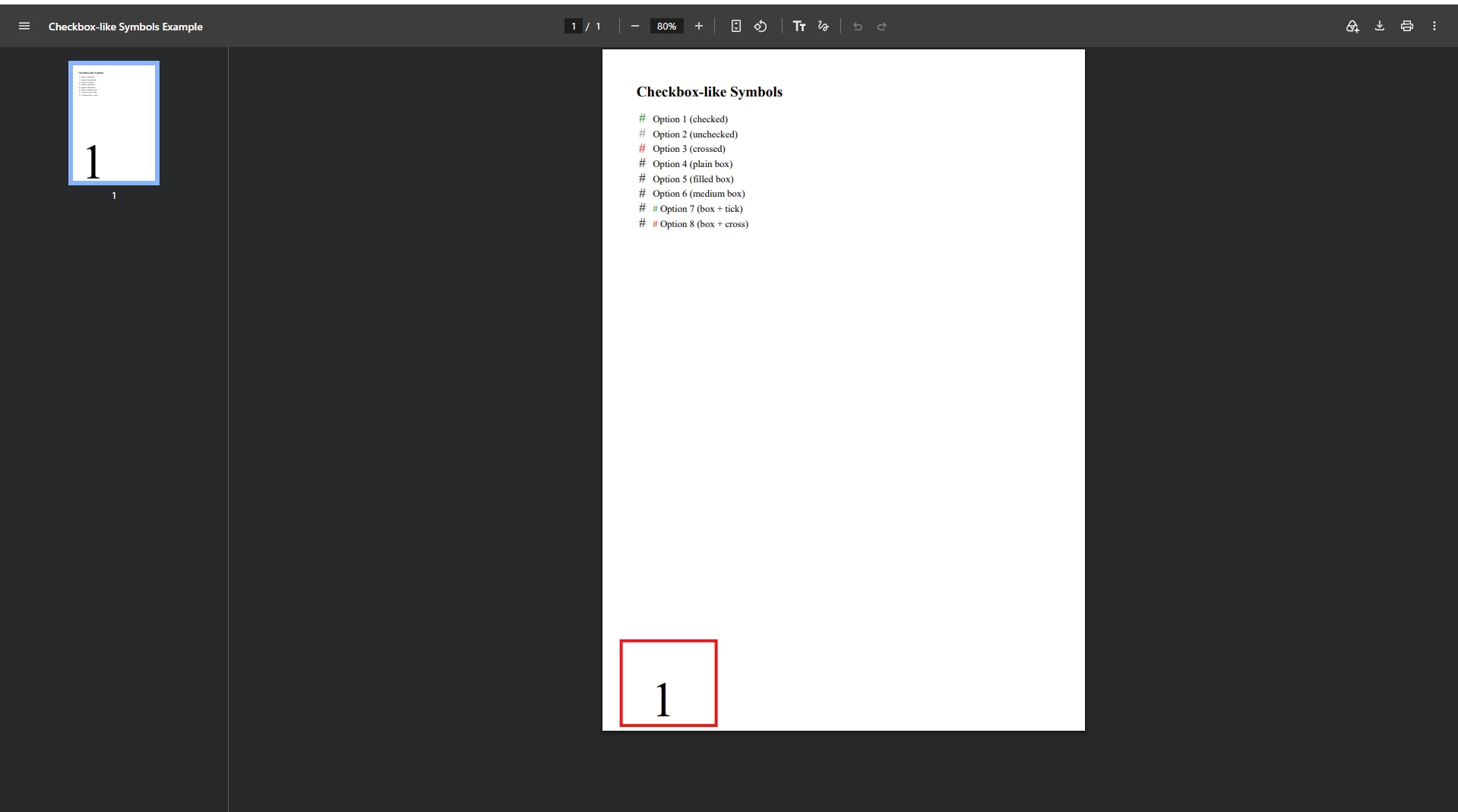
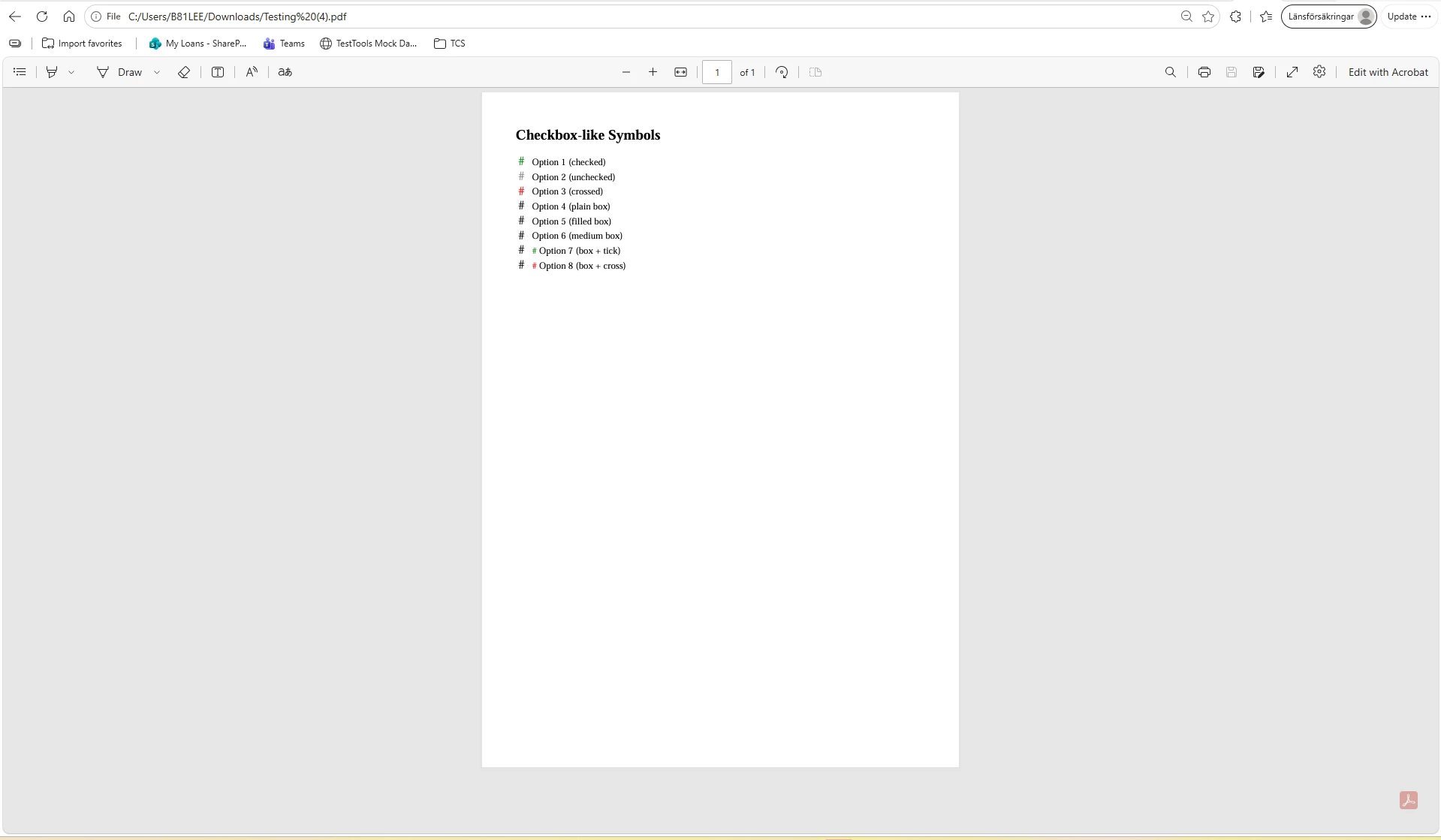
Unexpected Page Number Appearing in Appian-Generated PDF in Chrome but not in Other Browsers (Edge ,Adobe..)

I’m experiencing an issue with a document generated in Appian.

The document-generation process is:

HTML template → HTML document → PDF

After the PDF is generated, previewing it in Chrome displays an unexpected page number that was not configured in the HTML template . The issue does not occur when I preview the same document in Microsoft Edge/Adobe.

I tried by downloading and opening with different browsers also.

Please see the attached screenshots for reference and let me know if you have any solution for this.

Chrome 
Edge
Note : I have updated my chrome version to Version 156.0.8078.48 from its previous version . After that update only I am facing this issue .

3 replies

mathieud0001
Genius
October 27, 2026

Chrome and Edge use different engines to render PDFs so problem is most likely in the PDF itself. Can you share the original HTML used to convert to PDF?

New Participant
October 27, 2026

Hi ​@mathieud0001 , I cant share here as this upload feature not supporting HTML doc types . I will share you HTML code here , You can paste it in notepad and save that file with .html extension.


<!DOCTYPE html>
<html>
<head>
  <meta charset="UTF-8">
  <title>Checkbox-like Symbols Example</title>
  <style>
    .checkbox-symbol {
      font-size: 22px;
      vertical-align: middle;
      margin-right: 8px;
    }
    .checked { color: green; }
    .unchecked { color: gray; }
    .crossed { color: red; }
  </style>
</head>
<body>
  <h2>Checkbox-like Symbols</h2>
  <p>
    <span class="checkbox-symbol checked">☑</span> Option 1 (checked)<br>
    <span class="checkbox-symbol unchecked">☐</span> Option 2 (unchecked)<br>
    <span class="checkbox-symbol crossed">☒</span> Option 3 (crossed)<br>
    <span class="checkbox-symbol">□</span> Option 4 (plain box)<br>
    <span class="checkbox-symbol">■</span> Option 5 (filled box)<br>
    <span class="checkbox-symbol">◻</span> Option 6 (medium box)<br>
    <span class="checkbox-symbol">□</span> <span style="color:green;">✓</span> Option 7 (box + tick)<br>
    <span class="checkbox-symbol">□</span> <span style="color:red;">✗</span> Option 8 (box + cross)<br>
  </p>
</body>
</html>


Note: Ignore data as this is created for sample purpose 

stefanhelzle0001
Brainy
October 27, 2026

Did you try to display the PDF in a non-browser app? And, what plugin do you use to create the PDF?