kavyam0002
March 3, 2022
Question

Using multiple table

  • March 3, 2022
  • 4 replies
  • 0 views

Hi,

I have two tables with name x and y,

X has 20 columns with name of text1,text2,text3.. text20, and additional some columns as id and cif - which is used to store the values in this one row isequal to one line which includes all 20 cols

y has 20 columns with name of text1,text2,text3.. text20, and additional some columns as id and cif - which is reference for x table 

using both the table i have show the values of x table all 20 cols of one row in one line 

how can  i achieve this? 

as of now i used only X table to show the values and just concatenated all the cols 
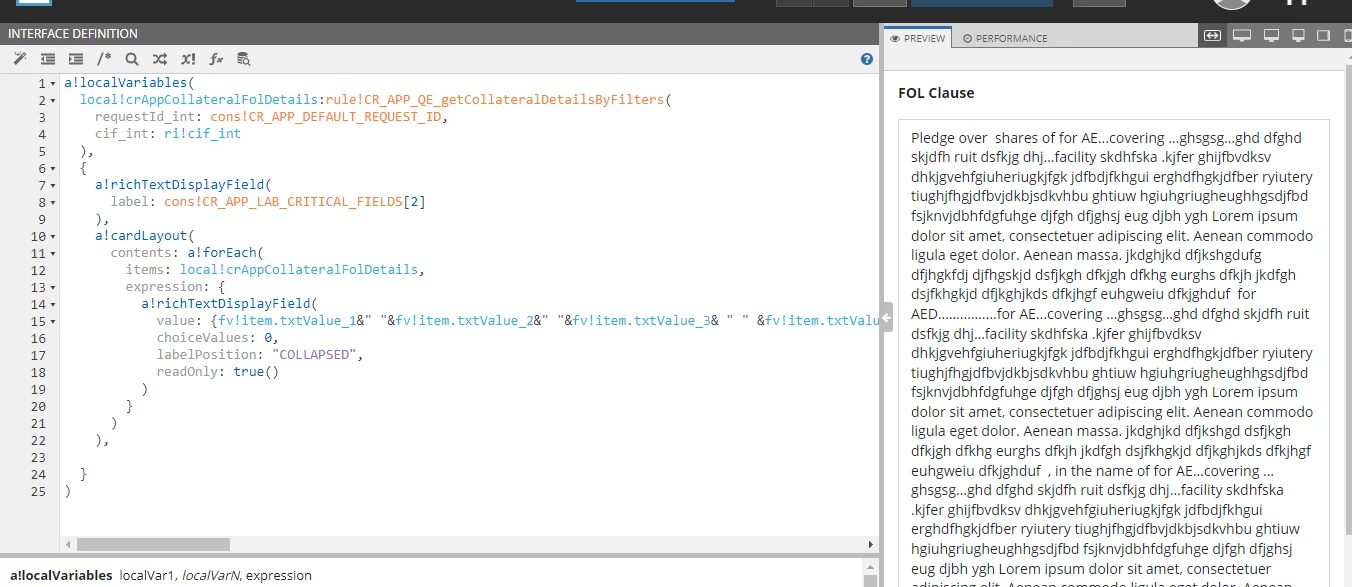
is this right way to do? 

Thanks

Kavya Muttur 

    4 replies

    gopalk2865
    Participating Frequently
    March 3, 2022

    Hi Kavya, Could you please explain your use case little more for better understanding.?

    kavyam0002
    March 3, 2022

    Hi Gopal,

    I have to show 20 columns text in one line using 2 tables...

    both the tables are having same column name but one is for reference and one for storing the values  

    gopalk2865
    Participating Frequently
    March 3, 2022

    Its very weird requirement to have such big text in one field. You can use collapsible fields to achieve this.it will be more ui user friendly and you use concatenate function to join your texts.

    stewart.burchell
    March 3, 2022

    A common pattern is to have two components in your user interface, one to show the list of rows in table X (lets' call this the 'Summary' view) and another table that shows the content of table Y only for a selected row in table X (let's call this the 'Detail' view). Unless there's a specific reason to see all of the data in one go (which is somewhat overwhelming to a user) then this is a better pattern to use.