July 22, 2022
Solved

Access integration connected system with parameter

  • July 22, 2022
  • 10 replies
  • 0 views

hello,

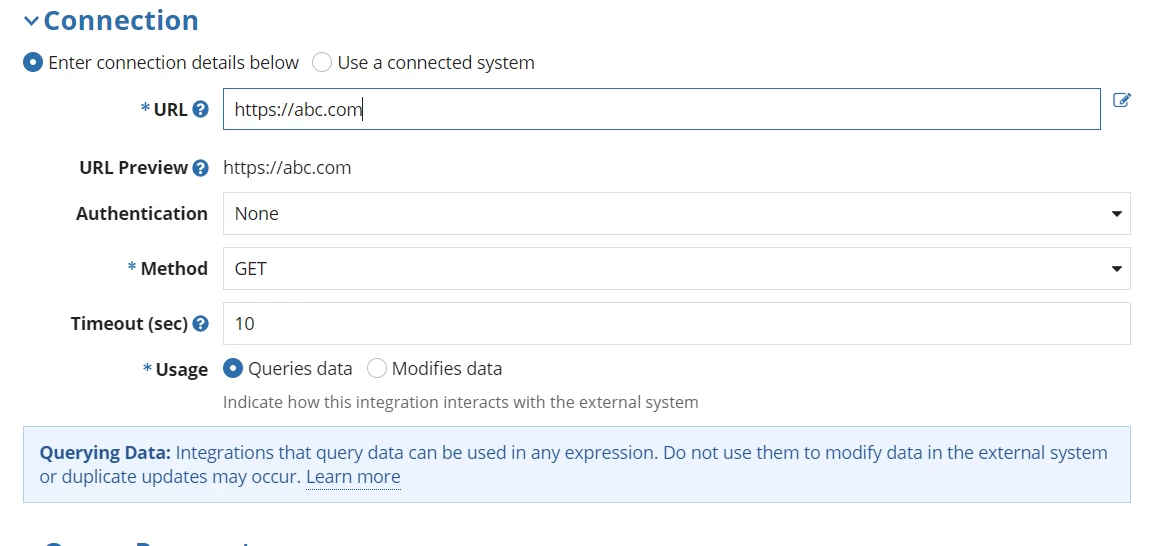
 below is my integration

Here i have given the url as https://abc.com

in my interface i have accessed this integration as local!data:rule!integration().result.body

It is working fine.

But instead of giving the url "https://abc.com in integration system, i want to pass the dynamic url from interface, and assign it to URL text box in integration system.

Is it possible?

    Best answer by harshitb6843

    You also need to pass the values. 
    Looks like you're really unaware of how to call expressions/interfaces inside one another. 

    You can call the integration in your interface using rule! domain. And you can pass the values in the called rule's Ri within its brackets. 
    Like rule!integration(urlString: "Pass your string here")

    10 replies

    harshitb6843
    July 22, 2022

    Yes. Please use the "Expression" icon adjacent to the text field to pass a rule input instead of static text and then you can pass the value in that rule input from your interface. 

    July 22, 2022

    step1:

    i have created a rule in Expression rule, wherein i have created a ruleinput url

    step2: in my interface i tried to call this rule.

    step3: i have tried to access the rule in connection system as below

    Kindly guide.

    stefanhelzle0001
    Brainy
    July 22, 2022

    Why make it complicated and toy around with expressions? Add a rule input to the integration object and reference it in the rule like this

    ri!urlName

    Then you can pass the URL dynamically whenever you call the integration.

    July 25, 2022

    Hey Nandhini, in your integration, on the top right panel there is a + icon in rule input section. Click on that and add a rule input. After that, just after your URL textfield there is a icon called expression editor. Click on that and it will show a popup and in that popup, put ri!ruleInputName. And then save this integration. Next move to interface where you are calling this integration. In that interface you are using rule!{YourIntegrationname}. for example rule!Your_Integration_Object_Name. now please make it to rule!Your_Integration_Object_Name(your variable name to pass or url string). for example. rule!Your_Integration_Object_Name(local!url) or rule!Your_Integration_Object_Name("www.dynamicurl.com")

    July 25, 2022

    thanks u so much. I have implemented and it is working.

    July 25, 2022

    Oh That's grreat, Could you please verify the comment as an answer