
November 25, 2024
Solved

Bearer Token Authentication

  • November 25, 2024
  • 11 replies
  • 0 views

Hi Experts,

Third party app admin has provided me API to call along the bearer token to authorize.

Kindly suggest if  Appian can use such bearer token Authorize the API calls or not if yes then can we use it in our connected system or not, for now I have used it directly in the integration object as header but its not working.
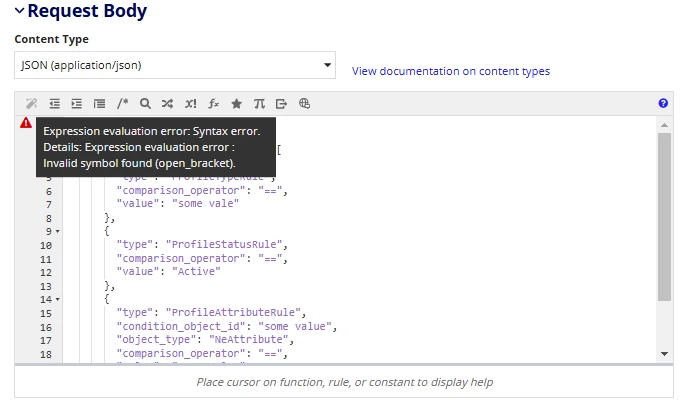
While using below Request payload in Appian Integration object its not being read properly because of the [ ] brackets.

{
  "advanced_search": {
    "condition_rules_attributes": [
      {
        "type": "ProfileTypeRule",
        "comparison_operator": "==",
        "value": "some vale" 
      },
      {
        "type": "ProfileStatusRule",
        "comparison_operator": "==",
        "value": "Active"
      },
      {
        "type": "ProfileAttributeRule",
        "condition_object_id": "some value",
        "object_type": "NeAttribute",
        "comparison_operator": "==",
        "value": "some value"
      }
    ]
  }
}

Best answer by stefanhelzle0001

That's the correct way. As I describer above, I had an issue with some additional spaces, coming from copy&paste actions. Once cleaned up, the syntax "Bearer jasfz793qgfuaigfu99393" with exactly a single space works.

11 replies

stefanhelzle0001
November 25, 2024

For that JSON like structure, I highly suggest to use the correct Appian dictionary syntax. Appian will then turn it into JSON automatically.

Kindly suggest if  Appian can use such bearer token Authorize the API calls or not if yes then can we use it in our connected system or not, for now I have used it directly in the integration object as header but its not working.

Sure, Appian does support Bearer authentication. Just check the docs. What exactly does "not working" mean?

November 25, 2024

Hi Stefan,

Thank you for your response,

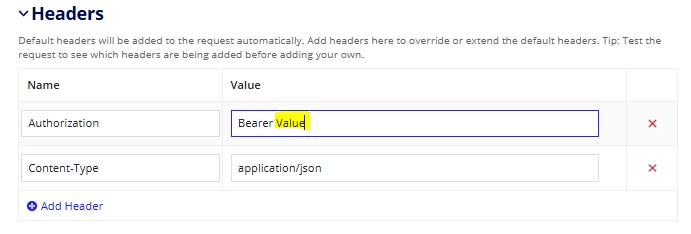
I was trying to use the bearer token in the connected system which seems to be impossible hence I have configured the Integration object to have Authentication as "NONE" and configured the token in the Header section of the integration object as in below screen shots.


I was trying to put the exact Json in the body which was throwing error. After converting the JSON to Dictionary and using a!toJson on it has resolved the issue.

stefanhelzle0001
November 26, 2024

Why did you not configure authentication in the CS? That's exactly the right place to do this! I frequently just but the string made of "Bearer + key" into the CS. But I learned that I sometimes had a leading or trailing space in that string, which broke it.

When you create an Appian dictionary in the body section, Appian will automatically turn it into JSON. There is no need for an additional a!toJson call.