
erazemk6135
March 11, 2024
Solved

Calling sharepoint integration from expression

  • March 11, 2024
  • 3 replies
  • 0 views

I have a Sharepoint connector defined and authenticated with an integration that uses it. It is set to create a folder. I am trying to use it in an expression like so:

a!localVariables(
    local!user: rule!HR_getUserFromUuid(ri!uuid),
    local!employeeFolder: upper(user(local!user, "firstName")) & " " & upper(user(local!user, "lastName")),
    rule!HR_SharepointCreateFolder(
      folderName: local!employeeFolder,
      rootPath: cons!HR_SHAREPOINT_EMPLOYEES_FOLDER
    )
)


It however doesn't create the folder. If I go to the integration, enter the same values as test inputs and click test, it does work as expected.

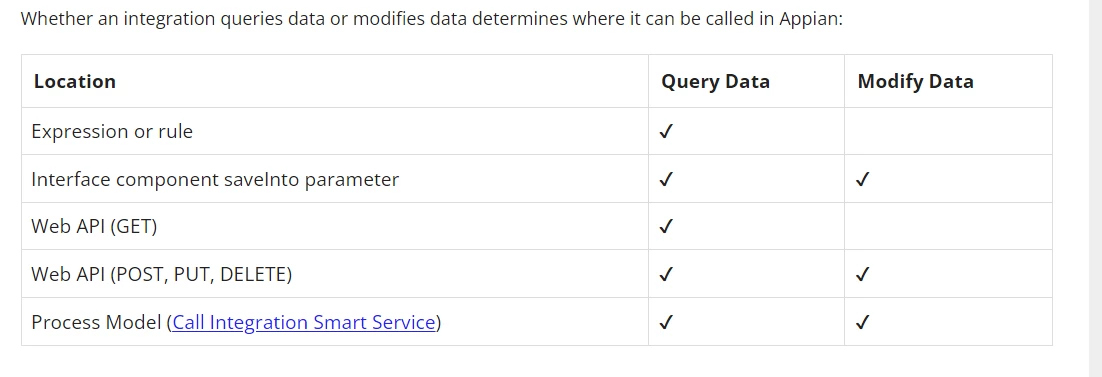
Best answer by konduruc733182

No, It will not work inside an expression. It will either work in a integration node from the process or executing this rule in a saveinto parameter.

Querying Data versus Modifying Data

3 replies

konduruc733182
March 11, 2024

No, It will not work inside an expression. It will either work in a integration node from the process or executing this rule in a saveinto parameter.

Querying Data versus Modifying Data

stefanhelzle0001
March 11, 2024
erazemk6135
March 12, 2024

I will just add this for future readers:

This example does not throw an error and you have no static analysis telling you that you shouldn't use the integration in an expression which is why you have to manually test to know for sure (in my case I had to look for the specific folders on my Sharepoint). This is poor development experience and a mistake on Appian's end since this kind of silent errors can become quite tricky to uncover in large applications.