
September 23, 2024
Question

Deployment API - Inspect Package

  • September 23, 2024
  • 11 replies
  • 0 views

Hii Everyone,

I am working on Deployment API - Inspect Package, i have created a connected system in which i have entered the base url as https://<domain>/suite/deployment-management/v2, where <domain> is replaced with my site domain, and use API key for authentication. Then i have created integration using this connected system with relative path as /inspections and in request body selected content type as multipart form data and created four parts adminConsoleSettingsFileName, packageFileName, customizationFileName and zipFile, for all this parts i have created rule inputs named same as the part names and kept type as text type
except zipFile which is of document type.
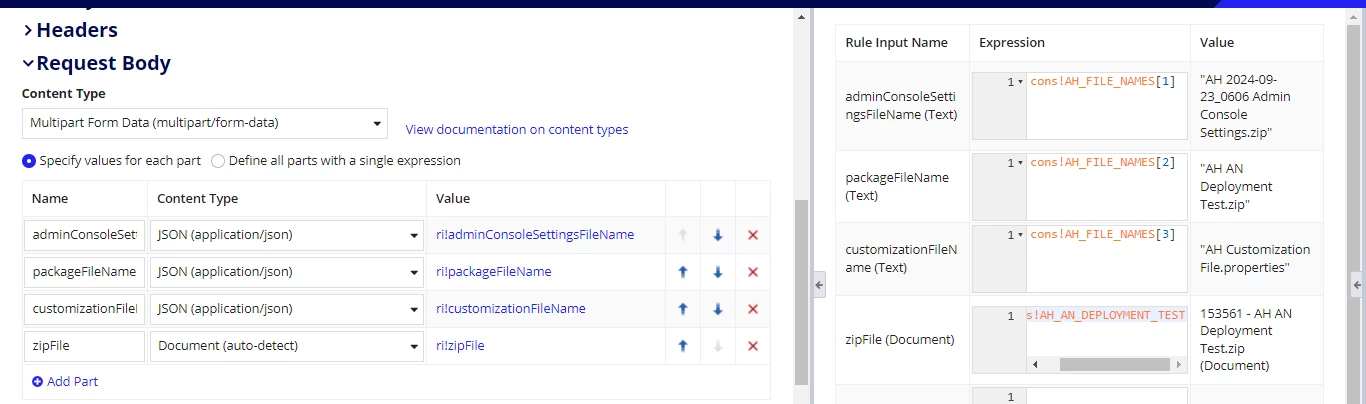
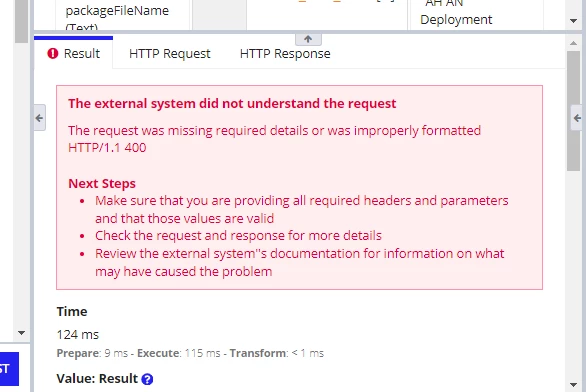
I have passed the names of document in text type rule inputs and in zipFile i have passed exported applications zip file but now its showing error as shown in below image, can anyone help me with this?
    11 replies

    davidj137213
    September 23, 2024

    The problem seems to be related with one of the parameters used.... check the image.

    Check this example via curl and  check if you are using it in the same way


    Probably you have to add the brackets in the json parameter ....

    + curl --location --request POST https://xxxxx.appian.com/suite/deployment-management/v1/inspections --header 'Appian-API-Key: xxxxxxxxxx' --form zipFile=@adm/package.zip --form 'json={packageFileName:package.zip}'

    September 23, 2024

    I tried via curl but its showing following error:

    curl: (6) Could not resolve host: POST
    curl: (3) URL rejected: Port number was not a decimal number between 0 and 65535
    curl: (3) URL rejected: Bad hostname
    curl: (3) URL rejected: Bad hostname
    curl: (3) URL rejected: Bad hostname
    curl: (3) URL rejected: Bad hostname
    curl: (3) URL rejected: Malformed input to a URL function

    davidj137213
    September 23, 2024

    Could you share here your request please? The one attached is working without problems.