
January 18, 2023
Question

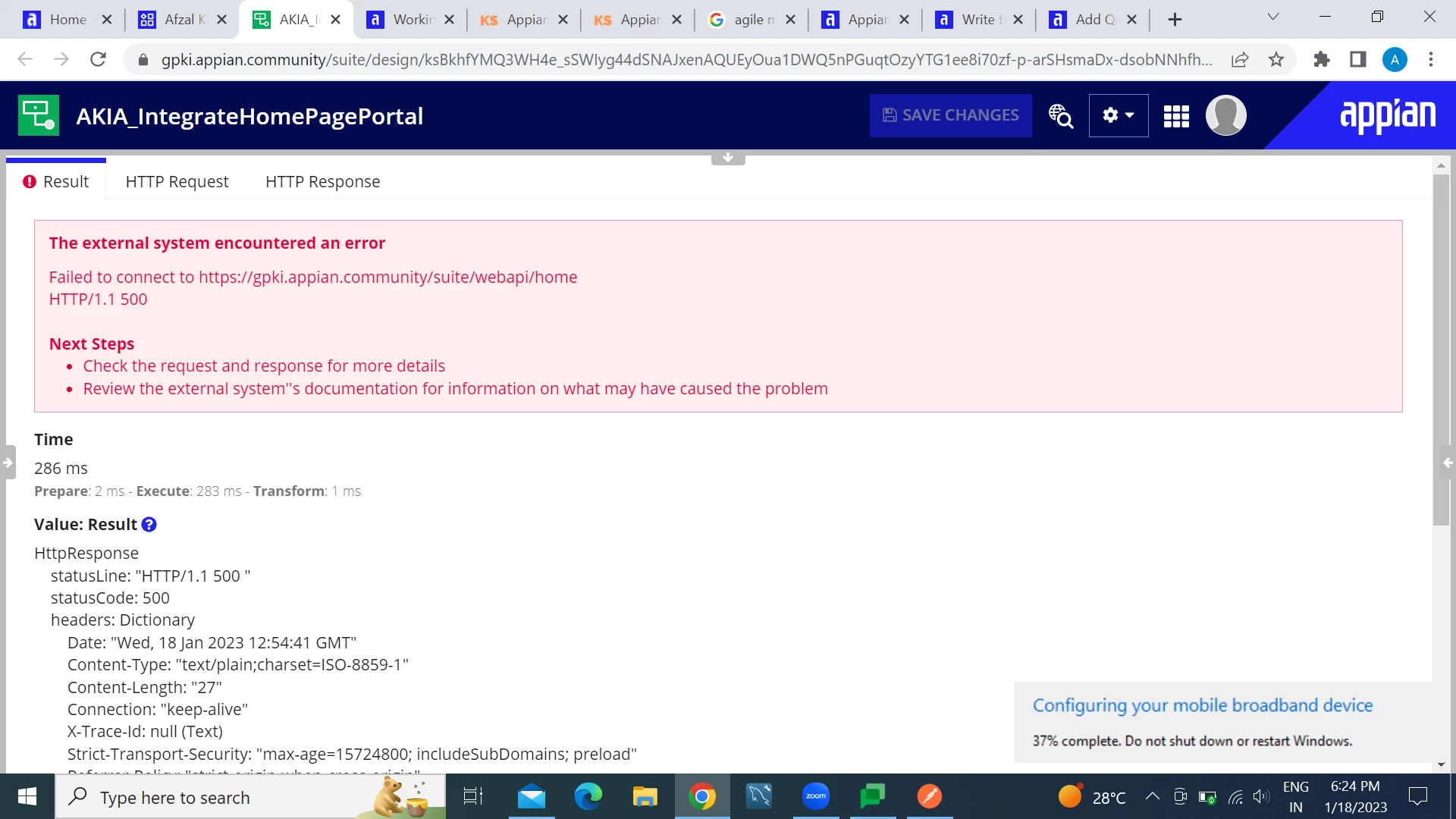
HTTP/1.1 500 Internet Server Error in Integration
  • January 18, 2023
  • 9 replies
  • 0 views

I constructed my Integration by configuring with connected system and when I test it I receive this error "HTTP/1.1 500 Internal Server Error" in Appian Designer.

Method:POST

Its working fine in postman.

Thanks

    9 replies

    February 7, 2023

    You can try the following steps to mitigate your error:
    1. Examine the Appian logs: Examine the Appian logs for any errors that occurred on the server. This will help you understand what went wrong and why.
    2. It could be a problem with access rights. Please verify that the user has at least viewer rights to the API-related objects such as datastore, etc.
    3. Validate input parameters: Ensure that the input parameters are in the correct format and not causing any problems.
    4. Verify connectivity: Ensure the connected system is accessible and operational.
    5. Check authentication: Verify that the authentication method used in the integration is correctly configured and that the authentication token is still valid.
    6. Increase the timeout: See if increasing the timeout in the integration configuration solves the problem.
    7. Debug the integration: Use the Appian Debugging Tools to troubleshoot the integration and pinpoint the source of the problem.

    nupoorg186699
    January 9, 2024

    Hi Kapil,

    I am facing similar issue, and tried out all the steps, but still the integration object is failing to give response, any other way to fix this issue?

    venkatrea696188
    January 9, 2024

     500 error comes at different situations like when no other error code is suitable or when system encountered an unexpected condition. Check integration logs (If you enabled them) to find root cause . If it's possible can you share the screenshot of the response.

    February 7, 2023

    You can try the following steps to mitigate your error:
    1. Examine the Appian logs: Examine the Appian logs for any errors that occurred on the server. This will help you understand what went wrong and why.
    2. It could be a problem with access rights. Please verify that the user has at least viewer rights to the API-related objects such as datastore, etc.
    3. Validate input parameters: Ensure that the input parameters are in the correct format and not causing any problems.
    4. Verify connectivity: Ensure the connected system is accessible and operational.
    5. Check authentication: Verify that the authentication method used in the integration is correctly configured and that the authentication token is still valid.
    6. Increase the timeout: See if increasing the timeout in the integration configuration solves the problem.
    7. Debug the integration: Use the Appian Debugging Tools to troubleshoot the integration and pinpoint the source of the problem.

    March 6, 2023

    Tips to fix-

    Try Reloading the Page.
    Clear Your Browser Cache.
    Check Your Server Logs.
    Check for Errors in Establishing a Database Connection.
    Check Your Plugins and Themes.
    Reinstall WordPress Core.
    Check for Permissions Error.
    Increase PHP Memory Limit.

    Regards,

    Rachel Gomez

    stefanhelzle0001
    January 9, 2024

    ATTENTION: This reply is nonsense as it talks about WordPress