
Question
Issue Creating Web API for Document Upload
I have created a web api for uploading documents into appian application
a!localVariables(
  local!body:http!request.body,
  local!key: http!request.pathSegments,
  local!keyNumber:regexfirstmatch(pattern: "\d+", searchString: local!key),
  local!requestStructure: rule!PRE_FormatRcoDocumentRequestFromMyWorldRequest(jsonRequest: todocument(local!body), key: local!key),
  if(
    or(
      a!isNullOrEmpty(local!requestStructure),
      a!isNullOrEmpty(local!key)
    ),
    a!httpResponse(
      statusCode: 400,
      headers: {
        a!httpHeader(
          name: "Content-Type",
          value: "application/json"
        )
      },
      body: a!toJson(a!map(error: local!requestStructure))
    ),

    a!startProcess(
      processModel: cons!PRE_PM_UPLOAD_DOCUMENTS,
      processParameters: {
        uploadDocuments:local!requestStructure,
        intakeMain:'recordType!{9228ede4-797f-443e-ba77-59aeed242b7a}PRELUDE Intake Main'(
          'recordType!{9228ede4-797f-443e-ba77-59aeed242b7a}PRELUDE Intake Main.fields.{61b2bc9e-c8e3-4635-bde7-b9c829a75682}idIntakeMain': local!key
        )
      },
      isSynchronous: true(),
      onSuccess: a!httpResponse(
        statusCode: 200,
        headers: {
          a!httpHeader(
            name: "Content-Type",
            value: "application/json"
          )
        },
        body: if(
          a!isNotNullOrEmpty(fv!processInfo),
          a!toJson(
            {
              rule!PRE_CreateResponseForMyWorldRcoComment(fv!processInfo.pv.RecordsUpdated),

            }
          ),
          null()
        )
      ),
      onError: a!httpResponse(
        statusCode: 500,
        headers: {
          a!httpHeader(
            name: "Content-Type",
            value: "application/json"
          )
        },
        body: a!toJson(
          {
            error: "There was an error starting the process"
          }
        )
      )
    )
  ),

)
This works perfectly fine if I use body as Binary to upload file but issue occurs when I am trying to use body as multipart/form-data
For the sake of clarity I have created an integration for this API and this is the result I am getting :
Scenario 1: Using Body as Document (Auto-Detect)
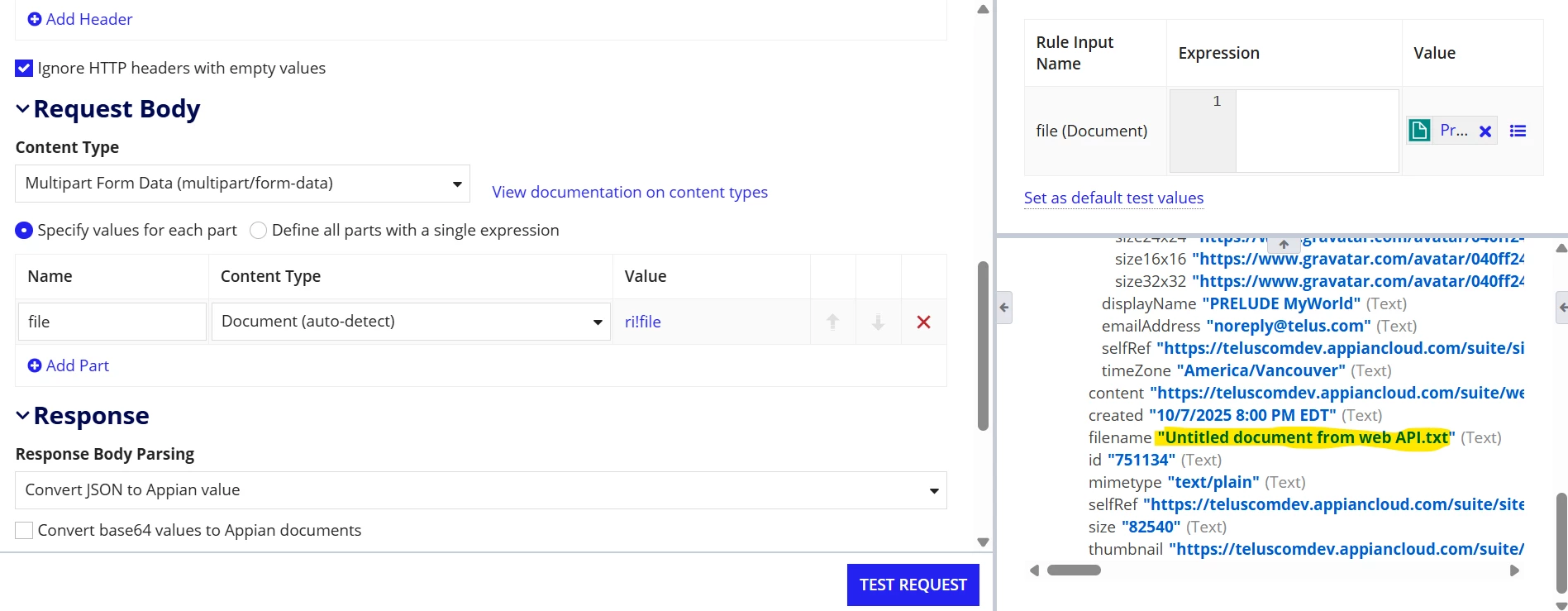
In this scenario png file is getting converted as txt and following text is getting added into the file(I have attached the file for more clarification)
--TnQmfygKfP801A_kE1bGL-7YAFk_k6gl9
Content-Disposition: form-data; name="file"; filename="Profile Picture.jpg"
Content-Type: image/png
Content-Transfer-Encoding: binary
[View:/cfs-file/__key/communityserver-discussions-components-files/18/Untitled-document-from-web-API-_2800_12_2900_.txt:320:240]