
September 28, 2022
Question

Query parameter in INTEGRATIONS

  • September 28, 2022
  • 4 replies
  • 0 views

Hi

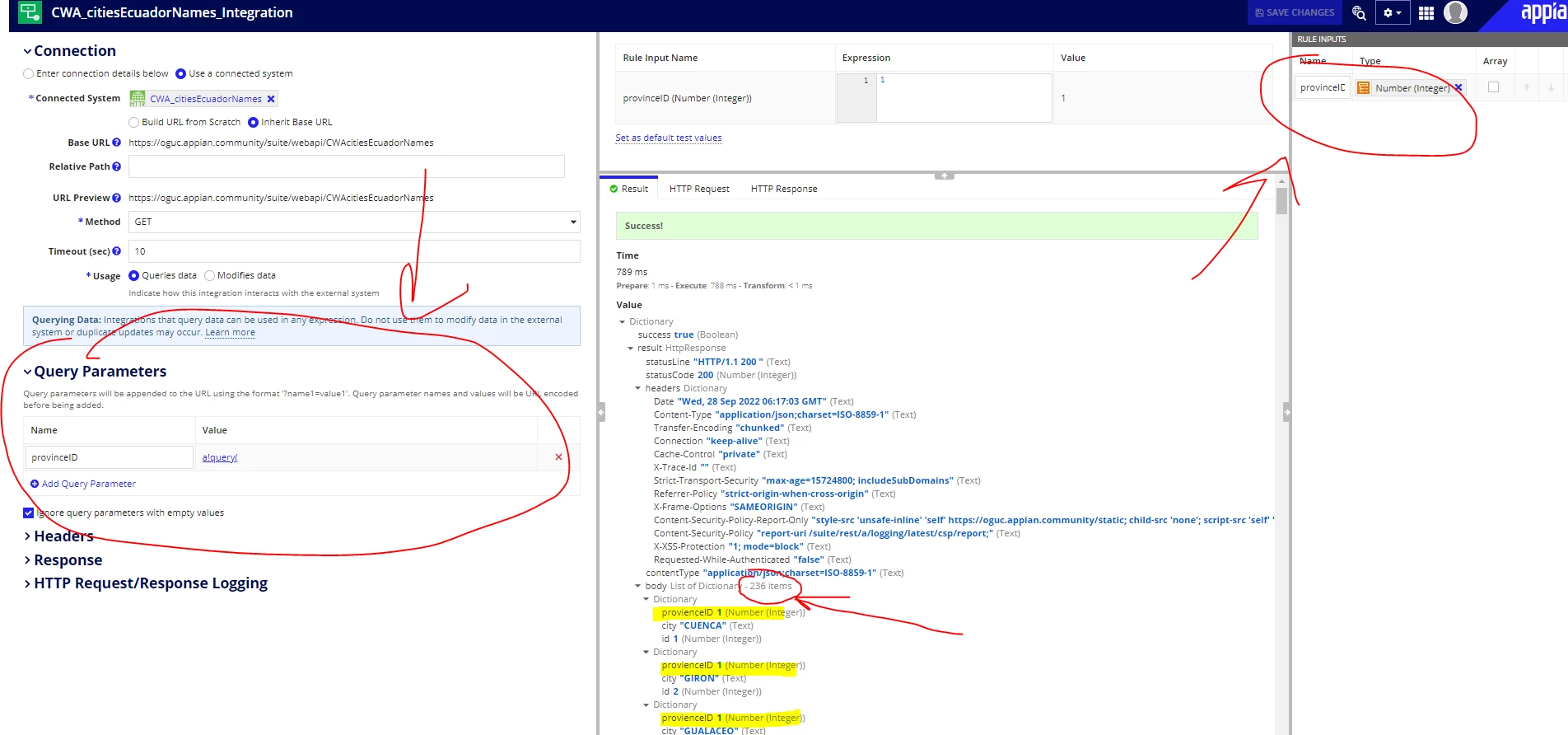
I want to filter my data by the field: "provienceID" (image bellow)  in my integration

I create a rule input (number integer)

The idea is, when I change the test values in the expression, I test with 1 and the result will be all my data with the "province ID" with value 1.

I use this expression in query parameter section, but it doesn't filter by the values that I want, it gives me all the values

For example for "province ID" with value 1 must show me just 15 fields

a!query(
      filter: a!queryFilter(
        field: "provienceID",
        operator: "=",
        value: ri!provinceID
      ),
      pagingInfo: a!pagingInfo(1,-1)

    )
4 replies

stefanhelzle0001
Brainy
September 28, 2022

A query parameter is meant to send this parameter to the integrated API. The API needs to implement this filtering. Check the API documentation for how to pass values for filtering.

BTW, even in a queryEntity, the filtering is not done inside Appian, but offloaded to the database.

balaganeshb0004
September 28, 2022

Hi, 
I would like to check a few points with you regarding your API configuration.

If you are using the WEBAPI that you have configured in the Appian, there you need to configure the WEBAPI using 'ProvinceId' to filter the data. So that we can use the same filter in the Integrations. 

danna3499Author
September 28, 2022

Hi, Bala Ganesh

This is the expression of my web api, but the query parameter doesn't work

stefanhelzle0001
Brainy
September 28, 2022

I do not see a queryFilter inside your queryEntity. I suggest to add that and use the passed query parameter as the filter value.