
April 16, 2024
Question

Recover info onSuccess/OnError from a ProcessModel to an Interface after calling an Integratio

  • April 16, 2024
  • 8 replies
  • 0 views

Hi everybody.

I want to extract information from a ProcessModel, calls from an Interface.
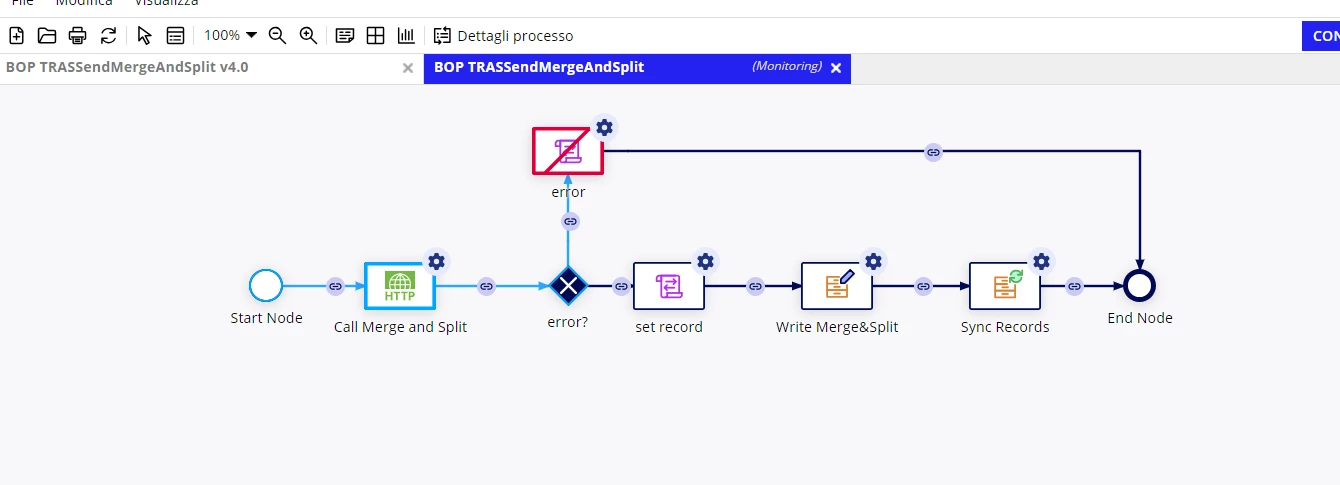

But I don't know how. And also, the interface show me the "onSuccess" result immediatly after the process'calling.

8 replies

karumurua531442
April 16, 2024

hi [mention:fcc3c8b45a9e452eaa99af720c40daf9:e9ed411860ed4f2ba0265705b8793d05]  you want display success message in interface if integration is successful? Am I correct 

April 17, 2024

Correct. 
And I want also that shows me an error message in case of KO.

shubhama926776
April 16, 2024

[mention:fcc3c8b45a9e452eaa99af720c40daf9:e9ed411860ed4f2ba0265705b8793d05] 
If you are expecting error node data output to come to the interface using fv!processInfo.pv.error, that is not possible AFAIK.
Do you want the Integration Node output data in the Interface?

April 17, 2024

For your question yes, I want a way to show in the interface a message that confirm the result of the integration.

shubhama926776
April 17, 2024


[mention:fcc3c8b45a9e452eaa99af720c40daf9:e9ed411860ed4f2ba0265705b8793d05] Then you can get the data output of integration in interface using processInfo.pv.name_of_pv.

Remember this while implementing: Smart service follows activity-chaining, completing only when the activity chain is complete or broken. The smart service then returns the process variables as of the completion of activity chaining through the processInfo.pv output.

daniell
April 16, 2024

To clarify the behavior of how onError works, from the Docs: "The onError parameter will only evaluate if the process fails to start. It will not evaluate if a node in the started process pauses by exception"

In your screenshot it looks like a Script Task is erroring. Why is that erroring? If your integration smart service node completes successfully (and returns information about any potential errors within it) then I don't see why your Script Task in the screen shot would need to error. 

Assuming the nodes in the process don't error, then the onSuccess should return the value of the process variables you've specified because you have activity chaining enabled throughout the nodes in the process. If you do not see the updated process variable values reflected after the a!startProcess executes, then it may be security issue. User's need only "initiator" permission to start a process using a!startProcess, but may need the higher level "viewer" permission to actually see process variable values. I would double check security settings of your user / the process model if resolving the script task error doesn't work.

April 17, 2024

Thank you so much for that reoly!

About security, I started the process by myself with admin's priviliges. 
The error node is exactly a node that made an error in the process, to stop it.


I tried also removing this error node and launch the process witht the interface scripted like the previous screen but the example local!error remains null().

mikes0011
Brainy
April 17, 2024

Don't throw an error() in the script task.  Just cause the process to end cleanly.  In your interface you probably want to make sure to capitalize "Error" the same way your pv!Error is capitalized (appian variables aren't usually case sensitive, but here i'm thinking to try it just in case).