
August 25, 2025
Question

Save Document into New Folder from Integration Result

  • August 25, 2025
  • 3 replies
  • 0 views

Hi all,

I have an integration that returns documents, and I am looking to have the document saved into a new folder that is created for each document. I am running into this error: 
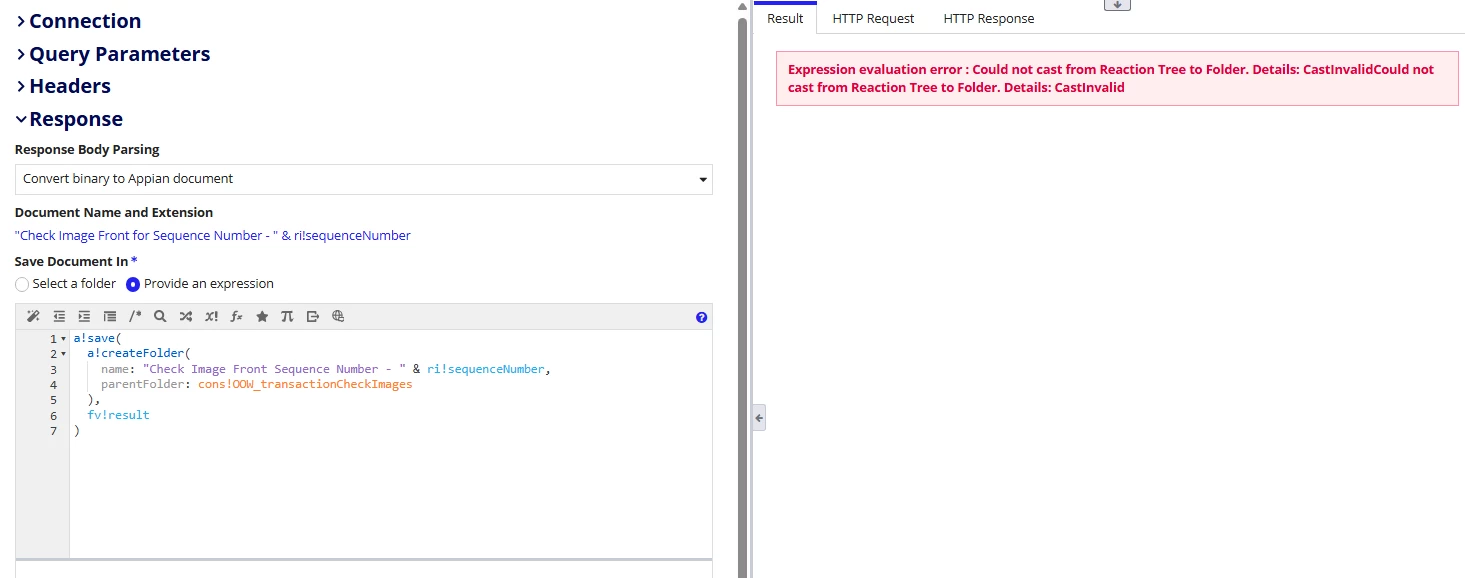
I'd appreciate any advice or thoughts. Would this be better fit for a PM, if so, what would be the recommended path of approaching this?

Thank you in advanced!

3 replies

stefanhelzle0001
August 25, 2025

You will have to create the folder beforehand, or store the file to a temporary folder and then move it later on.

May I ask why you want to create a folder for each file? Do you have any specific requirements in terms of security?

shubhama926776
August 25, 2025
Would this be better fit for a PM, if so, what would be the recommended path of approaching this?

Process Model is best - It provides proper transaction handling, built-in error recovery, and cleaner separation between folder creation and document writing using dedicated smart services.
In the process model, first use an integration object to store the document in a temporary folder. Then, use the "Create Folder" smart service to create the desired folder and the "Move Document" smart service to move the document from the temporary folder to the new folder.
Alternatively, if using Appian's document record type with your main record, you can leverage Appian's auto folder creation feature for greater flexibility and automation.

harshas2775
August 26, 2025

In the 'Save Document In' expression box the expression should return a folder object. Currently you are doing a!save() which returns a reaction tree instead of a folder. As a!createFolder() can be executed within saveInto or WebAPI only you should use a process model for your use case. a!createFolder() won't execute properly here. 
In the PM create a folder and then move your doc in it. For this integration use a temporary folder to store the document in.