April 18, 2024
Question

Unsupported policies issue while calling Web service.

  • April 18, 2024
  • 2 replies
  • 0 views

Hi All,

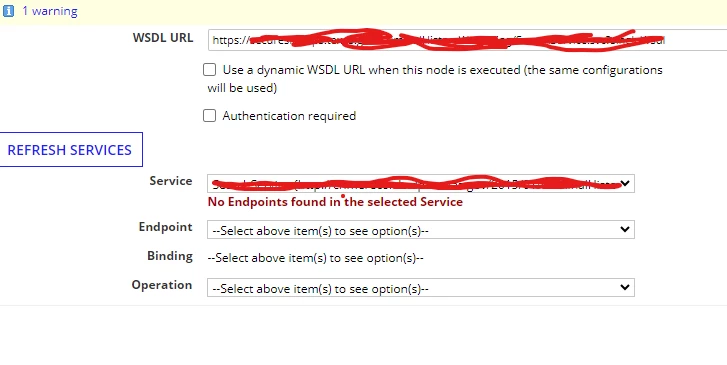
I'm trying to call a web service using the 'Call Web Service' smart service. However, when I paste the WSDL URL, I receive the following warning. As a result, I'm unable to select the Service and Endpoint options. Is there a solution to configure the webservice without modifying the WSDL structure?

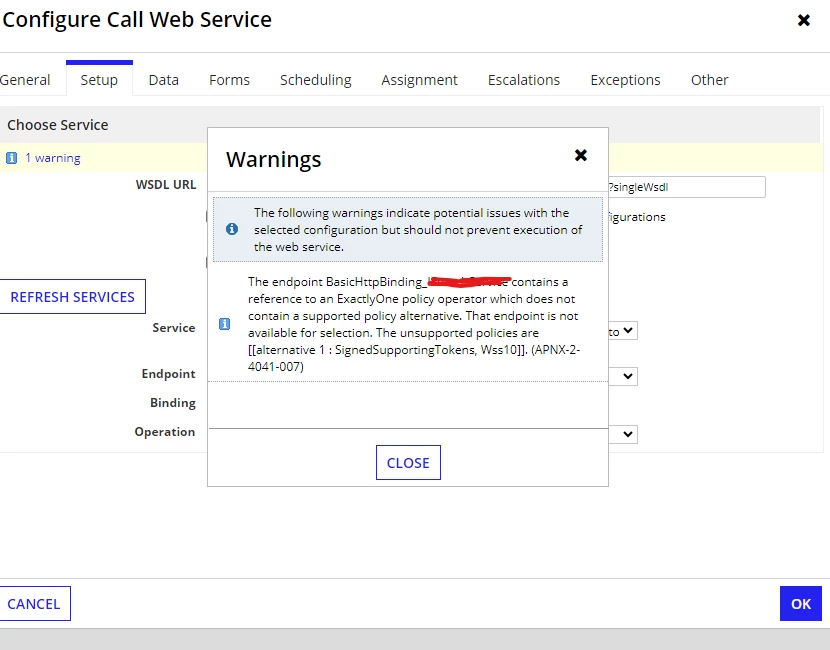
Warning: 'The endpoint BasicHttpBinding_AAA contains a reference to an ExactlyOne policy operator which does not contain a supported policy alternative. That endpoint is not available for selection. The unsupported policies are [[alternative 1 : SignedSupportingTokens, Wss10]]. (APNX-2-4041-007).'   
2 replies

karthikk538
April 19, 2024

Hi Sharat,

1. In the WDSL URL, do not enter the dynamic URL which gets generated in run time, you can use "use dynamic wsdl url" check box.

2. If you are connecting using a proxy server you have to enable settings in admin console.

3. Below page has list which are not supported.

See if below documentation helps, docs.appian.com/.../Call_Web_Service_Smart_Service.html

shubhama926776
April 19, 2024

Hello [mention:37a936c53217469e86396495d68d179f:e9ed411860ed4f2ba0265705b8793d05] 
You can ask server-side to disable security policies SignedSupportingTokens with the Wss10 standard.
SignedSupportingTokens authentication scheme is not supported


Still you can think of this option suggested by Appian.