jingp965361
June 3, 2025
Solved

Am I made a mistake that didn't build the [W#SA Rules & Constants] filder

  • June 3, 2025
  • 5 replies
  • 0 views

I am working on [Build an Application: Step-by-Step #5].

When I try to finish [Generate the Maintenance Summary View Interface] in page 17, the step 5 requests me to [Next to W#SA Rules & Constants folder, click the Edit icon. Replace this folder with the existing W#SA Interfaces.]

The problem is, I can only find W#AA Rules & Constants in my objects, so am I made a mistake that didn't build the [W#SA Rules & Constants] folder in the past exercise?

(Since this training is requested by my leader and time is limitted, I don't have enough time to confirm this issue. I must keep going.

Appreciate all of the support !)

Best answer by harshas2775

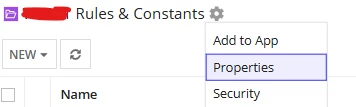
By the looks the issue seems with naming convention /app prefix. You created W#AA Rules & Constants while the exercise is saying to use W#SA Rules & Constants. In this case you can use the folder you have as its just a name and can be renamed to W#SA from folder properties. 

Next, you should have a folder W#SA Interfaces within the W#SA Rules & Constants folder. If not done in last step you can create it now as well and then follow along the instructions. https://docs.appian.com/suite/help/25.2/folder-object.html#creating-folders 

5 replies

shubhama926776
June 3, 2025

You most likely skipped creating W#SA Rules & Constants folder in a previous step.
Now, Create new folder manually give it exactly name as W#SA Rules & Constants.

jingp965361
June 3, 2025

Got it, thank you.

harshas2775
June 3, 2025

By the looks the issue seems with naming convention /app prefix. You created W#AA Rules & Constants while the exercise is saying to use W#SA Rules & Constants. In this case you can use the folder you have as its just a name and can be renamed to W#SA from folder properties. 

Next, you should have a folder W#SA Interfaces within the W#SA Rules & Constants folder. If not done in last step you can create it now as well and then follow along the instructions. https://docs.appian.com/suite/help/25.2/folder-object.html#creating-folders 

jingp965361
June 3, 2025

Thank you so much, I will try to create a new one. 

harshas2775
June 3, 2025

If it helped, please verify the response as/when you can! [emoticon:6d505171faa4497c85c5ca27290c555d]