jaideepb0002
March 3, 2023
Question

Appian IDP: Delete documents post work completion

  • March 3, 2023
  • 4 replies
  • 0 views

Hi, 

My company is moving towards Appian and we would like to use the power of Appian IDP. However there are many data that are confidential and are customer related and keeping it on Appian application or DB may violate our data protection or GDPR policies. We as Appian developers won't be able to promote IDP even though we have an Appian domain. People might see it as risk. So for me to sell IDP and its features I will also have to prove the post reconciliation data is being removed/deleted from Appian application or DB. I do not have the end to end knowledge of all the Appian IDP objects and process models. Please help me to know how I can ensure that once my data is processed if I have to delete the document and its related data - how do I do it ? Currently I see on the site
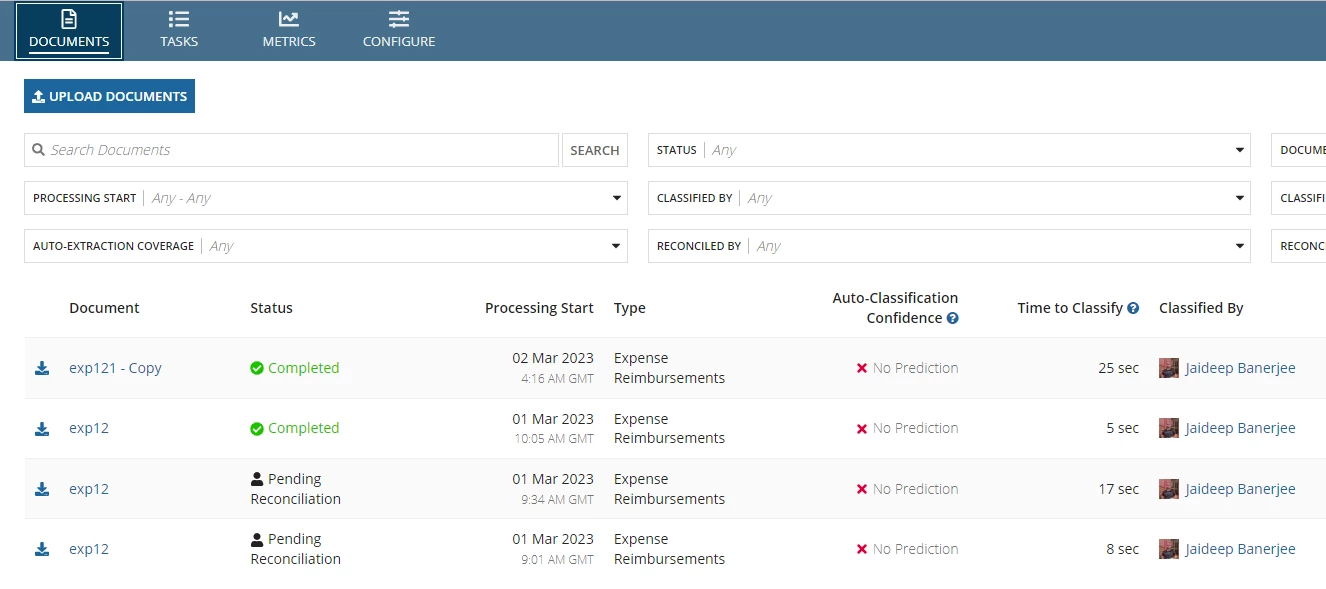
Is there a way user is given a choice to delete the document ?? 

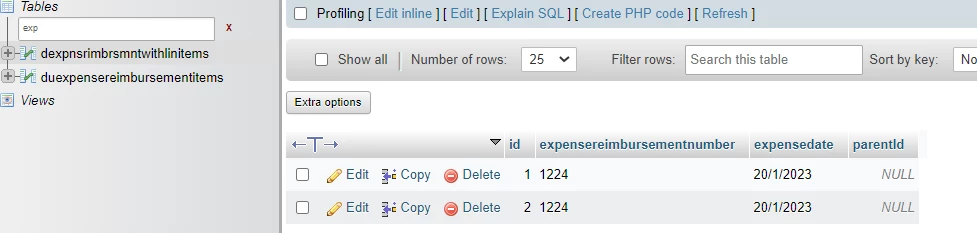
Tables: For now I am aware that dudocunderstanding and tables related to the newly created CDT like

contains the data.

Is it enough if I can trigger a process to delete data from these tables ? I could not find any IDP tutorial/document on community that talks about this ..

Please help me

thanks

jaideep


4 replies

jakubf0002
March 5, 2023

Appian uses server space to store location and as you noticed in table just reference to file as number. Once you process and reconcile document (which i assume is triggered by user and done on process mode) you can just add additional node in process model to delete document from server.

https://docs.appian.com/suite/help/22.3/Delete_Document_Smart_Service.html

Other option is to have small process scheduled on daily basic that will delete files from folder older than .... days. If you can say that files are processed within 2 days you can always delete older files.

Above all please remember that storing files uses server space so you may also reach to the point that you will use 100% space and then Appian Apps might not be available for you.

jaideepb0002
March 6, 2023

Absolutely Furman..good info. Infact, we can also create a DELETE button alongside the documents

(best option is - small process scheduled on daily basic that will delete files from folder older than .... days) 

but even before I start creating the delete logic I need to ensure that I know the right tables the data should be deleted from.. Are these 3 tables enough ? will you know ?

1. dudocunderstanding

2. and 3. Tables created from my 2 personalised CDTs (as in my earlier post)

and 

I am asking this because I really have no deep understanding of all the tables, process models, etc. (as of now) within IDP. Not sure if I may miss some tables that I haven't seen so far and has some kind of parent-child relationship.

***********

Secondly - will be great if someone from Appian team can pick this up for answering - If there are chances of users/companies reaching 100% limit that Appian is providing for storing files shouldn't a delete workflow for these uploaded documents be created as default ?   (especially for IDP where you can expect tons of documents getting uploaded and processed everyday)

thanks

jaideep 

jakubf0002
March 6, 2023

When you upload file to Appian you do have to point the folder (folder in Appian under your app KC) in which files should be stored. Once file is uploaded in Appian process you just have document it which you can use for further reference and that document id you store in table that you/your team defined. Keeping document ids for a long time in table will not do you a harm - just delete files from Appian folder where you uploaded them (that is why it is recommended to have separate folder for such files).

Read this (especially managing document section):

https://docs.appian.com/suite/help/22.4/folder-and-document-management.html