
Question
Appian Step-by-Step #4 page 13 - testing add vehicle form interface
Hello,
I am following step by step 4. On page 13, testing the add vehicle form with the data in the tutorial image, I have seen that:
- The first time I click submit the form, the value of "lastUpdated" is updated, but "nextServiceDate" is not updated.
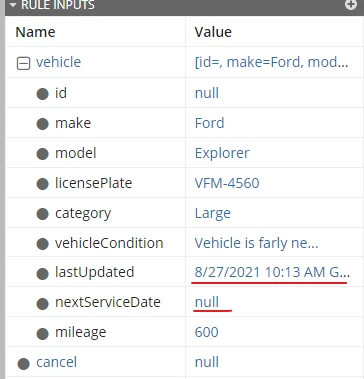
- If I submit the form again, the value of "nextServiceDate" is updated.
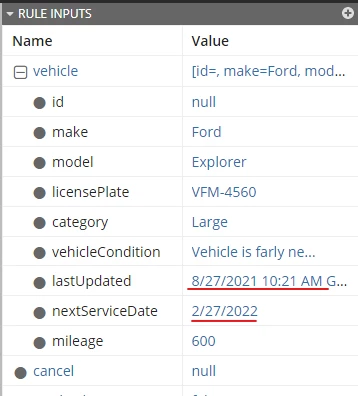
Is this behaviour correct or should both fields be updated when I click submit the first time?
The "Submit" button configuration I have is:
      a!buttonWidget(
        label: "Submit",
        value: if(
          isnull(ri!vehicle.lastUpdated),
          "",
          rule!VFM_CalculateNextServiceDate(
            vehicleType: ri!vehicle.category,
            dateUpdated: ri!vehicle.lastUpdated
          )
        ),
        saveInto: {
          ri!vehicle.nextServiceDate,
          a!save(ri!vehicle.lastUpdated,now())
        },
        submit: true,
        style: "PRIMARY"
      )
Thanks for your help.
Best regards.