
March 21, 2025
Question

Cucumber with Appian JAR Methods Causing Page Load Issues in Jenkins

  • March 21, 2025
  • 2 replies
  • 0 views

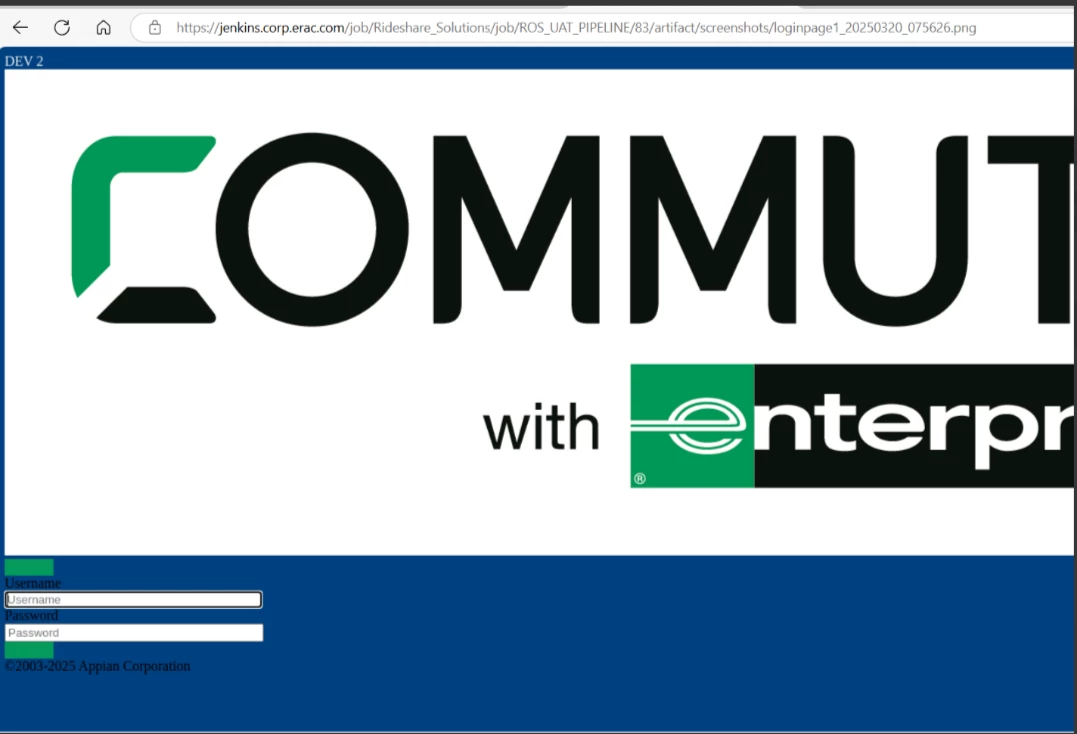
Scripts work fine in headless mode when I run them locally. But in Jenkins, the login page doesn't load fully, and the 'Sign In' button is missing so it throws an error when i use Appian 24.3 jar methods but the scripts running fine with page xpaths.. Can someone please help me fix this?
    2 replies

    March 22, 2025

    Hi [mention:17bec58c97f5462c990f414c7048862a:e9ed411860ed4f2ba0265705b8793d05] ,

    I'm not sure if that would be the exact reason behind this but I would like to suggest that can you try the following:

        Run the test in non-headless mode on Jenkins.
        Use driver.getPageSource() in Jenkins to check if the full HTML is being loaded.
        Try Appian JAR methods with debug logs enabled.
        Check Jenkins environment logs for any rendering errors.
        The Appian JAR might be trying to interact before the elements are fully loaded. Use explicit waits before interacting with the "Sign In" button.

    March 22, 2025

    When running Cucumber tests with Appian JAR methods in a Jenkins pipeline, users may encounter page load issues that affect test execution. This can be due to improper synchronization codice fiscale online between test steps and the Appian application’s dynamic content rendering.