
June 19, 2021
Solved

Does Deleting An Application Delete Physical Tables?

  • June 19, 2021
  • 8 replies
  • 0 views

Greetings All,

I manually created three tables using the Cloud Database tool.  I specified the primary key, foreign keys and populated the tables with data.

I then created an application.  I created Data Types, Data Stores and Records.  I then created an grid interfaces and I was able to see my data.

After some thoughts about how I named the application and if I should have select 'From Scratch', I DELETED the application.

I then created a new application and started to create a Data Type (or is it Custom Data Type) to connect to the existing physical tables I previously used.

I then discovered that my tables (along with the data) are now gone.

I am guessing I did something wrong.  If I had five applications using the same tables, it would seem counterproductive to have all of the physical tables being deleted because I deleted one application that refers to them.

Thanks for any help and advice!!

Best, Paul
    Best answer by paulp0005

    Thank you, Peter Lewis!!

    Your suggestions led me on a rather odd journey through the 'old' application objects and confirmed that my data was still there.

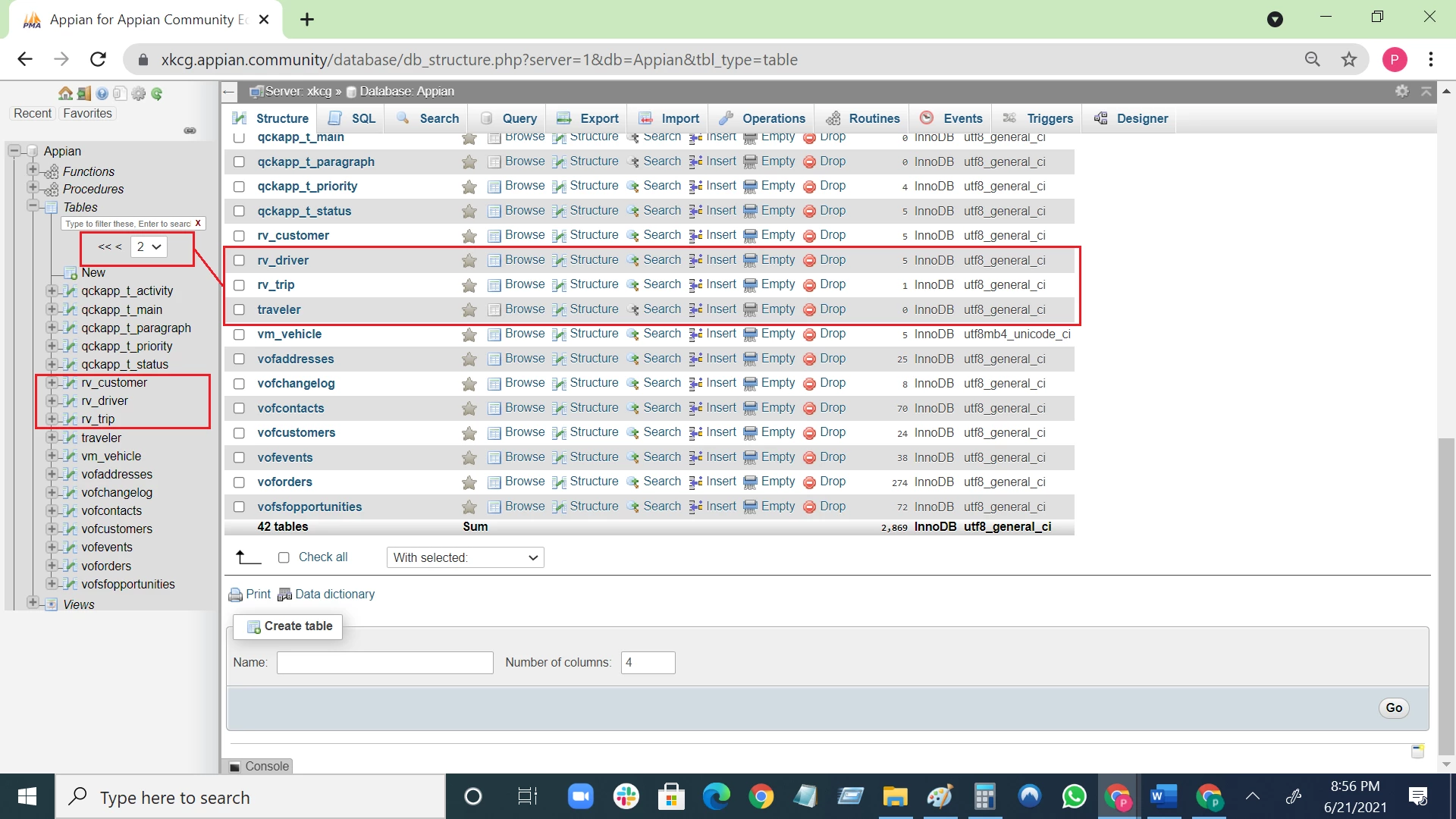
    Further, it led me to the embarrassing conclusion that I merely had to click to the next page to find my tables.

    Previously, my tables were on the 1st page.  Then I created a new application which pushed my tables to the second page.  I think I am so used to using Windows tools for managing tables that I never really saw the 'page forward feature'.

    I apologize for wasting your time and that of Stefan and selvakumark.

    And thank you for your help!!

    Paul

    8 replies

    stefanhelzle0001
    Brainy
    June 19, 2021

    In my experience, Appian is only doing non-destructive changes to DB.

    paulp0005Author
    June 19, 2021

    Thanks Stefan. 

    I am asking where did my tables go?  The fact that Appian deleted them is okay as long we as know that is what happens.  There was no warning that your tables will be deleted.

    Paul

    selvakumark
    Participating Frequently
    June 20, 2021

    Hi [mention:40cb30cb91a24b8e99a5202c5d6ada4c:e9ed411860ed4f2ba0265705b8793d05],

    As far as I know, Appian never touches the objects inside the application neither any database-related objects, if we delete the application. Could you please explain the exact steps that you followed?

    paulp0005Author
    June 20, 2021

    Thanks for asking selvakumark.  I would have taken screenshots if I thought my tables might go away.  I think, really, I just deleted the application that had CDT connected to the tables.

    Frankly, I am trying to rethink the whole 'my tables' thing.  It seems like the possibly better way to go is to just have Appian manage your tables so you know who updated what and when (which my tables did not take into consideration).  Still trying to wrap my brain around this new paradigm.

    stefanhelzle0001
    Brainy
    June 20, 2021

    I try to leave schema management to Appian as much as possible. Extra stuff like views, triggers, stored procedures are separate and must be managed by you.

    When creating views, keep in mind that Appian will try to create a table for them at deployment time. Add a "drop table" statement ahead of the "create view" in your DDL scripts.

    If you are used to do a lot of DB stuff, then this feels odd at first.