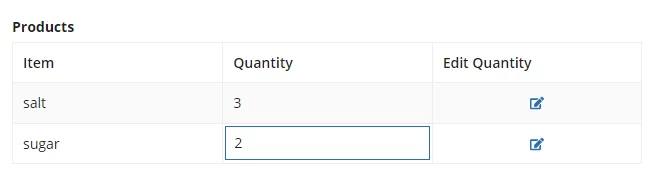
Using this code, if I click the "Edit" link for row 2, it makes row 1 editable, which I believe is not the intended behavior.
My suggestion, using the same code approach, would be to assemble an initial array of readOnly booleans matching the length of local!items (this will follow any other data configuration such as if it's passed-in from a rule input or queried). Then for the "edit" button we will want to use a!update() instead of insert(), to update that position of the array.
a!localVariables(
  local!items: {
    { item: "salt", qty: 1 },
    { item: "sugar", qty: 2 }
  },
  local!readOnly: a!forEach(local!items, true()),

  a!gridLayout(
    label: "Products",
    headerCells: {
      a!gridLayoutHeaderCell(label: "Item"),
      a!gridLayoutHeaderCell(label: "Quantity"),
      a!gridLayoutHeaderCell(label: "Edit Quantity")
    },
    rows: a!forEach(
      items: local!items,
      expression: a!gridRowLayout(
        contents: {
          a!textField(
            value: fv!item.item,
            saveInto: { fv!item.item },
            readOnly: true(),

          ),
          a!textField(
            value: fv!item.qty,
            saveInto: { fv!item.qty },
            readOnly: if(
              isnull(local!readOnly),
              true,
              index(local!readOnly, fv!index, true())
            ),

          ),
          a!richTextDisplayField(
            value: a!richTextIcon(
              icon: "edit",
              caption: "Edit",
              link: a!dynamicLink(
                value: false(),
                saveInto: {
                  a!save(
                    local!readOnly,
                    a!update(local!readOnly, fv!index, false())
                  )
                }
              )
            ),
            align: "CENTER"
          )
        }
      )
    )
  )
)
Secondarily, I recommend for this sort of approach, to just use a row-specific local variable, as this is much less confusing in code, allows simpler operation, and is easier to test / troubleshoot / update in the future. Here inside the a!forEach() statement defining individual rows, we simply wrap the a!gridRowLayout() statement in a new a!localVariables() and add a variable that will be scoped to just that row, i.e. "local!isReadOnly" in the below code. This can then be saved into directly and independently by in-row controls without needing to keep track of a global array etc.
a!localVariables(
  local!items: {
    { item: "salt", qty: 1 },
    { item: "sugar", qty: 2 }
  },
  /*local!readOnly: a!forEach(local!items, true()),*/

  a!gridLayout(
    label: "Products",
    headerCells: {
      a!gridLayoutHeaderCell(label: "Item"),
      a!gridLayoutHeaderCell(label: "Quantity"),
      a!gridLayoutHeaderCell(label: "Edit Quantity")
    },
    rows: a!forEach(
      items: local!items,
      expression: a!localVariables(
        local!isReadOnly: true(),
        a!gridRowLayout(
          contents: {
            a!textField(
              value: fv!item.item,
              saveInto: { fv!item.item },
              readOnly: true()
            ),
            a!textField(
              value: fv!item.qty,
              saveInto: { fv!item.qty },
              readOnly: local!isReadOnly

            ),
            a!richTextDisplayField(
              value: a!richTextIcon(
                icon: "edit",
                caption: "Edit",
                link: a!dynamicLink(
                  value: false(),
                  saveInto: {
                    a!save(
                      local!isReadOnly,
                      not(local!isReadOnly)
                    )
                  }
                ),
                linkStyle: "STANDALONE"
              ),
              align: "CENTER"
            )
          }
        )
      )
    )
  )
)