

Question
Enabled and disabled in editable grid
Hi All,
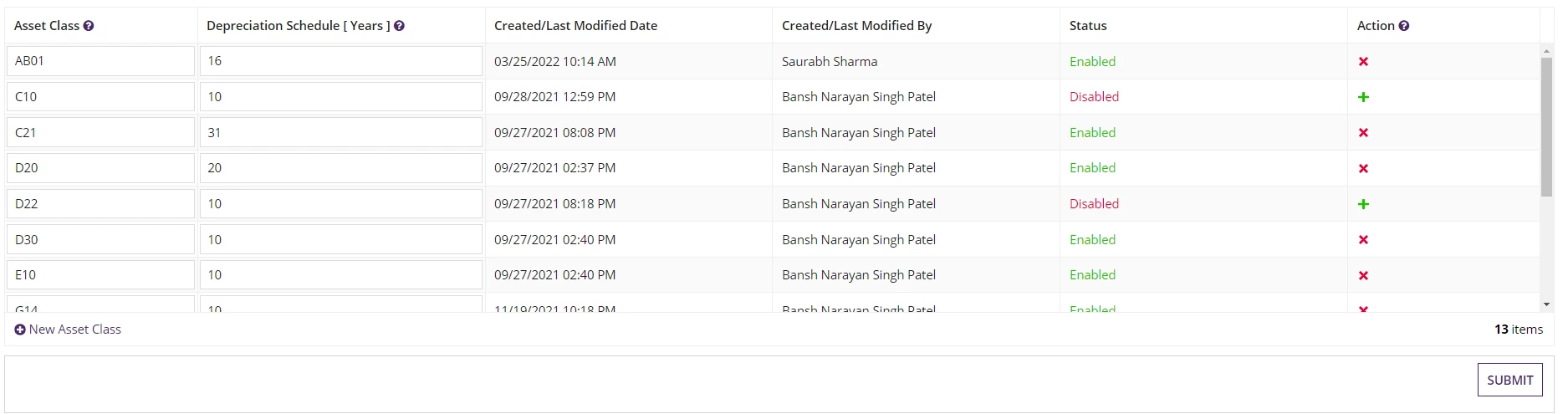
Below is the screenshot of requirement
You can see the item status is disabled against + icon and Enabled against cross icon
If we click on + icon, status will be changed to enabled and icon will be changed to - automatically.
a!localVariables(
  local!Employeefilterdata:"Employee_Id",

  /*local!Employeefilterdata: rule!ETA_filterEmployeesData(),*/
  local!Employeedata: rule!ETA_employeeData(local!Employeefilterdata),
  local!deletedEmployeeIds,


  /* Create Pagination */
  local!startIndex: 1,
  local!batchSize: 5,
  local!pagingInfo: a!pagingInfo(

    startIndex: local!startIndex,
    batchSize: local!batchSize
  ),
  local!datasubset: todatasubset(
    arrayToPage: local!Employeedata,
    pagingConfiguration: local!pagingInfo
  ),


a!formLayout(
  label: " Employee Data",
  instructions: "Add, Update and Remove Employee Data",
  contents: {
    a!imageField(
      label: "",
      labelPosition: "ABOVE",
      images: {a!documentImage(cons!ETA_HRA)},
      size: "FIT",
      isThumbnail: false,
      style: "STANDARD",

      marginAbove: "EVEN_LESS"
    ),
    a!dropdownField(
      label: "Selection",
      labelPosition: "ABOVE",
      placeholder: "--- Select a Value ---",
      choiceLabels: {cons!ETA_EMPLOYEE_CDT_DSE_POINTER},
      choiceValues: {cons!ETA_EMPLOYEE_CDT_DSE_POINTER},
      value: local!Employeefilterdata,
      saveInto: {local!Employeefilterdata},
      searchDisplay: "AUTO",
      validations: {}
    ),
      a!gridLayout(
        totalCount: local!datasubset.totalCount,
        headerCells: {
          /*a!gridLayoutHeaderCell(label: "Employee Id" ),*/

          a!gridLayoutHeaderCell(label: "Employee Name" ),

          a!gridLayoutHeaderCell(label: "DOB" ),
          a!gridLayoutHeaderCell(label: "Department" ),
          a!gridLayoutHeaderCell(label: "Designation" ),
          /*a!gridLayoutHeaderCell(label: "Phone Number" ),*/
          a!gridLayoutHeaderCell(label: "Date Of Joining" ),
          a!gridLayoutHeaderCell(label: "Gender" ),
          a!gridLayoutHeaderCell(label: "Email Address" ),
          a!gridLayoutHeaderCell(label: "Status"),
          /*a!gridLayoutHeaderCell(label: "Start Date", align: "RIGHT" ),*/
          /* For the "Remove" column */
          a!gridLayoutHeaderCell(label: " " )
        },
        /* Only needed when some columns need to be narrow */
        columnConfigs: {
          a!gridLayoutColumnConfig(width: "DISTRIBUTE", weight:3 ),
          a!gridLayoutColumnConfig(width: "DISTRIBUTE", weight:3 ),
          a!gridLayoutColumnConfig(width: "DISTRIBUTE", weight:3 ),
          a!gridLayoutColumnConfig(width: "DISTRIBUTE", weight:3 ),
          a!gridLayoutColumnConfig(width: "DISTRIBUTE", weight:3 ),
          a!gridLayoutColumnConfig(width: "DISTRIBUTE", weight:2 ),
          a!gridLayoutColumnConfig(width: "DISTRIBUTE", weight: 4),
          a!gridLayoutColumnConfig(width: "DISTRIBUTE", weight: 3)
        },
        /*
        * a!forEach() will take local!employee data and used that data to loop through an
        * expression that creates each row.
        *
        * When modifying the recipe to work with your data, you only need to change:
        * 1.) the number of fields in each row
        * 2.) the types of fields for each column (i.e. a!textField() for text data elements)
        * 3.) the fv!item elements. For example fv!item.firstName would change to fv!item.yourdata
        */
        rows: a!forEach(
          items: local!datasubset,
          expression: a!gridRowLayout(
            id: fv!index,
            contents: {

              /*a!textField(*/
                /* Labels are not visible in grid cells but are necessary to meet accessibility requirements */
                /*label: "Employee Id " & fv!index,*/
                /*value: fv!item.Employee_Id,*/
                /*saveInto: fv!item.Employee_Id,*/
                /*required: true*/
              /*),*/


              /* For the Employee Name Column*/
              a!textField(
                /* Labels are not visible in grid cells but are necessary to meet accessibility requirements */
                label: "Employee Name " & fv!index,
                value: fv!item.Employee_Name,
                saveInto: {fv!item.Employee_Name,
                a!save(local!Employeedata[fv!identifier],
                updatedictionary(local!Employeedata[fv!identifier],
                {Employee_Name: save!value}
                ))
                },
                required: true
                ),


              /* For the DOB Column*/
              a!dateField(
                label: "DOB " & fv!index,
                value: fv!item.DOB,
                saveInto: {fv!item.DOB,
                a!save(local!Employeedata[fv!identifier],
                updatedictionary(local!Employeedata[fv!identifier],
                {DOB: save!value}
                ))
                },
                required:true
              ),

              /* For the Department Column*/
              a!dropdownField(
                label: "Department " & fv!index,
                placeholder: "-- Select -- ",
                choiceLabels: {"Desktop Support", "Helpdesk","Systems Engineering","Network Engineering","Application Management"},
                choiceValues: {"Desktop Support", "Helpdesk","Systems Engineering","Network Engineering","Application Management"},

                value: fv!item.Department,
                saveInto: {fv!item.Department,
                a!save(local!Employeedata[fv!identifier],
                updatedictionary(local!Employeedata[fv!identifier],
                {Department: save!value}
                ))
                },
                required:true
              ),
              /* For the Designation Column*/
              a!dropdownField(
                label: "Designation " & fv!index,
                placeholder: "-- Select -- ",
                ChoiceLabels: {"Cloud Computing Engineer", "Network Specialist", "Support Specialist", "Database Administrator",
                "Information Technology Analyst", "Technology Leadership", "Security Specialist", "Software/Application Developer"},

                choiceValues: {"Cloud Computing Engineer", "Network Specialist", "Support Specialist", "Database Administrator",
                "Information Technology Analyst", "Technology Leadership", "Security Specialist", "Software/Application Developer"},

                value: fv!item.Designation,
                saveInto: {fv!item.Designation,
                a!save(local!Employeedata[fv!identifier],
                updatedictionary(local!Employeedata[fv!identifier],
                {Designation: save!value}
                ))
                },
                required:true
              ),

              /* For the Phone Number Column*/
              /*a!textField(*/
                /*label: "Phone Number " & fv!index,*/
                /*placeholder:"555-456-7890",*/
                /*value: fv!item.Phone_Number,*/
                /*saveInto: fv!item.Phone_Number*/
              /*),*/


              a!dateField(
                label: "Date Of Joining " & fv!index,
                value: fv!item.Date_Of_Joining,
                saveInto: {fv!item.Date_Of_Joining,
                a!save(local!Employeedata[fv!identifier],
                updatedictionary(local!Employeedata[fv!identifier],
                {Date_Of_Joining: save!value}
                ))
                },
                required:true,
                align: "RIGHT"
              ),
              /* For the Gender Column*/
              a!dropdownField(
                label: "Gender " & fv!index,
                placeholder: "-- Select -- ",
                choiceLabels: {"Male","Female"},
                choiceValues: {"Male","Female"},

                value: fv!item.Gender,
                saveInto: {fv!item.Gender,
                a!save(local!Employeedata[fv!identifier],
                updatedictionary(local!Employeedata[fv!identifier],
                {Gender: save!value}
                ))
                },
                required:true
              ),
              /* For the Email Address Column*/

              a!textField(
                label: "Email Address" & fv!index,
                value: fv!item.Email_Address,
                saveInto: {fv!item.Email_Address,
                a!save(local!Employeedata[fv!identifier],
                updatedictionary(local!Employeedata[fv!identifier],
                {Email_Address: save!value}
                ))
                },
                required:true
              ),
              a!textField(
                label: "Status" &fv!index,
                value: cons!ETA_Status,
                saveInto:{cons!ETA_Status,
                a!save(local!Employeedata[fv!identifier],
                updatedictionary(local!Employeedata[fv!identifier],
                {Email_Address: save!value}
                ))
                },
                required:true
              ),

              /* For the Removal Column*/
              a!richTextDisplayField(
                label: "Action",
                value: a!richTextIcon(
                  icon: "close",
                  /*color: "STANDARD",*/

                  altText: "delete " & fv!index,
                  caption: "Remove" & fv!item.Employee_Name,
                  link: a!dynamicLink(
                    value: fv!identifier,
                    saveInto: { if(
                      isnull( fv!identifier),
                      {},
                      a!save( local!deletedEmployeeIds, append(local!deletedEmployeeIds, fv!item.Employee_Id))
                    ),
                    a!save(ri!Value2, true),
                    a!save(ri!EmployeeId, local!deletedEmployeeIds),
                      a!save(local!Employeedata, remove(local!Employeedata, save!value)),

                        disabled: contains(local!Employeedata, fv!index)


                    }


                  ),
                  linkStyle: "STANDALONE",
                  color: "NEGATIVE"
                )
              )
            }
          )
        ),
        addRowlink: a!dynamicLink(
          label: "Add Employee",

          value: 'type!{urn:com:appian:types:ETA}ETA_EmployeeDt'(),
          saveInto: {
            a!save(local!Employeedata, append(local!Employeedata, save!value))
          }
        ),
        shadeAlternateRows: true,
        rowHeader: 1

      ),
      /* Pagination Functionality */
      rule!ETA_customPagingForGrid(
        startIndex: local!startIndex,
        batchSize: local!batchSize,
        totalCount: local!datasubset.totalCount
      )
    },
    buttons: a!buttonLayout(
      primaryButtons: a!buttonWidget(
        label: "Submit",
        saveInto: a!save(ri!Item,local!Employeedata),
        submit: true,
        style: "PRIMARY"
      ),

      secondaryButtons: {
        a!buttonWidget(
          label: "Cancel",
          value: true,
          saveInto: {ri!Cancel},
          submit: true,
          style: "NORMAL",
          validate: false
        )
      }
    )
  )
  )