
February 24, 2023
Question

Excel to CSV

  • February 24, 2023
  • 3 replies
  • 0 views

Hi!

I have a process model which creates a XLSX file, which I want to convert 1:1 to CSV. But I have 2 problems:

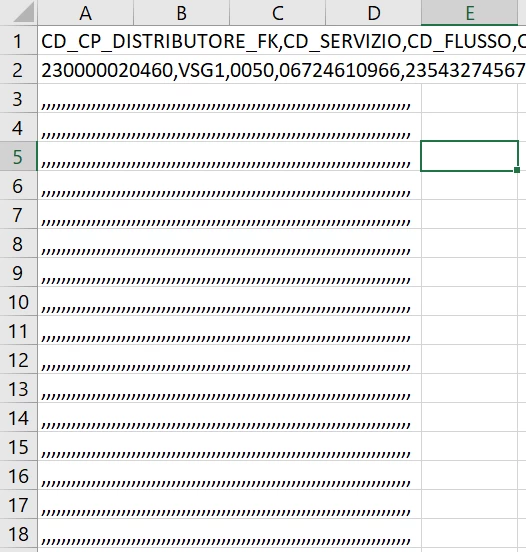
1. The columns don't get separated and are written to the same column, where attributes are separated by commas.

2. For some reason even having only one row in excel, it continues to read until row 95, so I get 95 rows full of commas.

Screen:
3 replies

abhayd3663
February 24, 2023

Open the CSV file in text editor like notepad++ etc. and it will look fine. To break comma separated values into excel, follow Data-> Text To Column -> Delimiter -> Comma.

February 25, 2023

Since the baby wanted to become someone who earns a lot. Well, of course, and who didn’t dream about this) I entered a prestigious university, and then I ran into a problem. I just couldn't do my homework. A service came to the rescue that helped just the same in doing homework accounting answer. While I was being helped to do more complex tasks, I paid attention to simpler things.