
swapnar6405
March 16, 2023
Solved

Exporting the data into excel with a date range.

  • March 16, 2023
  • 6 replies
  • 0 views

Hi,

I have a data in an an entity. I would like to pass two different dates and fetch the data between those dates and at the same time I would like to export to excel.

Can someone advise how can I can achieve this.

I found "Export Data Store Entity to Excel", but not sure whether this service will support date ranges to get the data from Data Store Entity.

Thanks.
Best answer by sanchitg0002

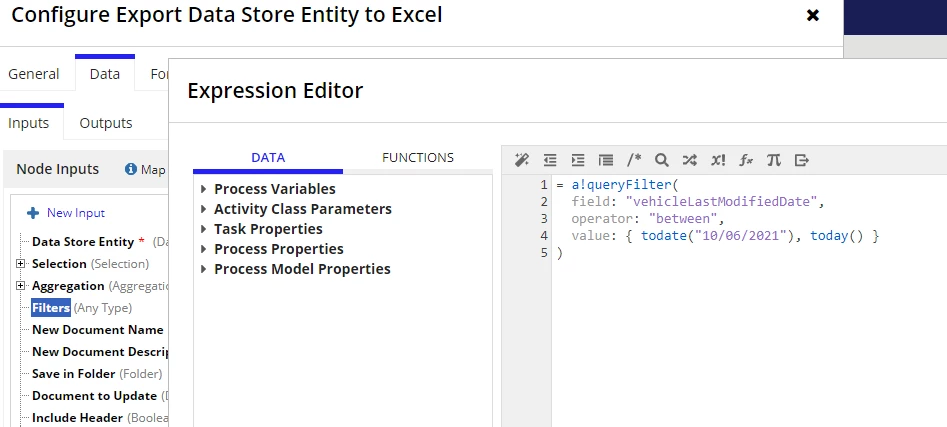
I tried implementing it in a process and it gave me error: "Filters field must be of type QueryFilter or LogicalExpression (APNX-1-4505-019)" even though I was passing correct filter 

I tried making some changes here and there and it seems like it do not accept dates from todate() and some other built-in functions, but when I passed the dates using constants it worked fine. So I would suggest making a constant for your "From" and "To" dates and use them in value parameter.

6 replies

March 16, 2023

You can go with the Export DSE to Excel smart service, it works perfectly fine with your use case I have tried it personally, you just need to add between date range a!queryFilter just as you do in any a!queryentity().

Below is the sample code for it


a!localVariables(
  local!exportDocId,
  local!errorMessage,
  {
    if(
      isnull(local!exportDocId),
      /*This link field contains the link that starts the export*/
      a!linkField(
        labelPosition: "COLLAPSED",
        links: a!dynamicLink(
          label: "Export to Excel File",
          saveInto: {
            a!exportDataStoreEntityToExcel(
              entity: cons!AA_VEHICLES_DSE_POINTER,
              documentName: "Excel Export " & now(),
              saveInFolder: cons!PA_FOLDER_ARTIFACTS,
              filters: a!queryFilter(
                field: "vehicleLastModifiedDate",
                operator: "between",
                value: { todate("10/06/2021"), today() }
              ),
              onSuccess: a!save(local!exportDocId, fv!newDocument),
              /*This displays an error if there is an issue executing the save*/
              onError: a!save(
                local!errorMessage,
                "Error Exporting File to Excel"
              )
            )
          }
        )
      ),
      {}
    ),
    if(
      /*This only displays the download link if a valid document was created*/
      not(isnull(local!exportDocId)),
      /*This changes the link to a download link for the newly created document */
      a!linkField(
        links: a!documentDownloadLink(
          label: "Download Excel File",
          document: local!exportDocId
        )
      ),
      a!textField(value: local!errorMessage, readOnly: true)
    )
  }
)

swapnar6405
March 16, 2023

Thank you so much for your reply.

I don't  have any interface to implement this. I have implement this functionality in a process model.

Please advise if we can implement the same in Process model

March 16, 2023

I tried implementing it in a process and it gave me error: "Filters field must be of type QueryFilter or LogicalExpression (APNX-1-4505-019)" even though I was passing correct filter 

I tried making some changes here and there and it seems like it do not accept dates from todate() and some other built-in functions, but when I passed the dates using constants it worked fine. So I would suggest making a constant for your "From" and "To" dates and use them in value parameter.