
August 24, 2024
Solved

Expression Evaluation Error

  • August 24, 2024
  • 6 replies
  • 0 views

I am working on the AcmeAuto app and got the following error: 

Expression evaluation error: Syntax error. Details: Expression evaluation error : Invalid character found in expression: “ (8220).

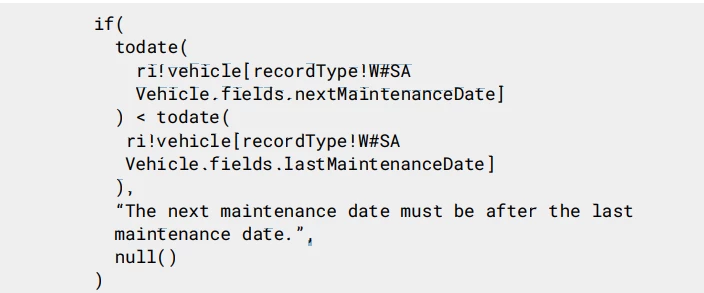
I copied the code provided on the guide but perhaps I did something wrong? 

code provided:
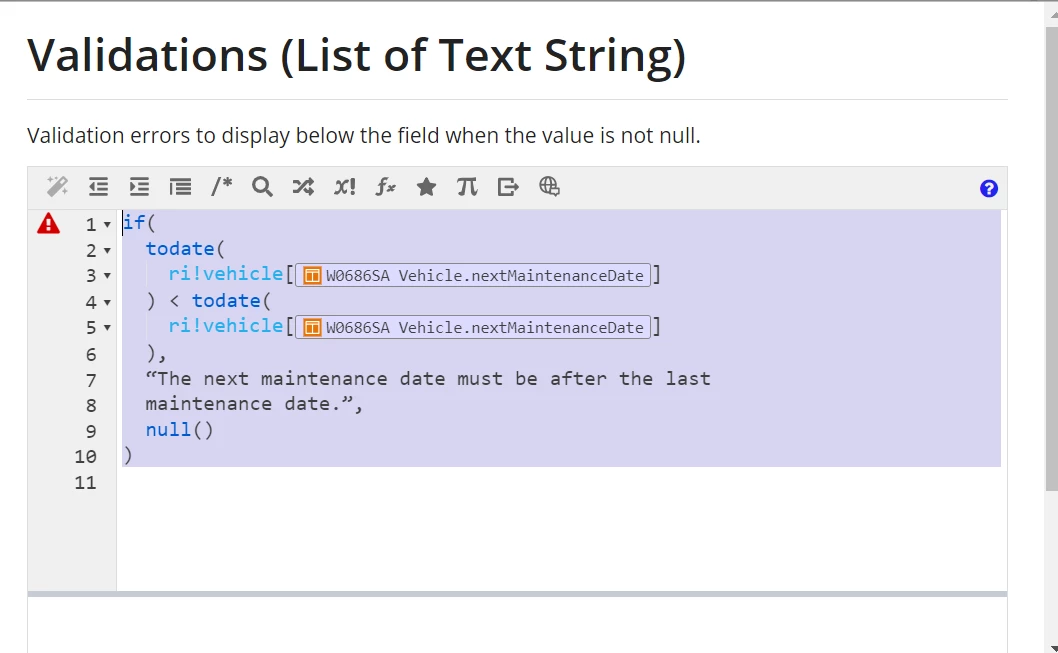
this is what I changed:
Any help appreciated.

Best answer by stefanhelzle0001

Use normal double quotes in line 7 and 8.

6 replies

stefanhelzle0001
August 24, 2024

Use normal double quotes in line 7 and 8.

August 24, 2024

Great, that fixed it. Thank you!

konduruc733182
August 24, 2024

[mention:2bf3bdac9cc348f2890d0e566e1b89e9:e9ed411860ed4f2ba0265705b8793d05]  Please verify Stefan's answer and close this thread as resolved. 

mariob6427
August 24, 2024

gdavila, In your code you are comparing the same field nextMaintenanceDate. One is last, the other next.

August 24, 2024

Thank you MarioB, noticed that when fixing the original mistake so it is no longer an issue.