
June 7, 2021
Solved

Expression Rule call within editable grid cell is not refreshing after saving data in DB

  • June 7, 2021
  • 11 replies
  • 0 views

Hi,

I have a editable grid where in one field has single select dropdown (i.e Status),
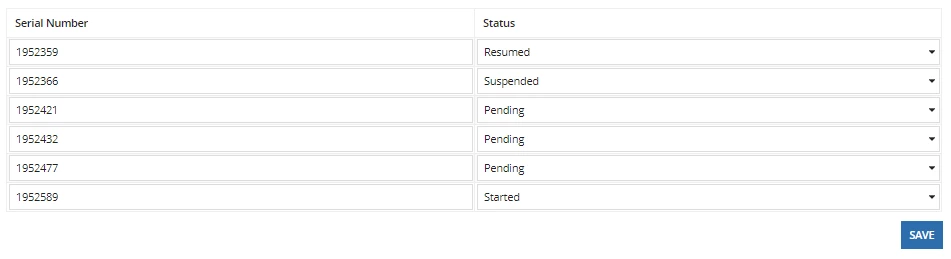

a!localVariables(
  local!data: rule!Data_Rule(
    serialNumber: null,
    pageBatchSize: -1
  ),
  local!statusToUpdate,
  {
    a!gridLayout(
      label: "Editable Grid",
      labelPosition: "COLLAPSED",
      headerCells: {
        a!gridLayoutHeaderCell(label: "Serial Number"),
        a!gridLayoutHeaderCell(label: "Status")
      },
      columnConfigs: {},
      rows: {
        a!forEach(
          items: local!data,
          expression: {
            a!gridRowLayout(
              contents: {
                a!textField(
                  label: "Serial Number",
                  value: fv!item.serialNumber
                ),
                a!dropdownField(
                  label: "Status",
                  labelPosition: "ABOVE",
                  choiceLabels: rule!RWM_Status_Matrix_Rule(currentStatus:fv!item.currentStatus),
                  choiceValues: rule!RWM_Status_Matrix_Rule(currentStatus:fv!item.currentStatus),
                  value:if(not(isnull(local!statusToUpdate)),local!statusToUpdate,fv!item.currentStatus),
                  saveInto: {
                    a!save(local!statusToUpdate,save!value),
                    a!save(ri!dataList, save!value)
                  },
                  searchDisplay: "ON",
                  required:true,
                  validations: {
                    
                  }
                )                
              }
            )
          }
        )
      },
      selectionSaveInto: {},
      validations: {},
      shadeAlternateRows: true
    ),
    a!buttonArrayLayout(
      buttons: {
        a!buttonWidget(
          label: "Save",
          style: "PRIMARY",
          saveInto: {
            /*Code to write updated value in DB*/
          }
        )
      },
      align: "END"
    )
  }
)

and the value in the dropdown is populated from a expression rule file (below) which has different value for every status selected.

a!localVariables(
  local!pendingStatusMatrix:{"Pending","Started","Cancelled"},
  local!startedStatusMatrix:{"Started","Suspended","Completed"},
  local!suspendedStatusMatrix:{"Suspended","Resumed","Completed"},
  local!resumedStatusMatrix:{"Resumed","Suspended","Completed"},
  local!completeStatusMatrix:{"Completed"},
  local!cancelledStatusMatrix:{"Cancelled"},
  
  {
    if(ri!currentStatus="Pending",local!pendingStatusMatrix,{}),
    if(ri!currentStatus="Started",local!startedStatusMatrix,{}),
    if(ri!currentStatus="Suspended",local!suspendedStatusMatrix,{}),
    if(ri!currentStatus="Resumed",local!resumedStatusMatrix,{}),
    if(ri!currentStatus="Completed",local!completeStatusMatrix,{}),
    if(ri!currentStatus="Cancelled",local!cancelledStatusMatrix,{})
  }
)

There is a button (SAVE) outside of editable grid which is pressed whenever any status is changed to update it in DB.

Now, what I am trying to achieve is whenever I press on SAVE button the value should be updated in DB (its working fine for me) and single select dropdown (i.e Status) should be updated with new value options based in current status selection.

Please hep me with it.

 

Best answer by mikes0011

Oh - I don't think you mentioned you're using a!startProcess as opposed to a!writeToDataStoreEntity.  This is fine, though.  Can you check to ensure you have activity chaining enabled in the process model from the start node and all the way through to your WTDS node at least?  This is usually the solution to this sort of issue.  If chaining breaks early (or doesn't exist) the "onSuccess" save(s) will happen too early (or immediately).

11 replies

danny.verb
June 7, 2021

Since local!data is populating your grid, you should refresh local!data when you click save. I recommending calling rule!Data_Rule() in the onSuccess parameter of a!writeToDataStoreEntity. If you are writing to the database using a!startProcess() you can do the same thing however you first need to make sure in your process model that you chain the process through the write to DB node.

June 8, 2021

This does not seem to work, status dropdown is not refreshing.

mikes0011
Brainy
June 7, 2021

You'll need to make more extensive use of the neat new capabilities available in the new a!localVariables() toolset, specifically a!refreshVariable settings.  The following represents my normal technique for doing this sort of thing:

a!localVariables(
  local!refreshCounter: 0,
  local!data: a!refreshVariable(
    value: rule!Data_Rule(
      serialNumber: null,
      pageBatchSize: -1
    ),
    refreshOnVarChange: {
      local!refreshCounter
    }
  ),
  local!statusToUpdate,
  
  {
    a!gridLayout(
      label: "Editable Grid",
      labelPosition: "COLLAPSED",
      headerCells: {
        a!gridLayoutHeaderCell(label: "Serial Number"),
        a!gridLayoutHeaderCell(label: "Status")
      },
      columnConfigs: {},
      rows: {
        a!forEach(
          items: local!data,
          expression: {
            a!gridRowLayout(
              contents: {
                a!textField(
                  label: "Serial Number",
                  value: fv!item.serialNumber
                ),
                a!dropdownField(
                  label: "Status",
                  labelPosition: "ABOVE",
                  choiceLabels: rule!RWM_Status_Matrix_Rule(currentStatus:fv!item.currentStatus),
                  choiceValues: rule!RWM_Status_Matrix_Rule(currentStatus:fv!item.currentStatus),
                  value:if(not(isnull(local!statusToUpdate)),local!statusToUpdate,fv!item.currentStatus),
                  saveInto: {
                    a!save(local!statusToUpdate,save!value),
                    a!save(ri!dataList, save!value)
                  },
                  searchDisplay: "ON",
                  required:true,
                  validations: {

                  }
                )                
              }
            )
          }
        )
      },
      selectionSaveInto: {},
      validations: {},
      shadeAlternateRows: true
    ),
    a!buttonArrayLayout(
      buttons: {
        a!buttonWidget(
          label: "Save",
          style: "PRIMARY",
          saveInto: {
            /*Code to write updated value in DB*/
            
            a!writeToDataStoreEntity(
              dataStoreEntity: cons!ASDF_MY_DSE,
              valueToStore: {/* value */},
              onSuccess: {
                a!save(
                  local!refreshCounter,
                  local!refreshCounter + 1
                )
              }
            )
          }
        )
      },
      align: "END"
    )
  }
)

The Expression Guru
June 8, 2021

This does not seem to work, status dropdown is not refreshing, in fact the variable "local!refreshCounter" counter in increasing but the "local!data" is not refreshing.

mikes0011
Brainy
June 8, 2021

What does the rule rule!Data_Rule() contain?

The Expression Guru