
July 8, 2024
Question

Fitness and selenium intergration issue

  • July 8, 2024
  • 19 replies
  • 0 views

I am trying to use the java selenium code into Fitnesse (fixture file intergration from Selenium), but observing that when we are running the Fitness test which we imported getting "could not find fixture : import" response.

Below are the steps we are performing:

Step 1:  Created user credentialls parameters and url functions in Fitness. 

Step 2: Verification - Just launching the webpage and passing the user credentialls, after that we are just verifying the tittle.

Step 3: All the validation we created in Selenium using two classes (first class created as fixture class and added all objects and parameters, same first class extended into second class where we just prformed login operations and verified page title)

Step4: Added all required Jar's into Selenium .

Step4: Added all required Jar's in Fitness test along with import method.

Step5: Running the Fitnesse test.

Step 6: After running the test getting "could not find fixture : import" response.

Note: We are just performing webpage launch and verify the field title.

Also placing the below snipet of the error message.
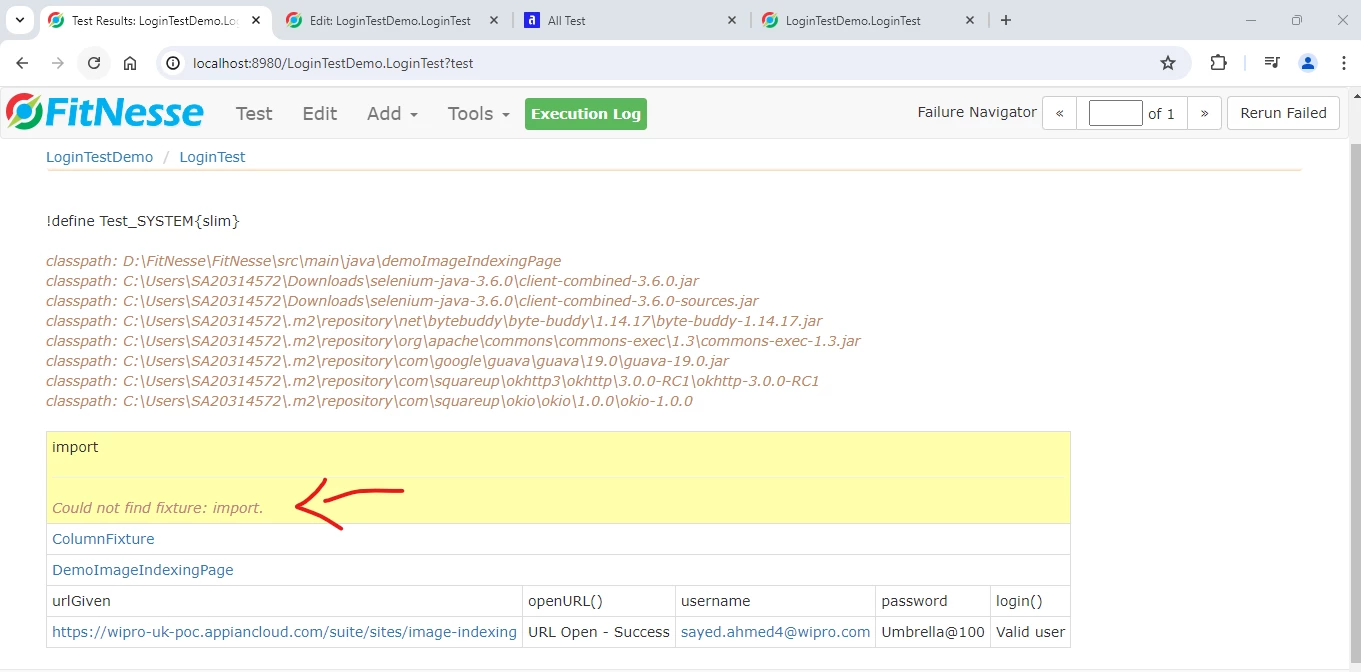
 

Script:

!define Test_SYSTEM{slim}

!path D:\FitNesse\FitNesse\src\main\java\demoImageIndexingPage
!path C:\Users\SA20314572\Downloads\selenium-java-3.6.0\client-combined-3.6.0.jar
!path C:\Users\SA20314572\Downloads\selenium-java-3.6.0\client-combined-3.6.0-sources.jar
!path C:\Users\SA20314572\.m2\repository\net\bytebuddy\byte-buddy\1.14.17\byte-buddy-1.14.17.jar
!path C:\Users\SA20314572\.m2\repository\org\apache\commons\commons-exec\1.3\commons-exec-1.3.jar
!path C:\Users\SA20314572\.m2\repository\com\google\guava\guava\19.0\guava-19.0.jar
!path C:\Users\SA20314572\.m2\repository\com\squareup\okhttp3\okhttp\3.0.0-RC1\okhttp-3.0.0-RC1
!path C:\Users\SA20314572\.m2\repository\com\squareup\okio\okio\1.0.0\okio-1.0.0

|import |
|ColumnFixture|
|DemoImageIndexingPage |
|urlGiven |openURL() |username |password |login() |
|wipro-uk-poc.appiancloud.com/.../image-indexing|URL Open - Success|sayed.ahmed4@wipro.com|Umbrella@100|Valid user|

19 replies

davidj137213
July 8, 2024

Could you attach your script, rather than the screenshot?

!| script | com.appiancorp.ps.automatedtest.fixture.SitesFixture |

Check if you forgot the last "|" in your code..  

July 9, 2024

Adding the script.

!define Test_SYSTEM{slim}

!path D:\FitNesse\FitNesse\src\main\java\demoImageIndexingPage
!path C:\Users\SA20314572\Downloads\selenium-java-3.6.0\client-combined-3.6.0.jar
!path C:\Users\SA20314572\Downloads\selenium-java-3.6.0\client-combined-3.6.0-sources.jar
!path C:\Users\SA20314572\.m2\repository\net\bytebuddy\byte-buddy\1.14.17\byte-buddy-1.14.17.jar
!path C:\Users\SA20314572\.m2\repository\org\apache\commons\commons-exec\1.3\commons-exec-1.3.jar
!path C:\Users\SA20314572\.m2\repository\com\google\guava\guava\19.0\guava-19.0.jar
!path C:\Users\SA20314572\.m2\repository\com\squareup\okhttp3\okhttp\3.0.0-RC1\okhttp-3.0.0-RC1
!path C:\Users\SA20314572\.m2\repository\com\squareup\okio\okio\1.0.0\okio-1.0.0

|import |
|ColumnFixture |
|DemoImageIndexingPage |
|urlGiven |openURL() |username |password |login() |
|wipro-uk-poc.appiancloud.com/.../image-indexing|URL Open - Success|sayed.ahmed4@wipro.com|Umbrella@100|Valid user|

Also I have verified again '|' is avaliabe in the script.

July 9, 2024
Is your fixture (java class) package named 'ColumnFixture' ? Which you have given in the Import?
In my case, its demo. The following work for me:
!path C:\fitnesse-for-appian-24.2.0\workspace\demo\target\classes
| Import |
| demo |

| DemoImageIndexingPage |
| urlGiven | openURL() | userName | password | login() |
| https://www.google.com | URL OPEN - Success | a@test.com | Test@123 | Valid User |
Note: You need to add dependent jars (ex. !path C:\Users\SA20314572\Downloads\selenium-java-3.6.0\client-combined-3.6.0-sources.jar). I have not added it since I have not used it in my fixture code.
July 9, 2024

Yes 'ColumnFixture' we are trying to import.

Also we have added all realted & suggested jar files in both selenium and fitnesse tool.

Can you please help us out.

srmm0001
July 10, 2024

Hi...

To resolve the "Could not find fixture: import" error in FitNesse, ensure the !path is set to the directory containing the .class files of your Java code, not the source files. Also, check that your import statement correctly specifies the Java package name, matching the case and structure of your package directory.

July 10, 2024

I have added class file locations path and imported statements, still throwing  the same error message.

can we have a small call for this issue please.

July 10, 2024
You have not fixed the things mentioned in the previous message:
- Correct package name (it is case-sensitive)
|Import|
|demoImageIndexingPage|
- Replace the path with the generated class files path and point to the parent directory of the package. Still, you are pointing to the source code(.java files):
Ex.
I have the following directory structure:
C:\fitnesse-for-appian-24.2.0\workspace\demo\target\classes\demo\DemoImageIndexingPage.class
Hence, I need to give the following:

!path C:\fitnesse-for-appian-24.2.0\workspace\demo\target\classes

You need to give a path as per your directory structure.