
Force Stopping a User Input Task
Hello everyone,
So I have a process model that involves a user submitting a form, putting in details before submitting. It basically involves the writing of some details to the record type before showing a confirmation page, which just shows the user a tick button of confirmation, requiring a done to submit. I have a few issues here.
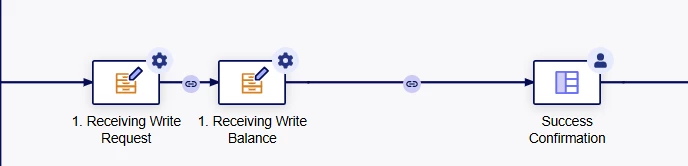
Firstly, the only reason I had the done button was because I attempted to let it auto-run of some sort before closing by itself, however, I could not achieve that. Next, I settled on a done button as upon clicking it will complete the process model. However, after my users started using it, I noticed that they do not click the done button always. Due to appian's process model clean up task not including active tasks, I believe active tasks will be active till forcibly ended by the admin. I also attempted to set a timer for the task, perhaps a deadline, attempted setting a and gateway to link directly to the end node, nothing changed, I'm still unable to force end a user input task. Any suggestions?
