
functionality to show different color for different requirement and disable button according to the requirement
Hi all,
I have a requirement as:
I have table in read-only grid where there are different site we can name it as A1, A2,A3,A4 , B1,B2, B3, B4 and each one has status as pending approval . and there are action button as approve and reject
if user click on approve button on A1 status then its status is changing to preliminary approved and button color remains as green and user again click on approve button of A1 then status changes to approved and button changes from green to grey and link gets disabled
when user click on approve button of A2 then status changes from pending approval to preliminary but here button color changes to grey and link gets disabled since A1 is in approved status , it means if any of the status of A is in approved then any of A status is preliminary approved then button will turn to grey and link also gets disabled.
now for B1 same cycle goes and if A1 status is approved and B1 , B2, B3, B4 status is either pending approval or preliminary approved then approve button stays green color and link also stays enabled but if B1 status is approved and B2 status is preliminary approved then approve button turns grey color and link also gets disabled and when B3, B4 is in pending approval status then their approve button will be in green color and link also works
for reference this is my code:
a!localVariables(
local!defaultPagingInfo: a!pagingInfo(
startIndex: 1,
batchSize: 20,

),
local!data: a!refreshVariable(
value: index(
rule!SLS_QRY_getVersionDetails_Approval(
siteId: null
),
"data",
null
),
refreshAlways: true
),
{
a!cardLayout(
contents: {
a!sectionLayout(
label: "",
labelSize: "LARGE",

),
a!gridField(
data: local!data,
columns: {
a!gridColumn(
label: "Site Id",
sortField: 'recordType!{bd5da3af-2226-4c9a-9043-a69b330429fb}SLS Version Sync.fields.{517a6c02-54af-45ed-a929-d410e3eb0528}siteName',
value: fv!row['recordType!{bd5da3af-2226-4c9a-9043-a69b330429fb}SLS Version Sync.fields.{517a6c02-54af-45ed-a929-d410e3eb0528}siteName']

),
a!gridColumn(
label: "Version#",
sortField: 'recordType!{bd5da3af-2226-4c9a-9043-a69b330429fb}SLS Version Sync.fields.{cd4dd5b1-31da-4039-acac-a63e07347ab8}versionNum',
value: fv!row['recordType!{bd5da3af-2226-4c9a-9043-a69b330429fb}SLS Version Sync.fields.{cd4dd5b1-31da-4039-acac-a63e07347ab8}versionNum']
),
a!gridColumn(
label: "Version Status",
sortField: 'recordType!{bd5da3af-2226-4c9a-9043-a69b330429fb}SLS Version Sync.relationships.{bdd27fb7-25f3-42fe-b1b3-f96fd4cd3597}versionStatusSync.fields.{e5269aae-75d4-42f8-b4aa-6ba4ccd76dfa}description',
value: fv!row['recordType!{bd5da3af-2226-4c9a-9043-a69b330429fb}SLS Version Sync.relationships.{bdd27fb7-25f3-42fe-b1b3-f96fd4cd3597}versionStatusSync.fields.{e5269aae-75d4-42f8-b4aa-6ba4ccd76dfa}description']
),
a!gridColumn(
label: "Action",
value: a!richTextDisplayField(
value: {
a!richTextIcon(
icon: "thumbs-up",
linkStyle: "STANDALONE",
size: "MEDIUM",
link: if(
and(
contains(
index(
local!data,
'recordType!{bd5da3af-2226-4c9a-9043-a69b330429fb}SLS Version Sync.relationships.{bdd27fb7-25f3-42fe-b1b3-f96fd4cd3597}versionStatusSync.fields.{e5269aae-75d4-42f8-b4aa-6ba4ccd76dfa}description',
{}
),
"APPROVED",

),
OR(
fv!row['recordType!{bd5da3af-2226-4c9a-9043-a69b330429fb}SLS Version Sync.relationships.{bdd27fb7-25f3-42fe-b1b3-f96fd4cd3597}versionStatusSync.fields.{e5269aae-75d4-42f8-b4aa-6ba4ccd76dfa}description'] = "APPROVED PRELIMINARY",
fv!row['recordType!{bd5da3af-2226-4c9a-9043-a69b330429fb}SLS Version Sync.relationships.{bdd27fb7-25f3-42fe-b1b3-f96fd4cd3597}versionStatusSync.fields.{e5269aae-75d4-42f8-b4aa-6ba4ccd76dfa}description'] = "APPROVED"
),

),
{},
a!startProcessLink(
processModel: cons!SLS_PM_APPROVERS_ACTION,
processParameters: {
versionId: fv!row['recordType!{bd5da3af-2226-4c9a-9043-a69b330429fb}SLS Version Sync.fields.{5a9fae27-52db-4d5d-acb3-2b9d8b22f306}IdSLSVersion']
}
),

),
color: if(
and(
contains(
index(
local!data,
'recordType!{bd5da3af-2226-4c9a-9043-a69b330429fb}SLS Version Sync.relationships.{bdd27fb7-25f3-42fe-b1b3-f96fd4cd3597}versionStatusSync.fields.{e5269aae-75d4-42f8-b4aa-6ba4ccd76dfa}description',
{}
),
"APPROVED",

),
or(
fv!row['recordType!{bd5da3af-2226-4c9a-9043-a69b330429fb}SLS Version Sync.relationships.{bdd27fb7-25f3-42fe-b1b3-f96fd4cd3597}versionStatusSync.fields.{e5269aae-75d4-42f8-b4aa-6ba4ccd76dfa}description'] = "APPROVED PRELIMINARY",
fv!row['recordType!{bd5da3af-2226-4c9a-9043-a69b330429fb}SLS Version Sync.relationships.{bdd27fb7-25f3-42fe-b1b3-f96fd4cd3597}versionStatusSync.fields.{e5269aae-75d4-42f8-b4aa-6ba4ccd76dfa}description'] = "APPROVED"
),

),
"SECONDARY",
"POSITIVE"
),
caption: if(
fv!row['recordType!{bd5da3af-2226-4c9a-9043-a69b330429fb}SLS Version Sync.relationships.{bdd27fb7-25f3-42fe-b1b3-f96fd4cd3597}versionStatusSync.fields.{e5269aae-75d4-42f8-b4aa-6ba4ccd76dfa}description'] = "APPROVED",
"Cannot approve once the status is approved",
if(
and(
contains(
index(
local!data,
'recordType!{bd5da3af-2226-4c9a-9043-a69b330429fb}SLS Version Sync.relationships.{bdd27fb7-25f3-42fe-b1b3-f96fd4cd3597}versionStatusSync.fields.{e5269aae-75d4-42f8-b4aa-6ba4ccd76dfa}description',
{}
),
"APPROVED",

),
fv!row['recordType!{bd5da3af-2226-4c9a-9043-a69b330429fb}SLS Version Sync.relationships.{bdd27fb7-25f3-42fe-b1b3-f96fd4cd3597}versionStatusSync.fields.{e5269aae-75d4-42f8-b4aa-6ba4ccd76dfa}description'] = "APPROVED PRELIMINARY",

),
"Cannot move to next status if version is already in Approved Status",
"Click here to approve"
)
)
),
a!richTextItem(text: " "),
a!richTextIcon(
icon: "Remove",
linkStyle: "STANDALONE",
size: "MEDIUM",
link: a!startProcessLink(
processModel: cons!SLS_PM_APPROVERS_ACTION,
processParameters: {
versionId: fv!row['recordType!{bd5da3af-2226-4c9a-9043-a69b330429fb}SLS Version Sync.fields.{5a9fae27-52db-4d5d-acb3-2b9d8b22f306}IdSLSVersion'],
isReject: true
}
),
color: "NEGATIVE",
caption: "Click here to Reject the status"
),

}
),
width: "AUTO",
align: "CENTER",

),

},
borderStyle: "STANDARD",
shadeAlternateRows: true,
pagingSaveInto: local!defaultPagingInfo,

),

}
)
}
)
grid looks this :
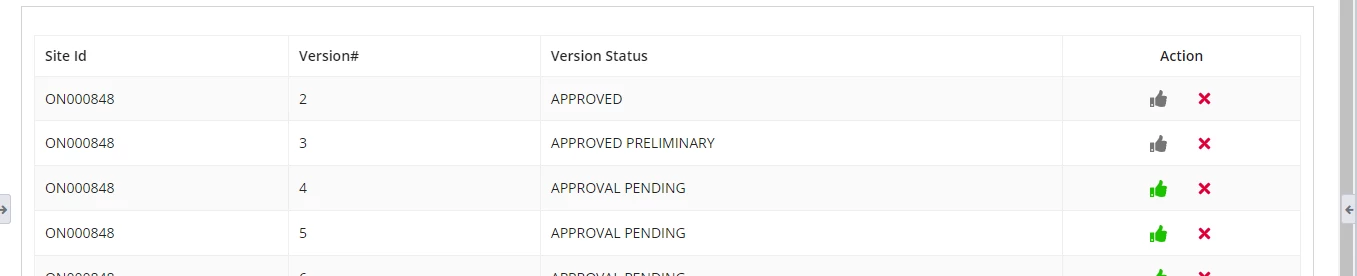
here data can be replaced .
please help me how to achieve this