nitinn0007
May 26, 2022
Solved

Getting an error

  • May 26, 2022
  • 19 replies
  • 0 views

Hello community,

     I am trying to save my local variable's data into the rule input.

I use editable grid and use of CDT as a local variable. Also, I have taken CDT as a rule input in the array form.

Now when I am trying to save these into rule input than after click on dynamic link, It is overriding the data and show the first time data I have and save  data only one time in the rule input.

Best answer by nitinn0007

a!localVariables(
  local!newgrid: 'type!{urn:com:appian:types:EC}EC_Data'(),
  local!grid: { local!newgrid },
  a!formLayout(
    label: "Practice",
    contents: {
      a!sectionLayout(
        label: "Nitin",
        contents: {
          a!gridLayout(
            label: "Form",
            labelPosition: "ABOVE",
            headerCells: {
              a!gridLayoutHeaderCell(label: "Name"),
              a!gridLayoutHeaderCell(label: "Department"),
              a!gridLayoutHeaderCell(label: "Document"),
              a!gridLayoutHeaderCell(label: "")
            },
            columnConfigs: {
              a!gridLayoutColumnConfig(width: "DISTRIBUTE", weight: 3),
              a!gridLayoutColumnConfig(width: "DISTRIBUTE", weight: 3),
              a!gridLayoutColumnConfig(width: "DISTRIBUTE", weight: 2),
              a!gridLayoutColumnConfig(width: "DISTRIBUTE", weight: 2)
            },
            rows: {
              {
                a!forEach(
                  items: local!newgrid,
                  expression: a!gridRowLayout(
                    contents: {
                      a!textField(
                        label: "Name",
                        labelPosition: "ABOVE",
                        value: local!newgrid.Name,
                        saveInto: local!newgrid.Name,
                        refreshAfter: "UNFOCUS",
                        required: true,
                        validations: {}
                      ),
                      a!multipleDropdownField(
                        label: "Department",
                        labelPosition: "ABOVE",
                        placeholder: "--- Select a Value ---",
                        choiceLabels: cons!EC_DEPARTMENT,
                        choiceValues: cons!EC_DEPARTMENT,
                        value: local!newgrid.Department,
                        saveInto: local!newgrid.Department,
                        searchDisplay: "AUTO",
                        required: true,
                        validations: {}
                      ),
                      a!fileUploadField(
                        label: "Document",
                        labelPosition: "ABOVE",
                        target: cons!EC_PHOTOS,
                        value: local!newgrid.Document,
                        saveInto: local!newgrid.Document
                      ),
                      a!richTextDisplayField(
                        labelPosition: "COLLAPSED",
                        value: {
                          a!richTextIcon(
                            icon: "window-close",
                            altText: "Delete Row Button",
                            link: a!dynamicLink(
                              label: "Dynamic Link",
                              saveInto: {
                                a!save(ri!item, remove(ri!item, fv!index))
                              }
                            ),
                            color: "#ff0000"
                          )
                        }
                      )
                    }
                  )
                )
              }
            },
            selectionSaveInto: {},
            addRowLink: a!dynamicLink(
              label: "Add New Recod",
              saveInto: {
                a!save(ri!item, append(ri!item, local!newgrid))
              }
            ),
            validations: {},
            shadeAlternateRows: true
          )
        }
      )
    },
    buttons: a!buttonLayout(
      primaryButtons: {
        a!buttonWidget(
          label: "Submit",
          icon: "check-circle",
          value: local!newgrid,
          saveInto: { a!save(ri!item, local!newgrid) }
        )
      }
    )
  )
)


19 replies

vikashk739
May 26, 2022

Hi Nitin, you can directly save that data to rule input, In line 33 & 34 you're using local variables. 

nitinn0007
May 26, 2022

I want to store in local variable after that it automatically save into rule input.

gopalk2865
Participating Frequently
May 26, 2022

I would suggest you iterate your grid based on local variable as you are saving and displaying values from local variable and transfer local variable data on click of submit button. I hope this helps.

nitinn0007
May 26, 2022

I do the same thing but when I click on dynamic link it shows the previous data on the text field automatically

gopalk2865
Participating Frequently
May 26, 2022

right now you are using rule input in your a!foreach expression.

mikes0011
Brainy
May 26, 2022

There are two common design concepts for an editable grid like this:

  1. store an array of CDT in a Rule Input; iterate the editable grid rows over that array and store values directly into the individual array members
  2. SEPARATELY, store an array of CDT/Dictionary in a Local variable and iterate the editable grid rows over that, save into that, then when everything is done, save the whole local variable back into the rule input upon Submit Click.

So you have things kinda jumbled up here, as if you're trying to pick and choose between implementation patterns #1 and #2 above.  I'm not even really sure where to start... I'll try to cover the big-picture issues that i think are preventing the form from working for you in either design concept.

First: local!newGrid is defined as a single element of your CDT.
Then: your editable grid rows iterate over the rule input version of the variable, BUT the saveIntos are all pointing at the local variable.

Your Add Row Link appends the local variable (containing its current value) onto the rule input.  Why?
And finally, your saveInto overwrites your whole rule input variable with the current value of local!newGrid.  But you've already configured things such that local!newGrid will not represent the array of entries you're trying to create on the form.

My suggestion: pick one approach instead of this awkward hybrid.  If you're going to assemble your rows of data in a local variable first that's fine, but in this case, usually you should not even *touch* the Rule Input variable until the Submit Click.  local!newGrid should be established at first as an empty array, the grid rows should refer to it, and the add row link should add new blank rows to it.

The Expression Guru
nitinn0007
May 26, 2022

a!localVariables(
local!newgrid: 'type!{urn:com:appian:types:EC}EC_Data'(),
local!grid: { local!newgrid },
a!formLayout(
label: "Practice",
contents: {
a!sectionLayout(
label: "Nitin",
contents: {
a!gridLayout(
label: "Form",
labelPosition: "ABOVE",
headerCells: {
a!gridLayoutHeaderCell(label: "Name"),
a!gridLayoutHeaderCell(label: "Department"),
a!gridLayoutHeaderCell(label: "Document"),
a!gridLayoutHeaderCell(label: "")
},
columnConfigs: {
a!gridLayoutColumnConfig(width: "DISTRIBUTE", weight: 3),
a!gridLayoutColumnConfig(width: "DISTRIBUTE", weight: 2),
a!gridLayoutColumnConfig(width: "DISTRIBUTE", weight: 2)
},
rows: {
{
a!forEach(
items: local!newgrid,
expression: a!gridRowLayout(
contents: {
a!textField(
label: "Name",
labelPosition: "ABOVE",
value: local!newgrid.Name,
saveInto: local!newgrid.Name,
refreshAfter: "UNFOCUS",
required: true,
validations: {}
),
a!multipleDropdownField(
label: "Department",
labelPosition: "ABOVE",
placeholder: "--- Select a Value ---",
choiceLabels: cons!EC_DEPARTMENT,
choiceValues: cons!EC_DEPARTMENT,
value: local!newgrid.Department,
saveInto: local!newgrid.Department,
searchDisplay: "AUTO",
required: true,
validations: {}
),
a!fileUploadField(
label: "Document",
labelPosition: "ABOVE",
target: cons!EC_PHOTOS,
value: local!newgrid.Document,
saveInto: local!newgrid.Document
),
a!richTextDisplayField(
labelPosition: "COLLAPSED",
value: {
a!richTextIcon(
icon: "window-close",
altText: "Delete Row Button",
link: a!dynamicLink(
label: "Dynamic Link",
saveInto: {
a!save(ri!item, remove(ri!item, fv!index))
}
),
color: "#ff0000"
)
}
)
}
)
)
}
},
selectionSaveInto: {},
addRowLink: a!dynamicLink(
label: "Add New Recod",
saveInto: {
a!save(ri!item, append(ri!item, local!newgrid))
}
),
validations: {},
shadeAlternateRows: true
)
}
)
},
buttons: a!buttonLayout(
primaryButtons: {
a!buttonWidget(
label: "Submit",
icon: "check-circle",
value: local!newgrid,
saveInto: { a!save(ri!item, local!newgrid) }
)
}
)
)
)
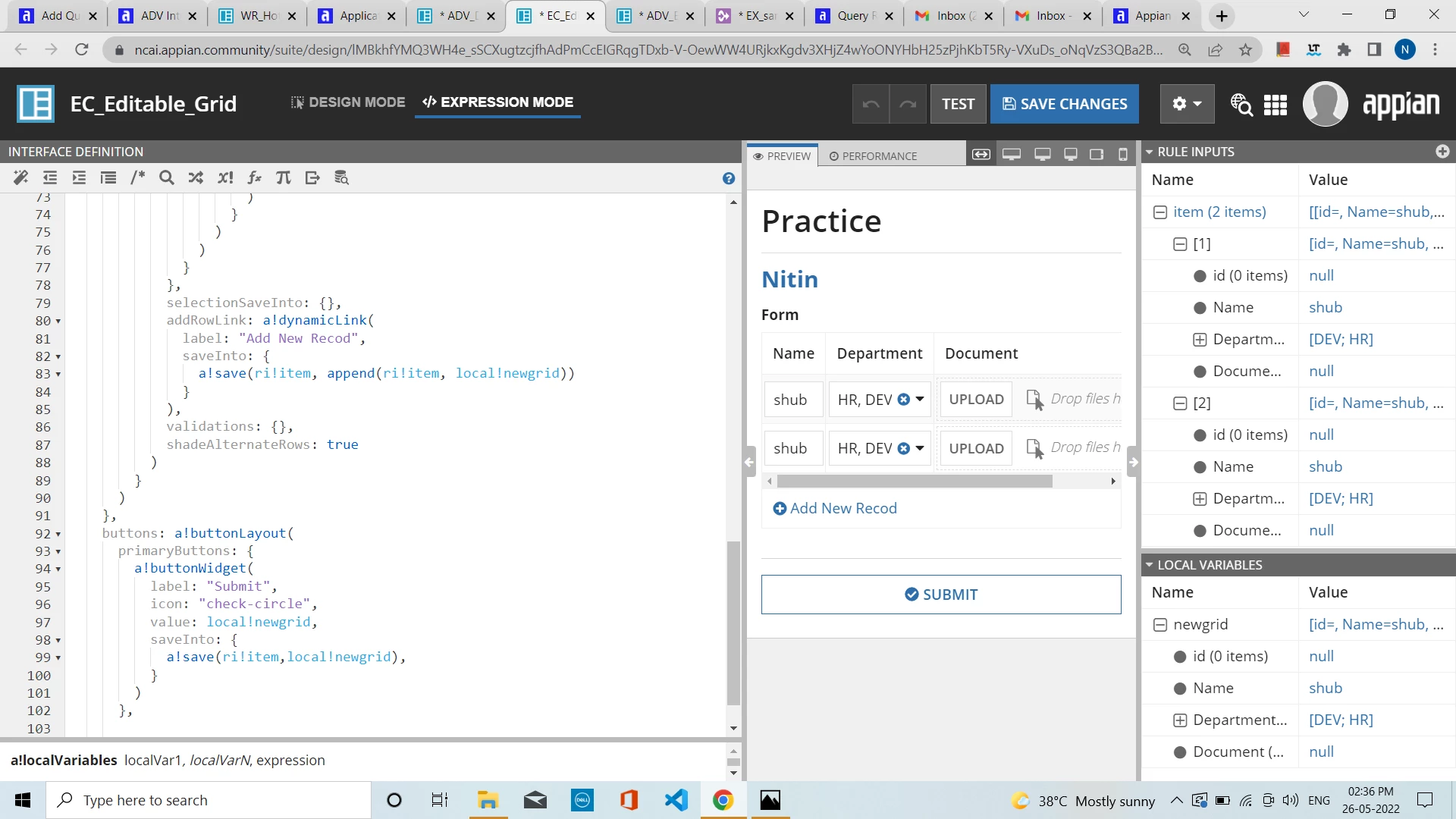
mikes0011
Brainy
May 26, 2022

If you could edit your comment and post all that code in a Code Box (making sure to re-copy it to retain indentation, etc), that would help a lot.

The Expression Guru