
March 8, 2023
Solved

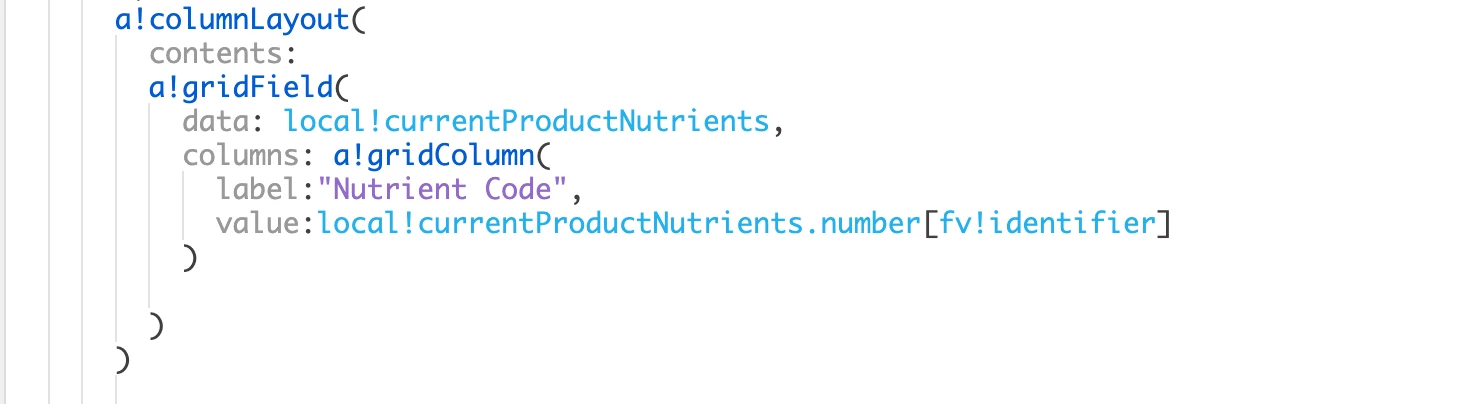
gridField - fv!row vs fv!identifier

  • March 8, 2023
  • 17 replies
  • 1 view

Hello Folks:

I am trying to figure out why the "value: ......." works when I use fv!identifier but fails when I use fv!row (this gives me all 14 values as the output) whereas I am looking for just the current grid-row's value (one value).  The gridfied documentation seem to imply both are equi

As usual, thanks to the community on my Appian learning journey.

Ma
Best answer by mikes0011

The main issue is you're not using fv!row correctly at all -- fv!row is the row value, it's not something that you'd use to access a positional index of the original array, which is what you're trying to do here for some reason.

The proper syntax is:

value: fv!row.number  /* or whatever property of the original dictionary you want to access here */

17 replies

harshitb6843
March 9, 2023

The problem is with the ".number" in value. If you add the same on the data parameter, then fv!row should work.

man0001Author
March 9, 2023

Hi Harshit:

Thank you for your response.  I tried various combinations.  I am trying to create a grid layout with the following columns:

Number | Name | Amount | Unit 

Here is my data: output I am starting with:

I get errors when I tried to move the '.number' to the data-attribute.

I also get errors when I tried a couple other variations of fv!row and .number.

stefanhelzle0001
Brainy
March 9, 2023

The grid field expects a datasubset as the datasource. It iterates on the items and make each individual item available as fv!row and the corresponding identifier (datasubset.identifiers) as fv!identifier.

man0001Author
March 9, 2023

Hi Stefan:

Thank you for your response.  I tried datasubset variations too.  Those led to errors too. 

mikes0011
mikes0011Answer
Brainy
March 9, 2023

The main issue is you're not using fv!row correctly at all -- fv!row is the row value, it's not something that you'd use to access a positional index of the original array, which is what you're trying to do here for some reason.

The proper syntax is:

value: fv!row.number  /* or whatever property of the original dictionary you want to access here */

The Expression Guru
komalj3844
March 9, 2023

Could you please share the data store in local variable currentProductNutrients

man0001Author
March 9, 2023

HI Komalj

If I understand your request correctly, this is the information you information you are seeking.

komalj3844
March 9, 2023

Hi 

I tried this 

a!localVariables(
local!data:{{number:301,name:"Calcium"},
{number:303,name:"Calcium"}},
a!gridField(
data: local!data,
columns: a!gridColumn(
label: "Number",
value: fv!row.number
)

)
)

and it worked 

Are you using a!localVariables if yes could you please share the data of you local variable from the local variable data section

I strongly feel your data structure is incorrect
