
swapnar6405
February 22, 2024
Question

gridField rows selection color

  • February 22, 2024
  • 4 replies
  • 0 views

Hi,

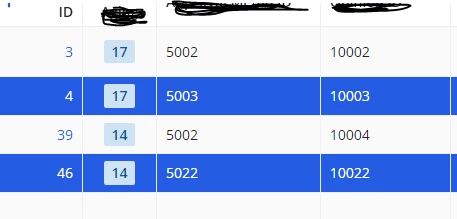
I have a read only grid with below parameters. Now when we select the rows those are appearing with a default color.

How and where I can customize the color which I want. Is there any parameter for doing this?

selectable: true,
selectionStyle: "ROW_HIGHLIGHT",
selectionValue: local!selection,
selectionSaveInto: local!selection,
4 replies

stefanhelzle0001
February 22, 2024

Sorry, that is not supported. By default this is the "ACCENT" color as defined in your site configuration.

swapnar6405
February 22, 2024

When we update at the site level it is impacting all other locations. We would like to change only for the selected grid.

stefanhelzle0001
February 22, 2024

Sorry, not supported.

konduruc733182
February 23, 2024

Hello [mention:74edcde47e734df8a3f1ea67013709ed:e9ed411860ed4f2ba0265705b8793d05] 

If you can use the selectionStyle as "CHECKBOX", may be you can play around with the background color parameter of your grid columns and achieve what you are looking for.


but you will have to write the logic in all the grid columns.

backgroundColor: if(
            contains(tointeger(local!selection),fv!identifier),
            "#FFFF00",
            ""
          )