jingp965361
July 1, 2025
Solved

How can I save an uploaded file into a Data Model ?

  • July 1, 2025
  • 3 replies
  • 0 views

Hi there,I need your kind support plz !

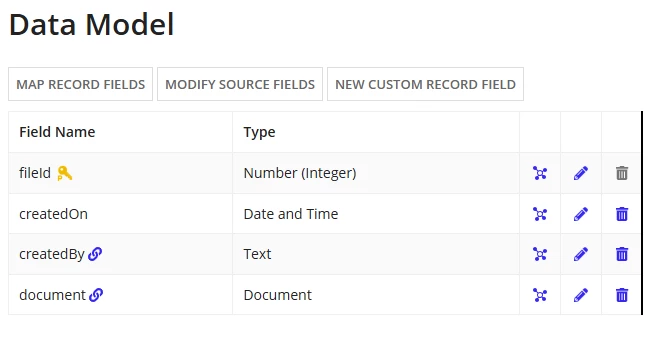
In my app, there is a Record Type as below:

I want to use it to store the documents which are uploaded from a!fileUploadField item in an interface.

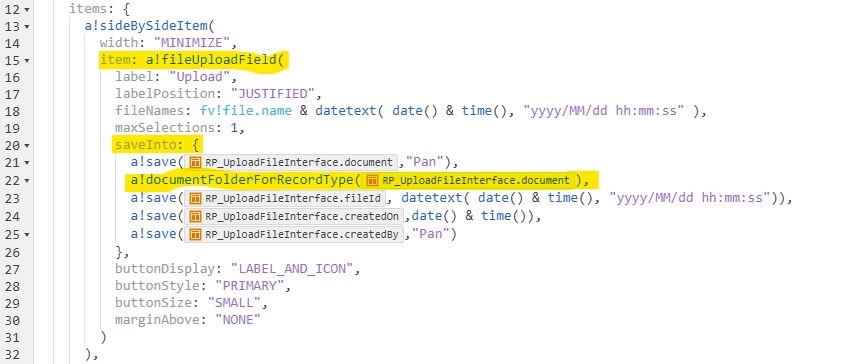
The introduction of a!save() in Documentation of Appian didn't mention the way to save a document type, can I get the directon here?

Best answer by harshas2775

Hi [mention:d0308f98d88a4b48874afdbefe571b9a:e9ed411860ed4f2ba0265705b8793d05]  
the function  a!documentFolderForRecordType() works when you have Record type to manage documents in your application. Also this function returns the folder where the document should be stored and thus should be used in the 'target' attribute of the file upload component which is missing in your code currently.

There are 2 ways to Manage documents in Appian

1. Using Record types

2. Using folders

Using Record types you will need a separate record type which has document and record id columns to store the document. You can find a detailed documentation and steps herea!documentFolderForRecordType() works for this management option and not when you use folders.

Using folders, we create a folder within the Knowledge center of application where we want to documents to be stored when a user uploads it in interface. 

Here is a working example to store documents using folders. Here is a tutorial to follow to learn about working with documents and records using folders

a!localVariables(
  local!file,
  local!submissionSuccessful,
  local!errorCode,
  {
    a!fileUploadField(
      label: "File Upload",
      labelPosition: "ABOVE",
      saveInto: local!file,
      value: local!file,
      /* Replace this with a constant of type Folder in your environment */
      target: cons!AS_DOCUMENTS_FOLDER_POINTER
    ),
    a!buttonArrayLayout(
      buttons: {
        a!buttonWidget(
          label: "Submit",
          style: "SOLID",
          /* If you don't use a!submitUploadedFiles(), the signature will not be uploaded */
          saveInto: a!submitUploadedFiles(
            onSuccess: a!save(local!submissionSuccessful, true),
            onError: {
              a!save(local!submissionSuccessful, false),
              a!save(local!errorCode, fv!error)
            }
          )
        )
      },
      align: "END"
    )
  }
)

So identify the way you want to establish document management then implement accordingly. Feel free to ask if you encounter any challenges. 

3 replies

harshas2775
July 4, 2025

Hi [mention:d0308f98d88a4b48874afdbefe571b9a:e9ed411860ed4f2ba0265705b8793d05]  
the function  a!documentFolderForRecordType() works when you have Record type to manage documents in your application. Also this function returns the folder where the document should be stored and thus should be used in the 'target' attribute of the file upload component which is missing in your code currently.

There are 2 ways to Manage documents in Appian

1. Using Record types

2. Using folders

Using Record types you will need a separate record type which has document and record id columns to store the document. You can find a detailed documentation and steps herea!documentFolderForRecordType() works for this management option and not when you use folders.

Using folders, we create a folder within the Knowledge center of application where we want to documents to be stored when a user uploads it in interface. 

Here is a working example to store documents using folders. Here is a tutorial to follow to learn about working with documents and records using folders

a!localVariables(
  local!file,
  local!submissionSuccessful,
  local!errorCode,
  {
    a!fileUploadField(
      label: "File Upload",
      labelPosition: "ABOVE",
      saveInto: local!file,
      value: local!file,
      /* Replace this with a constant of type Folder in your environment */
      target: cons!AS_DOCUMENTS_FOLDER_POINTER
    ),
    a!buttonArrayLayout(
      buttons: {
        a!buttonWidget(
          label: "Submit",
          style: "SOLID",
          /* If you don't use a!submitUploadedFiles(), the signature will not be uploaded */
          saveInto: a!submitUploadedFiles(
            onSuccess: a!save(local!submissionSuccessful, true),
            onError: {
              a!save(local!submissionSuccessful, false),
              a!save(local!errorCode, fv!error)
            }
          )
        )
      },
      align: "END"
    )
  }
)

So identify the way you want to establish document management then implement accordingly. Feel free to ask if you encounter any challenges. 

jingp965361
August 12, 2025

Thank you so much for your guidance[emoticon:44a8a53ad3364ea78a16c5a3229f75bb]

indhujab0002
July 4, 2025

Hi, 

Do you want to store the extension of the document (Ex: .pdf, .txt) as document type? If yes, you can use document function as mentioned below and use it in your a!save().

document("test_doc","extension")