

shukurs0001
August 12, 2022
Question

How can I save the value in different indexes ?
  • August 12, 2022
  • 2 replies
  • 0 views

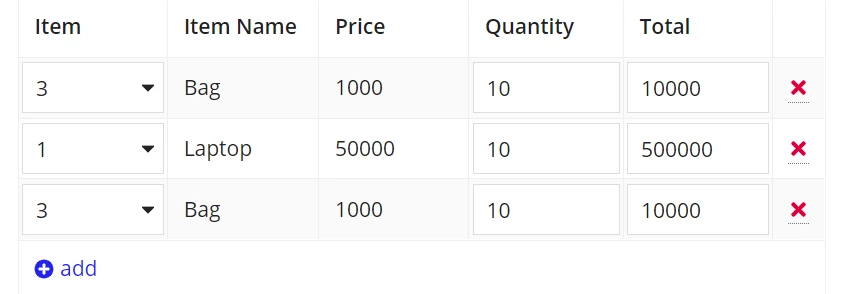
Here, If I give quantity value for 1st row then it is coming to all the rows with the same value. Item, ItemName, Price, are in one Rule input and Quantity, Total are belongs to other Ruleinput.
How can I save the Quantity value in their indexes ?

    2 replies

    gopalk2865
    Participating Frequently
    August 13, 2022

    Hi, you can use below save configuration to save values at a particular index of a rule input. If you are using forEach loop then you can use fv!index to define your indexes.

    a!save(ri!quantity[index], yourValue)

    August 15, 2022

    Instead of a normal local variable, you have to create it with the Map function. Please find the attached code for reference.

    a!localVariables(
      local!items: {
        a!map(item: "3", itemName: "Bag", price: "1000"),
        a!map(
          item: "1",
          itemName: "Laptop",
          price: "50000"
        ),
        a!map(item: "3", itemName: "Bag", price: "1000")
      },
      local!quanPrice: a!forEach(
        items: local!items,
        expression: {
          {
            a!map(
              quantity: 10,
              total: tointeger(fv!item.price) * 10
            )
          }
        }
      ),
      a!gridLayout(
        headerCells: {
          a!gridLayoutHeaderCell(label: "Item"),
          a!gridLayoutHeaderCell(label: "Item Name"),
          a!gridLayoutHeaderCell(label: "Price"),
          a!gridLayoutHeaderCell(label: "Quantity"),
          a!gridLayoutHeaderCell(label: "Total")
        },
        rows: a!forEach(
          items: local!items,
          expression: {
            a!gridRowLayout(
              id: fv!index,
              contents: {
                a!textField(
                  value: fv!item.item,
                  saveInto: fv!item.item,
                  readOnly: true()
                ),
                a!textField(
                  value: fv!item.itemName,
                  saveInto: fv!item.itemName,
                  readOnly: true()
                ),
                a!textField(
                  value: fv!item.price,
                  saveInto: fv!item.price,
                  readOnly: true()
                ),
                a!textField(
                  value: local!quanPrice[fv!index].quantity,
                  saveInto: local!quanPrice[fv!index].quantity,
                  
                ),
                a!textField(
                  value: local!quanPrice[fv!index].total,
                  saveInto: local!quanPrice[fv!index].total,
                  
                )
              }
            )
          }
        )
      )
    )