June 5, 2023
Solved

How do I change the record type description

  • June 5, 2023
  • 3 replies
  • 0 views

I would have though this would be pretty straight forward however I have been unable to find anything that show how to do this

I want to change the record type description that shows up AFTER you have created the record type?

Is this information stored somewhere on the database that I can edit it directly there? I can't seem to find an option that allows me to change this after you have either set it incorrectly or forgotten to set it when you create the record type. 

    Best answer by sanchitg0002

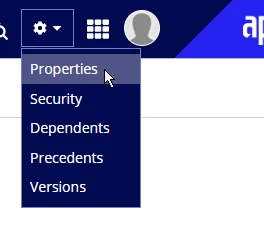
    This should be as simple as opening Record type and click on Properties from gear icon dropdown.

    3 replies

    June 5, 2023

    This should be as simple as opening Record type and click on Properties from gear icon dropdown.

    June 5, 2023

    Thank you - I clicked on just about everything else and assumed that gear icon wasn't applicable to the object I was working on. Never thought to click it. 

    harshitb6843
    June 5, 2023

    Its weird how Appian keeps this option disabled from the front menu and enables it from within the object.