
April 26, 2022
Solved

How to add sorting in an Editable Grid?

  • April 26, 2022
  • 2 replies
  • 0 views

Hi @all,

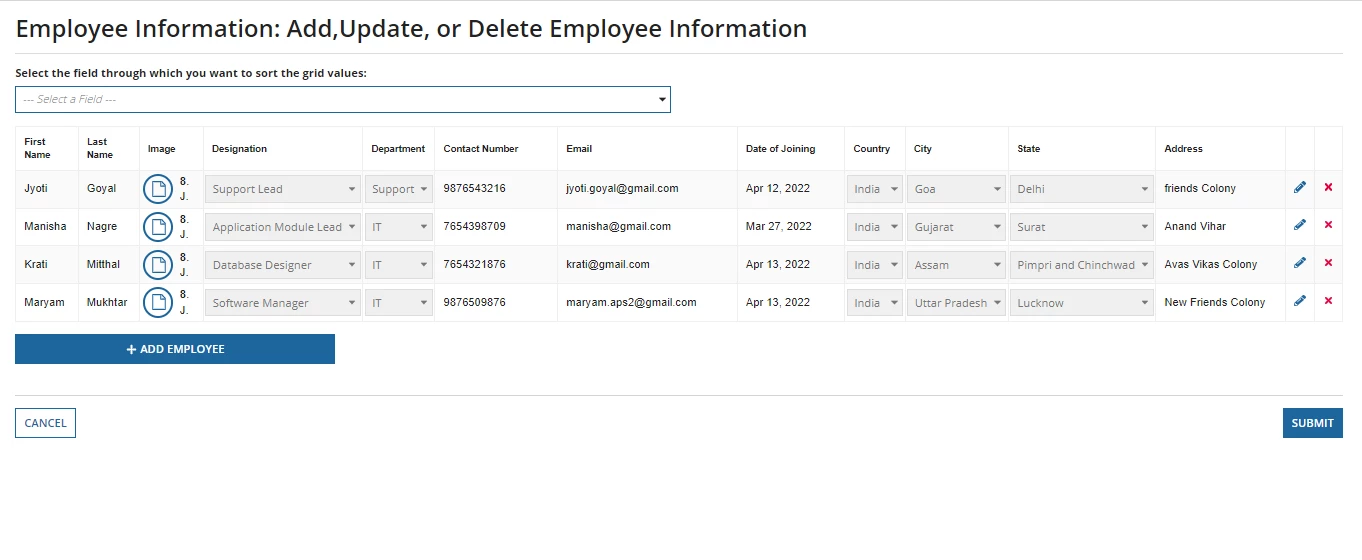
Can anybody help me in figuring out how we can apply sorting in an Editable Grid based on particular column selected by the user using a dropdown list.

I am attaching an image of the interface of my editable grid in which I am taking data from the database table using query entity.

Highly appreciate your efforts. 

Thank you.
    Best answer by harshitb6843

    You can create a dictionary for label and value pairs. 
    Here, the label is the Column name that you want to show to the user and the value is the corresponding field name of that column in the CDT. 

    Once a user selects from the dropdown, then pass the selected value in the a!sortInfo() of the query entity -> paging info 

    2 replies

    harshitb6843
    April 26, 2022

    You can create a dictionary for label and value pairs. 
    Here, the label is the Column name that you want to show to the user and the value is the corresponding field name of that column in the CDT. 

    Once a user selects from the dropdown, then pass the selected value in the a!sortInfo() of the query entity -> paging info 

    maryl0003Author
    April 27, 2022

    Thank you so much [mention:ef600ff8f5d2497eb2def2126dc89484:e9ed411860ed4f2ba0265705b8793d05] , it worked.
