saitoy6477
September 3, 2024
Solved

How to save a row order in grid

  • September 3, 2024
  • 14 replies
  • 1 view

Hi All,

I'm a beginner of Appian, and I would like to know how to save a row order in a grid.

In a grid in an interface, I put a arrow for up and down to move rows.

I need to save the order, so the changed order should be saved and updated to DB.

I should create a column in DB to save a row order, but it does not work.

What I want to do is ... when I change the row order by clicking arrow icon and the order is changed, I would like to save the ordering information for next time. When a user open the window next time, a user requires to see the row which was changed by user clicking an arrow.

I need your help.....

Best regards,

Best answer by kumara0180

a!localVariables(
  /*  
  * local!employess is provided in this recipe as a way to start with hard-coded
  * data. However, this data is identical to the data created from the entity-backed
  * tutorial. Replace the hard-coded data with a query to the employee data store
  * entity and all of the employee records from the tutorial will appear.
  *
  * To replace this data with your own, replace (ctrl+H or cmd+H) all references to
  * local!employees with your data source, either via rule input or local variable.
  */
  local!tempEmployHolder,
  local!employees: {
    a!map(
      id: 1,
      firstName: "John",
      lastName: "Smith",
      department: "Engineering",
      title: "Director",
      phoneNumber: "555-123-4567",
      startDate: today() - 360,
      sequence: 1
    ),
    a!map(
      id: 2,
      firstName: "Michael",
      lastName: "Johnson",
      department: "Finance",
      title: "Analyst",
      phoneNumber: "555-987-6543",
      startDate: today() - 360,
      sequence: 2
    ),
    a!map(
      id: 3,
      firstName: "Mary",
      lastName: "Reed",
      department: "Engineering",
      title: "Software Engineer",
      phoneNumber: "555-456-0123",
      startDate: today() - 240,
      sequence: 3
    ),

  },
  a!formLayout(
    label: "Example: Add,Update, or Remove Employee Data",
    contents: {
      a!gridLayout(
        totalCount: count(local!employees),
        headerCells: {
          a!gridLayoutHeaderCell(label: "First Name"),
          a!gridLayoutHeaderCell(label: "Last Name"),
          a!gridLayoutHeaderCell(label: "Department"),
          a!gridLayoutHeaderCell(label: "Title"),
          a!gridLayoutHeaderCell(label: "Phone Number"),
          a!gridLayoutHeaderCell(label: "Start Date", align: "RIGHT"),
          /* For the "Remove" column */
          a!gridLayoutHeaderCell(label: ""),
          a!gridLayoutHeaderCell(label: "")
        },
        /* Only needed when some columns need to be narrow */
        columnConfigs: {
          a!gridLayoutColumnConfig(width: "DISTRIBUTE", weight: 3),
          a!gridLayoutColumnConfig(width: "DISTRIBUTE", weight: 3),
          a!gridLayoutColumnConfig(width: "DISTRIBUTE", weight: 3),
          a!gridLayoutColumnConfig(width: "DISTRIBUTE", weight: 3),
          a!gridLayoutColumnConfig(width: "DISTRIBUTE", weight: 3),
          a!gridLayoutColumnConfig(width: "DISTRIBUTE", weight: 2),
          a!gridLayoutColumnConfig(width: "ICON"),
          a!gridLayoutColumnConfig(width: "ICON")
        },
        /*
        * a!forEach() will take local!employee data and used that data to loop through an
        * expression that creates each row.
        *
        * When modifying the recipe to work with your data, you only need to change:
        * 1.) the number of fields in each row
        * 2.) the types of fields for each column (i.e. a!textField() for text data elements)
        * 3.) the fv!item elements. For example fv!item.firstName would change to fv!item.yourdata
        */
        rows: a!forEach(
          items: local!employees,
          expression: a!gridRowLayout(
            contents: {
              /* For the First Name Column*/
              a!textField(
                /* Labels are not visible in grid cells but are necessary to meet accessibility requirements */
                label: "first name " & fv!index,
                value: fv!item.firstName,
                saveInto: fv!item.firstName,
                required: true
              ),
              /* For the Last Name Column*/
              a!textField(
                label: "last name " & fv!index,
                value: fv!item.lastName,
                saveInto: fv!item.lastName,
                required: true
              ),
              /* For the Department Column*/
              a!dropdownField(
                label: "department " & fv!index,
                placeholder: "-- Select -- ",
                choiceLabels: {
                  "Corporate",
                  "Engineering",
                  "Finance",
                  "Human Resources",
                  "Professional Services",
                  "Sales"
                },
                choiceValues: {
                  "Corporate",
                  "Engineering",
                  "Finance",
                  "Human Resources",
                  "Professional Services",
                  "Sales"
                },
                value: fv!item.department,
                saveInto: fv!item.department,
                required: true
              ),
              /* For the Title Column*/
              a!textField(
                label: "title " & fv!index,
                value: fv!item.title,
                saveInto: fv!item.title,
                required: true
              ),
              /* For the Phone Number Column*/
              a!textField(
                label: "phone number " & fv!index,
                placeholder: "555-456-7890",
                value: fv!item.phoneNumber,
                saveInto: fv!item.phoneNumber
              ),
              /* For the Start Date Column*/
              a!dateField(
                label: "start date " & fv!index,
                value: fv!item.startDate,
                saveInto: fv!item.startDate,
                required: true,
                align: "RIGHT"
              ),
              /* For the Moving Column Up*/
              a!richTextDisplayField(
                value: a!richTextIcon(
                  icon: "arrow-circle-o-up",
                  altText: "Move " & fv!index,
                  caption: "Move " & fv!item.firstName & " " & fv!item.lastName,
                  link: a!dynamicLink(
                    value: fv!index,
                    saveInto: {
                      local!employees[fv!index - 1].sequence,
                      a!save(
                        local!employees[fv!index].sequence,
                        fv!index - 1
                      ),
                      a!save(
                        local!tempEmployHolder,
                        index(local!employees, fv!index - 1, null())
                      ),
                      a!save(
                        local!employees,
                        a!update(
                          local!employees,
                          fv!index - 1,
                          index(local!employees, fv!index, null())
                        )
                      ),
                      a!save(
                        local!employees,
                        a!update(
                          local!employees,
                          fv!index,
                          local!tempEmployHolder
                        )
                      ),
                      a!save(local!tempEmployHolder, null())
                    }
                  ),
                  linkStyle: "STANDALONE",
                  color: "NEGATIVE",
                  showWhen: not(fv!isFirst)
                )
              ),
              a!richTextDisplayField(
                value: a!richTextIcon(
                  icon: "arrow-circle-down",
                  altText: "Move " & fv!index,
                  caption: "Move " & fv!item.firstName & " " & fv!item.lastName,
                  link: a!dynamicLink(
                    value: fv!index,
                    saveInto: {
                      local!employees[fv!index + 1].sequence,
                      a!save(
                        local!employees[fv!index].sequence,
                        fv!index + 1
                      ),
                      a!save(
                        local!tempEmployHolder,
                        index(local!employees, fv!index + 1, null())
                      ),
                      a!save(
                        local!employees,
                        a!update(
                          local!employees,
                          fv!index + 1,
                          index(local!employees, fv!index, null())
                        )
                      ),
                      a!save(
                        local!employees,
                        a!update(
                          local!employees,
                          fv!index,
                          local!tempEmployHolder
                        )
                      ),
                      a!save(local!tempEmployHolder, null())
                    }
                  ),
                  linkStyle: "STANDALONE",
                  color: "NEGATIVE",
                  showWhen: not(fv!isLast)
                )
              )
            },
            id: fv!index
          )
        ),
        addRowlink: a!dynamicLink(
          label: "Add Employee",
          /*
           * For your use case, set the value to a blank instance of your CDT using
           * the type constructor, e.g. type!Employee(). Only specify the field
           * if you want to give it a default value e.g. startDate: today()+1.
           */
          value: { startDate: today() + 1 },
          saveInto: {
            a!save(
              local!employees,
              append(local!employees, save!value)
            )
          }
        ),
        rowHeader: 1
      )
    },
    buttons: a!buttonLayout(
      primaryButtons: a!buttonWidget(label: "Submit", submit: true)
    )
  )
)


14 replies

kumara0180
September 3, 2024

a!localVariables(
  /*  
  * local!employess is provided in this recipe as a way to start with hard-coded
  * data. However, this data is identical to the data created from the entity-backed
  * tutorial. Replace the hard-coded data with a query to the employee data store
  * entity and all of the employee records from the tutorial will appear.
  *
  * To replace this data with your own, replace (ctrl+H or cmd+H) all references to
  * local!employees with your data source, either via rule input or local variable.
  */
  local!tempEmployHolder,
  local!employees: {
    a!map(
      id: 1,
      firstName: "John",
      lastName: "Smith",
      department: "Engineering",
      title: "Director",
      phoneNumber: "555-123-4567",
      startDate: today() - 360,
      sequence: 1
    ),
    a!map(
      id: 2,
      firstName: "Michael",
      lastName: "Johnson",
      department: "Finance",
      title: "Analyst",
      phoneNumber: "555-987-6543",
      startDate: today() - 360,
      sequence: 2
    ),
    a!map(
      id: 3,
      firstName: "Mary",
      lastName: "Reed",
      department: "Engineering",
      title: "Software Engineer",
      phoneNumber: "555-456-0123",
      startDate: today() - 240,
      sequence: 3
    ),

  },
  a!formLayout(
    label: "Example: Add,Update, or Remove Employee Data",
    contents: {
      a!gridLayout(
        totalCount: count(local!employees),
        headerCells: {
          a!gridLayoutHeaderCell(label: "First Name"),
          a!gridLayoutHeaderCell(label: "Last Name"),
          a!gridLayoutHeaderCell(label: "Department"),
          a!gridLayoutHeaderCell(label: "Title"),
          a!gridLayoutHeaderCell(label: "Phone Number"),
          a!gridLayoutHeaderCell(label: "Start Date", align: "RIGHT"),
          /* For the "Remove" column */
          a!gridLayoutHeaderCell(label: ""),
          a!gridLayoutHeaderCell(label: "")
        },
        /* Only needed when some columns need to be narrow */
        columnConfigs: {
          a!gridLayoutColumnConfig(width: "DISTRIBUTE", weight: 3),
          a!gridLayoutColumnConfig(width: "DISTRIBUTE", weight: 3),
          a!gridLayoutColumnConfig(width: "DISTRIBUTE", weight: 3),
          a!gridLayoutColumnConfig(width: "DISTRIBUTE", weight: 3),
          a!gridLayoutColumnConfig(width: "DISTRIBUTE", weight: 3),
          a!gridLayoutColumnConfig(width: "DISTRIBUTE", weight: 2),
          a!gridLayoutColumnConfig(width: "ICON"),
          a!gridLayoutColumnConfig(width: "ICON")
        },
        /*
        * a!forEach() will take local!employee data and used that data to loop through an
        * expression that creates each row.
        *
        * When modifying the recipe to work with your data, you only need to change:
        * 1.) the number of fields in each row
        * 2.) the types of fields for each column (i.e. a!textField() for text data elements)
        * 3.) the fv!item elements. For example fv!item.firstName would change to fv!item.yourdata
        */
        rows: a!forEach(
          items: local!employees,
          expression: a!gridRowLayout(
            contents: {
              /* For the First Name Column*/
              a!textField(
                /* Labels are not visible in grid cells but are necessary to meet accessibility requirements */
                label: "first name " & fv!index,
                value: fv!item.firstName,
                saveInto: fv!item.firstName,
                required: true
              ),
              /* For the Last Name Column*/
              a!textField(
                label: "last name " & fv!index,
                value: fv!item.lastName,
                saveInto: fv!item.lastName,
                required: true
              ),
              /* For the Department Column*/
              a!dropdownField(
                label: "department " & fv!index,
                placeholder: "-- Select -- ",
                choiceLabels: {
                  "Corporate",
                  "Engineering",
                  "Finance",
                  "Human Resources",
                  "Professional Services",
                  "Sales"
                },
                choiceValues: {
                  "Corporate",
                  "Engineering",
                  "Finance",
                  "Human Resources",
                  "Professional Services",
                  "Sales"
                },
                value: fv!item.department,
                saveInto: fv!item.department,
                required: true
              ),
              /* For the Title Column*/
              a!textField(
                label: "title " & fv!index,
                value: fv!item.title,
                saveInto: fv!item.title,
                required: true
              ),
              /* For the Phone Number Column*/
              a!textField(
                label: "phone number " & fv!index,
                placeholder: "555-456-7890",
                value: fv!item.phoneNumber,
                saveInto: fv!item.phoneNumber
              ),
              /* For the Start Date Column*/
              a!dateField(
                label: "start date " & fv!index,
                value: fv!item.startDate,
                saveInto: fv!item.startDate,
                required: true,
                align: "RIGHT"
              ),
              /* For the Moving Column Up*/
              a!richTextDisplayField(
                value: a!richTextIcon(
                  icon: "arrow-circle-o-up",
                  altText: "Move " & fv!index,
                  caption: "Move " & fv!item.firstName & " " & fv!item.lastName,
                  link: a!dynamicLink(
                    value: fv!index,
                    saveInto: {
                      local!employees[fv!index - 1].sequence,
                      a!save(
                        local!employees[fv!index].sequence,
                        fv!index - 1
                      ),
                      a!save(
                        local!tempEmployHolder,
                        index(local!employees, fv!index - 1, null())
                      ),
                      a!save(
                        local!employees,
                        a!update(
                          local!employees,
                          fv!index - 1,
                          index(local!employees, fv!index, null())
                        )
                      ),
                      a!save(
                        local!employees,
                        a!update(
                          local!employees,
                          fv!index,
                          local!tempEmployHolder
                        )
                      ),
                      a!save(local!tempEmployHolder, null())
                    }
                  ),
                  linkStyle: "STANDALONE",
                  color: "NEGATIVE",
                  showWhen: not(fv!isFirst)
                )
              ),
              a!richTextDisplayField(
                value: a!richTextIcon(
                  icon: "arrow-circle-down",
                  altText: "Move " & fv!index,
                  caption: "Move " & fv!item.firstName & " " & fv!item.lastName,
                  link: a!dynamicLink(
                    value: fv!index,
                    saveInto: {
                      local!employees[fv!index + 1].sequence,
                      a!save(
                        local!employees[fv!index].sequence,
                        fv!index + 1
                      ),
                      a!save(
                        local!tempEmployHolder,
                        index(local!employees, fv!index + 1, null())
                      ),
                      a!save(
                        local!employees,
                        a!update(
                          local!employees,
                          fv!index + 1,
                          index(local!employees, fv!index, null())
                        )
                      ),
                      a!save(
                        local!employees,
                        a!update(
                          local!employees,
                          fv!index,
                          local!tempEmployHolder
                        )
                      ),
                      a!save(local!tempEmployHolder, null())
                    }
                  ),
                  linkStyle: "STANDALONE",
                  color: "NEGATIVE",
                  showWhen: not(fv!isLast)
                )
              )
            },
            id: fv!index
          )
        ),
        addRowlink: a!dynamicLink(
          label: "Add Employee",
          /*
           * For your use case, set the value to a blank instance of your CDT using
           * the type constructor, e.g. type!Employee(). Only specify the field
           * if you want to give it a default value e.g. startDate: today()+1.
           */
          value: { startDate: today() + 1 },
          saveInto: {
            a!save(
              local!employees,
              append(local!employees, save!value)
            )
          }
        ),
        rowHeader: 1
      )
    },
    buttons: a!buttonLayout(
      primaryButtons: a!buttonWidget(label: "Submit", submit: true)
    )
  )
)
saitoy6477
September 3, 2024

thank you! I will try!

stefanhelzle0001
September 3, 2024
I should create a column in DB to save a row order, but it does not work.

What exactly "does not work"?

In short my typical design is like this:

- "sort" field in DB

- up/down swaps the items in the underlying data

  - then iterates on the list to renumber the sort value all items

  - then write the data back to the DB

To get started, a good standalone example is this: https://docs.appian.com/suite/help/24.3/recipe-add-edit-and-remove-data-in-an-inline-editable-grid.html

September 3, 2024

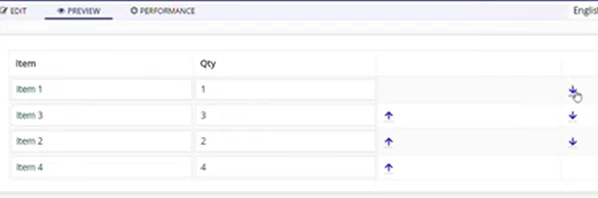
 [mention:00e6688d68c542b99c8c455359d12cd4:e9ed411860ed4f2ba0265705b8793d05] You can use a Id with the above map data . Id will uniquely identify each record same as like Db primary key . You can use below code i just tried for down functionality you can use same for Up as well .

a!localVariables(
local!items: {
{ id: 1, item: "Item 1", qty: 1, unitPrice: 10 },
{ id: 2, item: "Item 2", qty: 2, unitPrice: 20 }
},
a!gridLayout(
label: "Products",
instructions: "Update the item name, quantity, or unit price.",
headerCells: {
a!gridLayoutHeaderCell(label: "Item"),
a!gridLayoutHeaderCell(label: "Qty"),
a!gridLayoutHeaderCell(label: "Unit Price"),
a!gridLayoutHeaderCell(label: "Total", align: "RIGHT"),
a!gridLayoutHeaderCell(label: " "),

},
rows: a!forEach(
items: local!items,
expression: a!gridRowLayout(
contents: {
a!textField(
value: fv!item.item,
saveInto: fv!item.item
),
a!integerField(value: fv!item.qty, saveInto: fv!item.qty),
a!floatingPointField(
value: fv!item.unitPrice,
saveInto: fv!item.unitPrice
),
a!textField(
value: a!currency(
isoCode: "USD",
value: tointeger(fv!item.qty) * todecimal(fv!item.unitPrice)
),
readOnly: true,
align: "RIGHT"
),
a!richTextDisplayField(
value: {
a!richTextIcon(
icon: "arrow-circle-down",
showWhen: not(fv!isLast),
link: a!dynamicLink(
saveInto: {
a!save(
local!items,
a!update(
local!items,
{fv!index,fv!index+1},
{index(local!items,(fv!index+1),null()),fv!item}
)
)
}
)
),
a!richTextIcon(icon: "arrow-circle-up")
}
)
}
)
),
rowHeader: 1
)
)

saitoy6477
September 3, 2024

Thank you! I will try.