
September 30, 2022
Solved

Local Variables in Reusable Interface

  • September 30, 2022
  • 7 replies
  • 0 views

Hi!

I created an interface with cardChoiceField, which allows me to choose one of multiple subinterfaces (via rule!), which I created before. These subinterfaces have a dropdown which value is assigned to a local (to subinterface) variable. 

The problem is that when I choose a value in the dropdown it doesn't change the local variable simultaneously - to see the "refreshed" interface, I have to switch to other subinterface, and then turn back to the original. In that case I obtain the subinterface I want, with refreshed variables. Is there any way to do this without switching to other subinterfaces? 

I understand that it could be solved using rule inputs, but I would like to know how the interaction with local variables in reusable interfaces work

Best answer by mikes0011

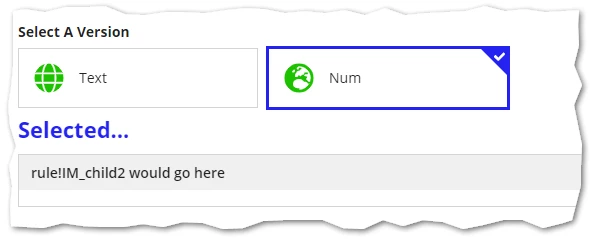
IMHO you're way over-complicating this.  Your parent need only save a marker / pointer of whichever child you currently want to show, instead of trying to save the child itself into some sort of local variable.

a!localVariables(
  /*local!link: null,*/
  local!selection: null(),

  {
    a!cardChoiceField(
      label: "Select A Version",
      data: {
        a!map(
          /*id: rule!IM_Child1,*/
          id: 1,
          icon: "globe-alt",
          primaryText: "Text"
        ),
        a!map(
          /*id: rule!IM_Child2,*/
          id: 2,
          icon: "globe-europe",
          primaryText: "Num"
        )
      },
      cardTemplate: a!cardTemplateBarTextStacked(
        id: fv!data.id,
        primaryText: fv!data.primaryText,
        icon: fv!data.icon,
        iconColor: "POSITIVE"
      ),
      saveInto: 
      /*{*/
        /*local!link*/
        local!selection,
      /*},*/
      value: local!selection,
      maxSelections: 1,
      validations: {}
    ),
    a!sectionLayout(
      label: "Selected...",
      contents: {
        a!match(
          value: index(local!selection, 1, null()),
          equals: 1,
          then: a!boxLayout(label: "rule!IM_child1 would go here"),
          equals: 2,
          then: a!boxLayout(label: "rule!IM_child2 would go here"),
          
          default: {}
        )
      }
    )
  }
)

7 replies

harshitb6843
September 30, 2022

That should not be happening in the first place. I am not sure what is the reason but to explain the interaction when you create local variables in that interface, the scope is limited to that interface only but when you call that interface in a new interface (parent) then you will be able to interact with the components and store their values in the child interface's locals and will also able to see them but cannot access them in the parent. If it made sense. 

harshitb6843
September 30, 2022

Can you paste the code here for one of the child interfaces where you are facing this problem along with the parent?

September 30, 2022

I think I'm not allowed to post the original code, so I created an example with the same type of problem

Here is the parent:

a!localVariables(
  local!link: null(),
  {
    a!cardChoiceField(
      label: "Select A Version",
      data: {
        a!map(id: rule!IM_Child1(), icon: "globe-alt", primaryText: "Text"),
        a!map(id: rule!IM_Child2(), icon: "globe-europe", primaryText: "Num")
      },
      cardTemplate: a!cardTemplateBarTextStacked(
        id: fv!data.id,
        primaryText: fv!data.primaryText,
        icon: fv!data.icon,
        iconColor: "POSITIVE"
      ),
      saveInto: {local!link},
      maxSelections: 1,
      validations: {}
    ),
    a!sectionLayout(
      label: "",
      contents: local!link
    )
  })

Here is child 1:

a!localVariables(
  local!var:{"text1", "text2", "text3"},
  local!res:null,
  {
  a!dropdownField(
    label: "Dropdown",
    labelPosition: "ABOVE",
    placeholder: "--- Select a Value ---",
    choiceLabels: local!var,
    choiceValues: local!var,
    value: local!res,
    saveInto: {local!res},
    searchDisplay: "AUTO",
    validations: {}
  ),
  a!textField(
    label: "Text",
    value: local!res,
    labelPosition: "ABOVE",
    saveInto: {},
    refreshAfter: "UNFOCUS",
    validations: {},
    showWhen: a!isNotNullOrEmpty(local!res)
  )
})

Here is child 2:

a!localVariables(
  local!var:{"num1", "num2", "num3"},
  local!res:null,
  {
    a!dropdownField(
      label: "Dropdown",
      labelPosition: "ABOVE",
      placeholder: "--- Select a Value ---",
      choiceLabels: local!var,
      choiceValues: local!var,
      value: local!res,
      saveInto: {local!res},
      searchDisplay: "AUTO",
      validations: {}
    ),
    a!textField(
      label: "Text",
      value: local!res,
      labelPosition: "ABOVE",
      saveInto: {},
      refreshAfter: "UNFOCUS",
      validations: {},
      showWhen: a!isNotNullOrEmpty(local!res)
    )
  })

To recreate the problem you have to:

1. Select "Text" choice.

2. Choose any value in dropdown.

3. See nothing has changed.

4. Switch to "Num" choice.

5. Switch back to "Text" choice.

6. At this point I obtain the "Text" interface with refreshed variable.