
July 8, 2021
Solved

"localhost:2181 Unreachable" Error

  • July 8, 2021
  • 2 replies
  • 0 views

Hello,

I am working on upgrading the version of our on-premise.(21.1 -> 21.2)

And when following the "Stopping the Application Suite on Linux" (https://docs.appian.com/suite/help/20.4/Starting_and_Stopping_Appian.html#stopping-the-application-suite-on-linux)

after executing the "5. status.script", I am getting the message like the picture bellow.
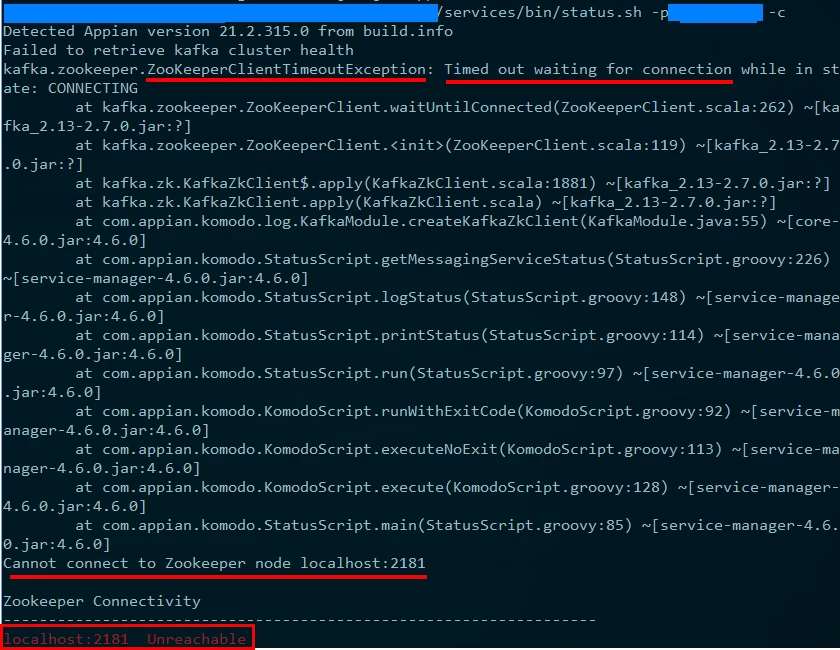
How can I get it solved?

Thank you very much for all of your help.

    Best answer by stefanhelzle0001

    I think it is the idea of this step to check whether services are down. Not an expert here, but I think this is expected behavior.

    2 replies

    stefanhelzle0001
    Brainy
    July 8, 2021

    I think it is the idea of this step to check whether services are down. Not an expert here, but I think this is expected behavior.

    July 9, 2021

    Hello, Stefan.

    Thank you for the reply.

    Yes, this is the step for status check to verify if the services is down or running.

    But, I am getting this message after trying to upgrade the Appian version from 21.1 to 21.2.

    The version upgrade wasn't successful, so I am trying to find the reason for it.

    One of the difference is the "localhost:2181 Unreachable" message.

    I didn't get such message before trying to upgrade the version, so wanted to know if this was the cause.

    Thank you.