

arulk0002
Inspiring
March 23, 2022
Question

Multi Drop Down Validation

  • March 23, 2022
  • 3 replies
  • 0 views

Hi Friends,

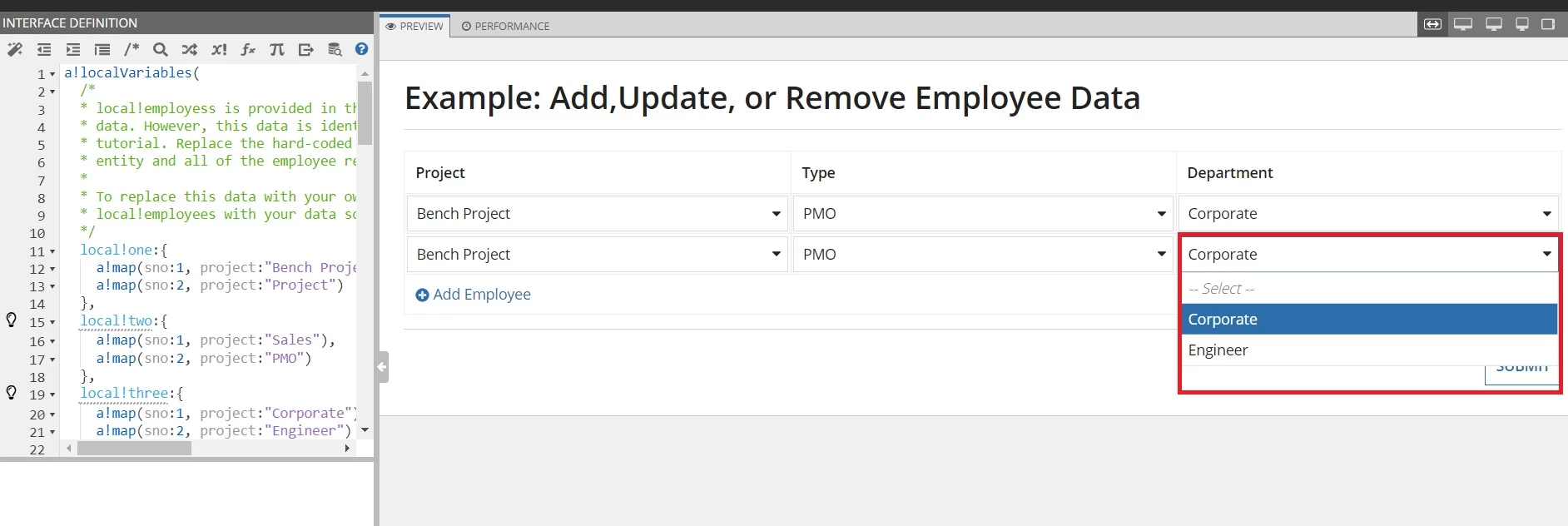
Please look at the screenshot. There is a two rows. In that two rows should validate when the two rows are equal. So what i am planning in the "Department" section. When i used "Corporate" in the dropdown then it should not come in the second row. Please share your thoughts.
3 replies

sunilnaikb0002
March 23, 2022

You can conditionally manage the choice labels in the second dropdown based on the value selected at the first dropdown. 
can you share the code of the dropdown components, so that the community could get better insight of the use case.

sunilnaikb0002
March 23, 2022

a!localVariables(
  local!savedValueIndex,
  local!firstDropdownSavedValue,
  local!secondDropdownSavedValue,
  local!choiceLabels1: {
    "Corporate",
    "Engineer",
  },
  local!choiceValues1: { 1, 2 },
  local!choiceLabels2: {
    "Corporate",
    "Engineer",
  },
  local!choiceValues2: { 1, 2},
  {
    a!dropdownField(
      label: "Dropdown",
      labelPosition: "ABOVE",
      placeholder: "--- Select a Value ---",
      choiceLabels: local!choiceLabels1,
      choiceValues: local!choiceValues1,
      value: local!firstDropdownSavedValue,
      saveInto: {
        a!save(local!savedValueIndex, index(local!choiceValues1, save!value, null)),
        a!save(local!firstDropdownSavedValue, save!value)
      },
      searchDisplay: "AUTO",
      validations: {}
    ),
    a!dropdownField(
      label: "Dropdown",
      labelPosition: "ABOVE",
      placeholder: "--- Select a Value ---",
      choiceLabels: if(
        a!isNullOrEmpty(local!savedValueIndex),
        local!choiceLabels2,
        remove(local!choiceLabels2, local!savedValueIndex)
      ),
      choiceValues: if(
        a!isNullOrEmpty(local!savedValueIndex),
        local!choiceValues2,
        remove(local!choiceValues2, local!savedValueIndex)
      ),
      saveInto: {
        a!save(local!secondDropdownSavedValue, save!value)
      },
      searchDisplay: "AUTO",
      validations: {},
      value: local!secondDropdownSavedValue
    )
  }
)

Please refer the code to figure out the logic to conditionally manage the choice labels and values.

harshitb6843
March 23, 2022

Hi there,

You can add a validation when a single value has been selected more than once. You can use wherecontains function and use it on the CDT/Dict field. If it returns more than one item, then you could show a validation.