
kavyam0002
July 5, 2022
Solved

multipledropdown

  • July 5, 2022
  • 3 replies
  • 0 views

HI 

can someone suggest me how can i come up with the logic to display multipledropdown when i have data like this 

UserInputField-multipledropdownfield: Risk Rating > 14; Min year in Business < 3 years (at group level ); Minimum years in “core business” globally (experience) < 3 years; Audited financials < 2 years & 6 months in-house / management financial; Not Normal CBRB classification including related borrowers (if any); AECB Credit Score <650; Any Other Exception

first part has to be removed i.e, UserInputField-multipledropdownfield: and after every ; i have show the value as next value in the dropdown

    Best answer by agamb0001

    Hi [mention:bd2e537916fe4b31980bfba549754efc:e9ed411860ed4f2ba0265705b8793d05],

    You could use something like below to extract the data into list of string that you could show up in the choice labels.

    According to your application design, you could either use the same in choice values / use integer indexes for such values (but you would need to store a reference as well for display purposes later)

    a!localVariables(
      local!value,
      local!data: "UserInputField-multipledropdownfield: Risk Rating > 14; Min year in Business < 3 years (at group level ); Minimum years in â`œcore businessâ`%9D globally (experience) < 3 years; Audited financials < 2 years & 6 months in-house / management financial; Not Normal CBRB classification including related borrowers (if any); AECB Credit Score <650; Any Other Exception",
      local!dropdownLabelsString: keyval(
        local!data,
        "UserInputField-multipledropdownfield",
        ":"
      ),
      local!choiceLabels: trim(split(local!dropdownLabelsString, ";")),
      local!choiceValues: local!choiceLabels,
      a!multipleDropdownField(
        label: "Drop down",
        choiceValues: local!choiceValues,
        choiceLabels: local!choiceLabels,
        value: local!value,
        saveInto: local!value,
        placeholder: "Select a value"
      )
    )

    3 replies

    harshj0001
    July 5, 2022

    [mention:bd2e537916fe4b31980bfba549754efc:e9ed411860ed4f2ba0265705b8793d05] I did not get your point, can you elaborate it more

    kavyam0002
    July 5, 2022

    i have data like below 

    UserInputField-multipledropdownfield: Risk Rating > 14; Min year in Business < 3 years (at group level ); Minimum years in “core business” globally (experience) < 3 years; Audited financials < 2 years & 6 months in-house / management financial; Not Normal CBRB classification including related borrowers (if any); AECB Credit Score <650; Any Other Exception

    for the above data i have to show these data using multidropdown field 

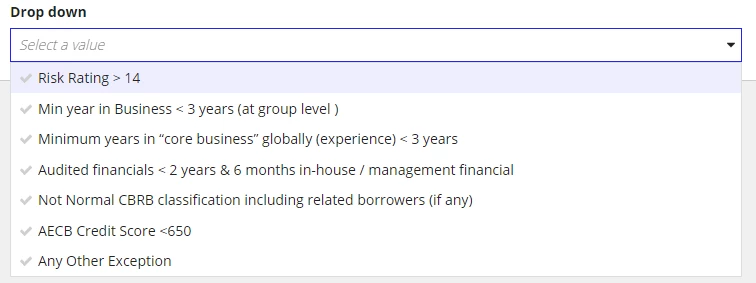
    in multidropdown values to be looks like : 

    Risk Rating > 14

     Min year in Business < 3 years (at group level )

    Minimum years in “core business” globally (experience) < 3 years

    ....so on 

    agamb0001
    agamb0001Answer
    July 5, 2022

    Hi [mention:bd2e537916fe4b31980bfba549754efc:e9ed411860ed4f2ba0265705b8793d05],

    You could use something like below to extract the data into list of string that you could show up in the choice labels.

    According to your application design, you could either use the same in choice values / use integer indexes for such values (but you would need to store a reference as well for display purposes later)

    a!localVariables(
      local!value,
      local!data: "UserInputField-multipledropdownfield: Risk Rating > 14; Min year in Business < 3 years (at group level ); Minimum years in â`œcore businessâ`%9D globally (experience) < 3 years; Audited financials < 2 years & 6 months in-house / management financial; Not Normal CBRB classification including related borrowers (if any); AECB Credit Score <650; Any Other Exception",
      local!dropdownLabelsString: keyval(
        local!data,
        "UserInputField-multipledropdownfield",
        ":"
      ),
      local!choiceLabels: trim(split(local!dropdownLabelsString, ";")),
      local!choiceValues: local!choiceLabels,
      a!multipleDropdownField(
        label: "Drop down",
        choiceValues: local!choiceValues,
        choiceLabels: local!choiceLabels,
        value: local!value,
        saveInto: local!value,
        placeholder: "Select a value"
      )
    )