February 3, 2022
Solved

Populate Choice Values in Dropdown from Record - is it possible?

  • February 3, 2022
  • 6 replies
  • 0 views

Hi,

How would I go about getting option 1 and option 2.
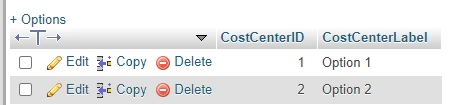
show up in my choice labels for a dropdown.
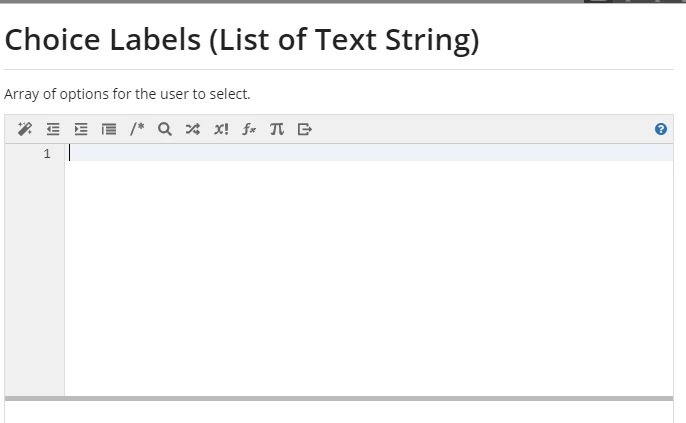
Is this even possible?

All similar topics, didnt result in very good answers.

    Best answer by acaciob0002

    Hi [mention:5e40108269fb4d2e9dd13cc5b07cda42:e9ed411860ed4f2ba0265705b8793d05],

    You can try a code similar to the below one:

    a!localVariables(
      local!a: a!queryRecordType(
        recordType: 'recordType!BTM Cost Center',
        pagingInfo: a!pagingInfo(1,500)
      ).data,
      local!b,
      {
      a!dropdownField(
        value: local!b,
        placeholder: "Please select",
        choiceLabels: index(local!a, 'recordType!BTM Cost Center.fields.CostCenterLabel',null),
        choiceValues:  index(local!a, 'recordType!BTM Cost Center.fields.CostCenterId',null),
      )
    
      }
    )

    This code it is not fully working as I tried to mock up your recordType, so you will need to adjust these bits, but if what your were looking for was to display the CostCenterLabel and store the CostCenterId, the concept is in there.

    Regards,

    Acacio B.

    6 replies

    February 3, 2022

    Ok got this far:

    Just a bit more.

    February 3, 2022

    Well I looked a the AA refernce app and saw there that it is done through local variables, but I have no idea, how to put in local variables. 

    acaciob0002
    February 3, 2022

    Hi [mention:5e40108269fb4d2e9dd13cc5b07cda42:e9ed411860ed4f2ba0265705b8793d05],

    You can try a code similar to the below one:

    a!localVariables(
      local!a: a!queryRecordType(
        recordType: 'recordType!BTM Cost Center',
        pagingInfo: a!pagingInfo(1,500)
      ).data,
      local!b,
      {
      a!dropdownField(
        value: local!b,
        placeholder: "Please select",
        choiceLabels: index(local!a, 'recordType!BTM Cost Center.fields.CostCenterLabel',null),
        choiceValues:  index(local!a, 'recordType!BTM Cost Center.fields.CostCenterId',null),
      )
    
      }
    )

    This code it is not fully working as I tried to mock up your recordType, so you will need to adjust these bits, but if what your were looking for was to display the CostCenterLabel and store the CostCenterId, the concept is in there.

    Regards,

    Acacio B.

    harshitb6843
    February 4, 2022

    Do remember to add a saveInto else you will lose what you just selected [emoticon:98f842990f454422aa6a04953955f9d9]