

aland3033
April 20, 2023
Solved

Question Re build an application step 9

  • April 20, 2023
  • 7 replies
  • 0 views

I am re building the Dev training app and this is only thing I cannot get to work from the training guidance and I am not sure why.  I have rebuilt up to step 13 and every thing else and other tips have worked. 

On the add Vehicle form.

a tip is "TIP: Use the Visibility Setting to Conditionally Show Interface Components ● In some cases, you might want to display a component based on a condition. ● To do this, use the Visibility setting in the Component Configuration pane. Select Only Show When and enter an expression in the Expression Editor. ● For example, imagine that you want to display a Comments field if a vehicle’s mileage is above 150,000 miles. You can enter the expression ri!vehicle[recordType!AX Vehicle.fields.vehicleMileage] > 150000. ● This expression determines whether the Comments component is displayed on the interface. When set to false, the component is hidden and not evaluated. The default is set to true."

I have the following in
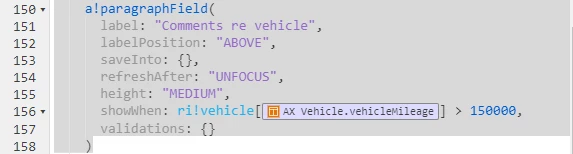
How ever I get the following message when I try this tip.

Could not display interface. Please check definition and inputs. Interface Definition: Expression evaluation error at function a!paragraphField [line 156]: Cannot compare incompatible operands of type Null and type Number (Integer).

The reference application in community does not have this tip in it so its hard to see why and I don't fully understand why following the tip is not working correctly. 

Any comments on how to fix it would be appreciated. 

    Best answer by sanchitg0002

    I don't have any clue which community course are you talking about, but it seems like there is no value saved in the vehicleMileage field of vehicle recordType and that's why it is throwing error that you are comparing null with integer number. Make sure that there is some value in vehicleMileage field and if the value in this field is saved from the current interface only, then you need to change the showWhen condition to handle the null value as well, like:

    and(
    a!isNotNullOrEmpty(ri!vehicle[recordType!AX Vehicle.fields.vehicleMileage]),
    ri!vehicle[recordType!AX Vehicle.fields.vehicleMileage] > 150000
    )

    7 replies

    April 20, 2023

    I don't have any clue which community course are you talking about, but it seems like there is no value saved in the vehicleMileage field of vehicle recordType and that's why it is throwing error that you are comparing null with integer number. Make sure that there is some value in vehicleMileage field and if the value in this field is saved from the current interface only, then you need to change the showWhen condition to handle the null value as well, like:

    and(
    a!isNotNullOrEmpty(ri!vehicle[recordType!AX Vehicle.fields.vehicleMileage]),
    ri!vehicle[recordType!AX Vehicle.fields.vehicleMileage] > 150000
    )

    aland3033
    aland3033Author
    April 20, 2023

    Its the Appian Developer training course and its the on the interface for adding a new vehicle so it is a blank form. The tip is meant to open a comments box if your asking to add a vehicle that would be classed as high mileage to the application. 

    I can confirm the above worked so thanks now I can feed back around the tip not taking into consideration the null value of the form until you actually go to add the vehicle to the application.

    I will configure a save value now. I understood not having it before meant the comment was not passed on in the process model. 

    April 20, 2023

    Did you tried the showWhen code I provided above?

    Thanks for editing the above comment, yeah you need to save the comment in a field too