
swapnar6405
May 2, 2023
Question

Send E-Mail from address

  • May 2, 2023
  • 16 replies
  • 0 views

Hi,

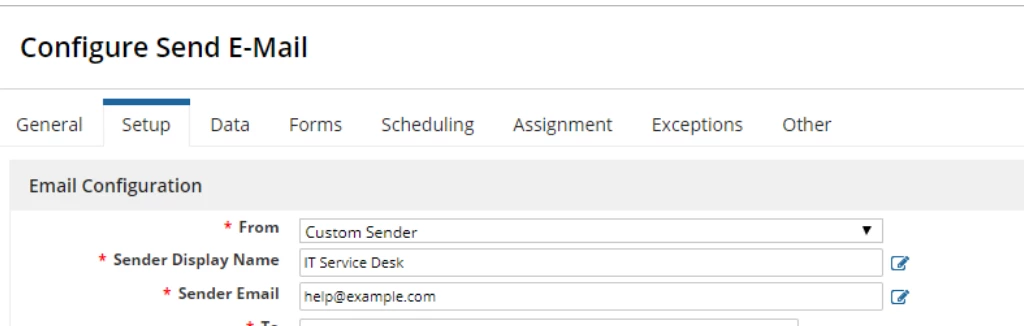
I did set up from and other options as per the below specified screen shot, but still I am NOT getting email from IT Service Desk.

I am getting an email from "appian-alerts@nsroot.net; on behalf of; XXX, XXX.com".

Do I need to change any other setting any where to reflect this.
16 replies

gopalk2865
Participating Frequently
May 2, 2023

Check your "Sender Dispaly Name" Parameter. Looks like its not configured properly. it should be a string, have it under quotes.

swapnar6405
May 2, 2023

NO luck even after using quotes like "IT Service Desk".

gopalk2865
Participating Frequently
May 2, 2023

Arent you getting email like below?

tushark6475
May 2, 2023

Just wrap the display name inside the double quotes and also for smooth working wrap the recipient's mail address inside "toemailaddress()" 

swapnar6405
May 2, 2023

I did both, but still no luck.

tushark6475
May 2, 2023

I don't know why but this configuration works fine for me.

stefanhelzle0001
Brainy
May 2, 2023

As defined by email security rules, a system cannot just send email from a random domain without permission. The documentation helps in this case as well: docs.appian.com/.../Configuring_Custom_Email_Senders.html

mikes0011
Brainy
May 2, 2023
I am getting an email from "appian-alerts@nsroot.net; on behalf of; XXX, XXX.com".

This behavior was modified / improved in the 23.1 release. Up until then this was the expected behavior.  What version are you on?

swapnar6405
May 2, 2023

We are using 22.4

mikes0011
Brainy
May 2, 2023

Ok, then the expected behavior is that the sender line will say "<email address of selected sender account>; on behalf of <server URL>" or similar, much like what you have written in your original post.  The particular verbiage *should* reflect different senders you select in the configuration, but there's no way to completely get rid of the "on behalf of..." language until the updated version included in 23.1 and newer versions.