
swapnar6405
May 2, 2023
Question

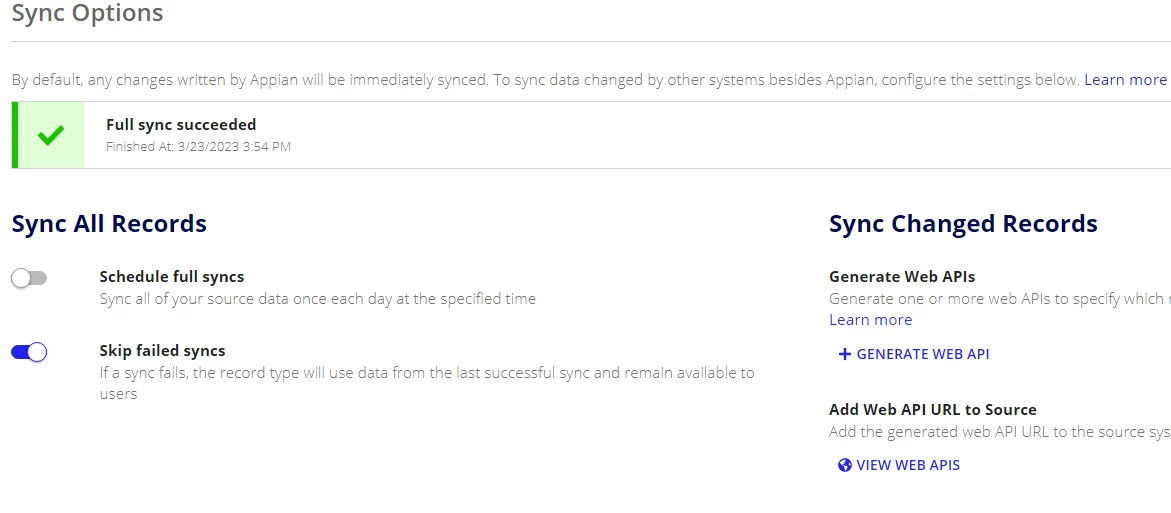
Sync Records - GENERATE EXPRESSION RULE option is not appearing.

  • May 2, 2023
  • 4 replies
  • 0 views

Hi,

I am trying to use "Sync Records" smart service after using "Execute Stored Procedure"

I found in the documentation that in order to use "Sync Records" smart service with a service-backed record type, you must first configure a Sync Expression on your record type.

As per the documentation, in order to generate a new Sync Expression, I have to follow the below steps 

docs.appian.com/.../records-data-sync.html

  1. In the record type, go to Sync Options.
  2. Under Sync Changed Records, locate Configure Sync Expression and click + GENERATE EXPRESSION RULE.

But, unfortunately I am not able to find the "GENERATE EXPRESSION RULE" under Sync Changed Records. 

Any advise here.
4 replies

stefanhelzle0001
Brainy
May 2, 2023

When you write about a stored procedure, I assume that your synced record connects to a database as well. Then you do not need any expressions.

swapnar6405
May 2, 2023

Using my stored procedure, I am inserting data into two different tables. But, the tables data is not reflecting immediately into respective RecordTypes.

May 3, 2023

Then where is the need to create a Sync Expression if the source of your recordType is just a Database table and not a web service. If both of these Record types have sync enabled then automatic sync using Sync Records smart service should work without any additional setup. Is manual sync working as expected? please make sure that your structure is same in DB and Record Type look for the column definition of primary key column and ensure that it is not UNSIGNED or BIGINT and what do you mean by "not reflecting immediately", is it getting synced without triggering a manual sync but taking more time than what you expect?