

saitoy6477
December 10, 2024
Solved

task tab not visible

  • December 10, 2024
  • 5 replies
  • 0 views

Hi all,

I am a beginner of Appian, and I would like to know access right to "Task".

I can see the task tab below,...but my colleague cannot see the task bar.... Why? In this case, how the colleague check his task ??

Best regards,

Best answer by shivar8114

Hi [mention:00e6688d68c542b99c8c455359d12cd4:e9ed411860ed4f2ba0265705b8793d05] 

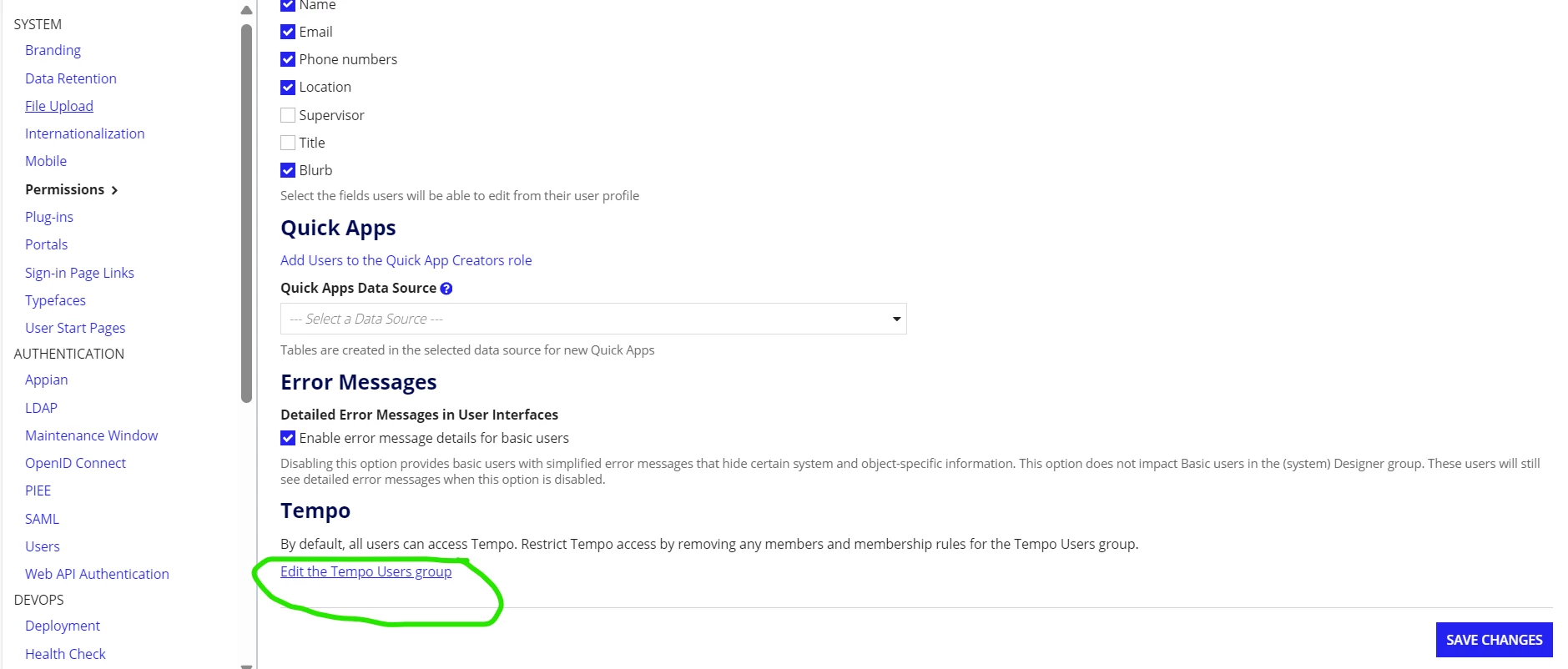
Please Verify Whether your colleague is added in tempo user group.

To verify whether he is part of group 

Switch to Admin console ------ 

5 replies

prasantap0900
December 10, 2024

You can check the security for the tempo. 

shivar8114
December 10, 2024

Hi [mention:00e6688d68c542b99c8c455359d12cd4:e9ed411860ed4f2ba0265705b8793d05] 

Please Verify Whether your colleague is added in tempo user group.

To verify whether he is part of group 

Switch to Admin console ------ 

saitoy6477
December 11, 2024

thank you for your help! resolved!

mathieud0001
December 10, 2024

The user needs to be part of the tempo group.

url: https://<instancename>/suite/tempo/tasks

December 10, 2024

Kindly verify whether your colleague is part of the Tempo user group. To do so, go to Admin Console -> System -> Permissions and click on 'Edit' for the Tempo Users group to add the user.