
niting8491
May 8, 2025
Solved

The selected process model must have a SAIL start form

  • May 8, 2025
  • 4 replies
  • 0 views

Doing Appian Developer course in which under Engage Logged IN Users excercise it is trying to add a second page as Action where we have to select Process Model which doesn't exist when trying to add an empty Process model it keep throwing this error - help me with steps how to getrid of it or point me to excercise which I missed and can follow to get rid of this error

Best answer by harshas2775

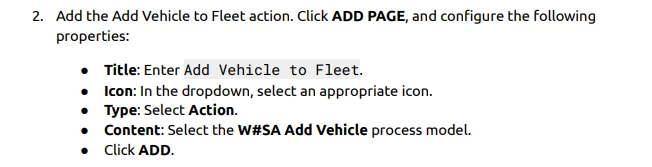
You should have a process model with a SAIL form to add an Action in a Site. If I understood correctly, you might be following this step 

And to successfully do this you should already have a process model to Add Vehicle And this process model would have been configured with a start form. 

In the Appian Developer Course the Process Modeling tutorials are after the Site configurations. Thats why you dont have a process model yet. I would suggest you to skip this step for now, make a note of it. And once you are done with the Process Modeling 101 :Automate your business process course, come back to this and add the Action in Site. 

4 replies

shubhama926776
May 8, 2025

[mention:8848b3b11f18471d8e33cf600f42d1c3:e9ed411860ed4f2ba0265705b8793d05]  Could you tell us what error you are getting?

May 8, 2025

Did you try adding the start form to the process model?

harshas2775
May 8, 2025

You should have a process model with a SAIL form to add an Action in a Site. If I understood correctly, you might be following this step 

And to successfully do this you should already have a process model to Add Vehicle And this process model would have been configured with a start form. 

In the Appian Developer Course the Process Modeling tutorials are after the Site configurations. Thats why you dont have a process model yet. I would suggest you to skip this step for now, make a note of it. And once you are done with the Process Modeling 101 :Automate your business process course, come back to this and add the Action in Site. 

niting8491
May 8, 2025

appreciate it thank you for confirming