
To capture Primary Id in a Read Only Grid
Hi,
I am displaying a table in a Read only grid based on Drop down selection from another table.
I am able configure update Emp action in Emp type in drop down as I am catching Primary key but I want to configure the same in the Grid for updating the Emp Sub Type.
For one Emp in drop down there are few sub types getting displayed in Grid. This grid has also Primary key associated for sub type table.
I want to catch Primary for one selected row to use update action on Sub EMP type in GRID.
Could someone help me here plz how to do?
The UI looks like
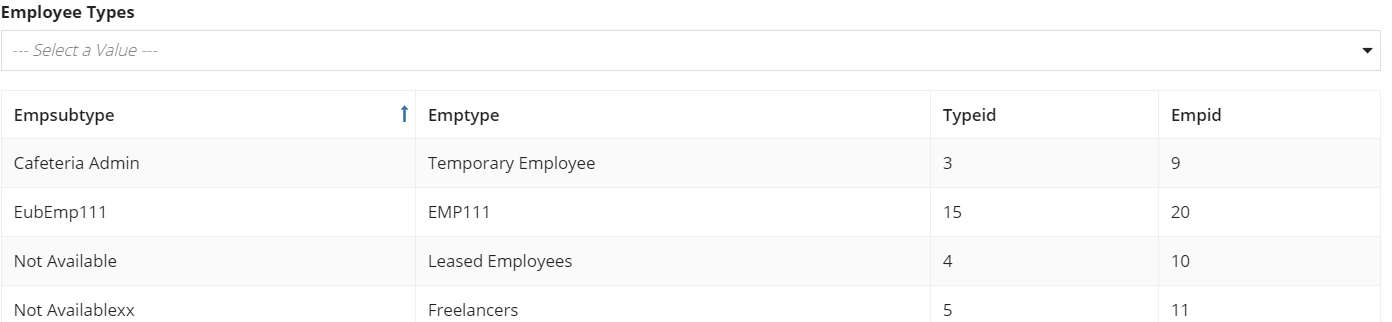
code I am using
a!localVariables(
local!typeData:rule!FF_EMP_QE_EmpTypes(empType: null),
local!empType,
local!typeId:index(local!typeData.typeid,wherecontains(local!empType,touniformstring(local!typeData.emptype)),{}),
{
/*a!textField(*/
/*value: index(local!typeData.typeid,wherecontains(local!empType,local!typeData.emptype),{})),*/
a!textField(value: wherecontains(local!empType,touniformstring(local!typeData.emptype))),
/*a!textField(*/
/*value: index(rule!FF_EMP_SubType(empId: ri!subEmpIds),"empsubtype",{}),*/
/*),*/
a!sectionLayout(
label: "",
contents: {
a!columnsLayout(
columns:
a!columnLayout(
contents: {
a!dropdownField(
label: "Employee Types",
labelPosition: "ABOVE",
placeholder: "--- Select a Value ---",
choiceLabels: {local!typeData.emptype},
choiceValues: {local!typeData.emptype},
value:local!empType,
saveInto: {local!empType},
searchDisplay: "AUTO",
validations: {}
)
}
)
),
a!gridField(
data: a!queryEntity(
entity: cons!FF_ENT_EMPSUBTYPE,
query: a!query(
selection: a!querySelection(
columns: {
a!queryColumn(
field: "empsubtype"
),
a!queryColumn(
field: "emptype"
),
a!queryColumn(
field: "typeid"
),
a!queryColumn(
field: "empid"
)
}
),
filter:if(isnull(local!empType),null,a!queryFilter(
field: "emptype",
operator: "=",
value: local!empType
)),
pagingInfo: fv!pagingInfo
),
fetchTotalCount: true
),
columns: {
a!gridColumn(
label: "Empsubtype",
sortField: "empsubtype",
value: fv!row.empsubtype
),
a!gridColumn(
label: "Emptype",
sortField: "emptype",
value: fv!row.emptype
),
a!gridColumn(
label: "Typeid",
sortField: "typeid",
value: fv!row.typeid
),
a!gridColumn(
label: "Empid",
sortField: "empid",
value: fv!row.empid
)
},
pageSize: 20,
initialSorts: {}
),
a!recordActionField(
actions: {a!recordActionItem(
action: 'recordType!{abd29c56-81fd-455f-a4d9-25cee496c62c}FF_EMP_RC_Detail.actions.{33cc01b3-6f31-47b8-a75f-d5eacfbd1169}addEmp'
),
a!recordActionItem(
action: 'recordType!{abd29c56-81fd-455f-a4d9-25cee496c62c}FF_EMP_RC_Detail.actions.{888454cb-b159-4263-8c01-a771c96ff919}updateDetails',
identifier:local!typeId
)}
)
},
)
})